

What is transactionSubscribe?
The transactionSubscribe WebSocket method (a Helius extension to the standard Solana WebSocket API) enables real-time transaction events.
To use it, provide a TransactionSubscribeFilter and optionally include TransactionSubscribeOptions for further customization.
transactionSubscribe lives on the same unified wss://mainnet.helius-rpc.com and wss://devnet.helius-rpc.com endpoints as the standard Solana subscription methods.
TransactionSubscribeFilter
vote: boolean flag to include/exclude vote-related transactionsfailed: boolean flag to include/exclude transactions that failedsignature: filters updates to a specific transaction based on its signatureaccountInclude: list of accounts for which you want to receive transaction updates. Only one of the accounts must be included in the transaction updates (e.g., Account 1 OR 2).accountExclude: list of accounts you want to exclude from transaction updatesaccountRequired: transactions must include all of the specified accounts to be included in updates (e.g., Account 1 AND 2)tokenAccounts: opt-in associated token account (ATA) expansion (balanceChanged,all, ornone). See Watching a wallet, including token transfers below.
TransactionSubscribeOptions (Optional)
commitment: commitment level for fetching data (processed,confirmed, orfinalized)encoding: encoding format of the returned data (base58,base64, orjsonParsed)transactionDetails: level of detail for the returned data (full,signatures,accountsandnone)showRewards: boolean flag indicating if reward data should be included in the updatesmaxSupportedTransactionVersion: specifies the highest version of transactions you want to receive updates from. Set the value to1to receive legacy, v0, and v1 transactions. See Transaction v1 support.
maxSupportedTransactionVersion is required to return the accounts and full-level details of a given transaction (i.e., transactionDetails: "accounts" | "full").Transaction Subscribe Example
In this example, we are subscribing to transactions that contain the Raydium account675kPX9MHTjS2zt1qfr1NYHuzeLXfQM9H24wFSUt1Mp8.
When a transaction occurs that contains 675k...1Mp8 account in the accountKeys of the transaction, we will receive a WSS notification.
Based on the subscription options, the transaction notification will be sent at the processed commitment level,jsonParsed encoding, full transaction details, and will show rewards.
Example Notification
Watching a Wallet, Including Token Transfers
When you watch a wallet withaccountInclude, you only match transactions where the wallet pubkey appears directly in the account keys. A common case slips through: when someone sends the wallet an SPL token (USDC, for example), the transfer touches the wallet’s associated token account (ATA), not the wallet pubkey — so a plain accountInclude: [wallet] subscription never sees it.
Set the tokenAccounts field to expand matching so the watched account also matches transactions where it owns a token balance:
balanceChanged: match when the wallet owns a token balance whose amount changed (or whose token account was closed) in the transaction. Use this for “tell me when money actually moved.” This is the narrower, lower-volume, and most common choice.all: match any transaction referencing a token balance the wallet owns, even if unchanged. Higher volume.none: no expansion. Same as omitting the field (the default).
-32602. Subscriptions that omit tokenAccounts behave exactly as before. For a full overview of how ATA expansion works, see Token Account (ATA) Filtering over WebSocket.
Monitoring new Jupiter DCAs
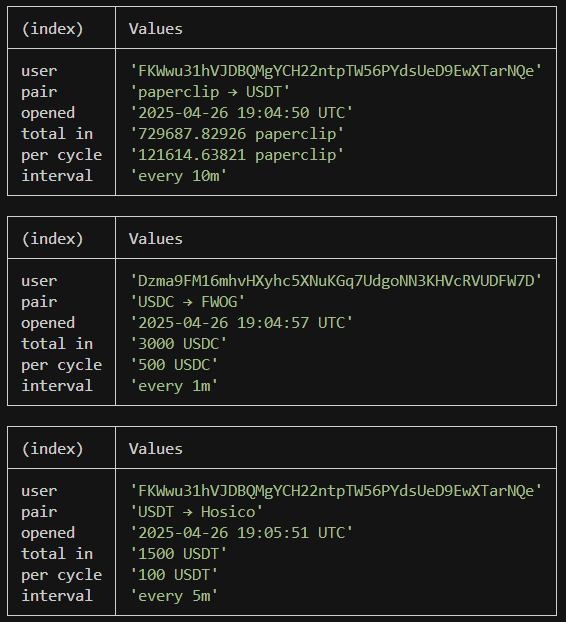
Jupiter DCA, or Dollar Cost Averaging, is a way to schedule recurring trades on Solana. Because these scheduled buy/sell orders are recorded on-chain, traders can use thetransactionSubscribe method and getAsset to listen for new orders.
Example Notification
Monitoring new pump.fun tokens
Example Notification
Managing Subscriptions
Subscription IDs
WhentransactionSubscribe succeeds, the server returns a subscription ID in the result field. This is the same number that appears in params.subscription on every notification from that subscription:
Unsubscribing
To stop receiving notifications, calltransactionUnsubscribe with the subscription ID. Each transactionSubscribe call on the same connection creates a separate subscription with its own ID, so make sure to unsubscribe before resubscribing to avoid receiving duplicate notifications.
transactionUnsubscribe. This is expected behavior.