

- A UTXO is not a Solana account, so it needs no rent-exemption.
- Its balance is encrypted onchain.
- Owner – Solana keypair, PDA, or P-256 key.
- Asset – the mint (SOL, SPL or Token-2022).
- Amount – the number of units of
asset, in its smallest unit. - Data – a UTXO can store arbitrary data, for example the owner of escrowed tokens.
- Program and policy data – optional configured Ring compliance.
- Diagram
- Code

View source code: Spec · sdk-libs/transaction/src/utxo/note.rs
View Solana token account
View Solana token account
- Diagram
- Code

Private Balance
The private balance is the sum of all UTXOs of one asset owned by a private wallet. The wallet displays one balance, regardless of whether a private balance consists of one, or multiple UTXOs. A private transfer can spend several UTXOs at once.
Private Transfer
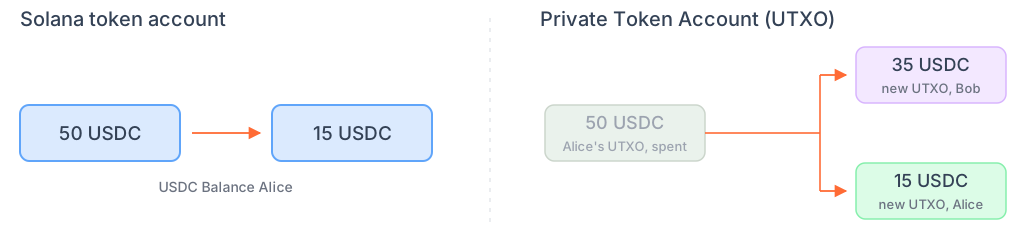
Private transfers with UTXOs work differently from public transfers with SPL token accounts:- A transfer from an SPL token account updates the
amount. - A private transfer with UTXOs does not update the
amountof a UTXO. Instead, private transfers spend existing UTXOs and create new UTXOs for the recipient and for the sender’s remaining balance.
- With SPL token accounts, Alice’s
amountdecreases from 50 to 15, and Bob’s increases by 35. - With UTXOs, Alice holds one UTXO for 50 USDC. The transaction spends the existing UTXO and creates two new UTXOs: one with 35 USDC for Bob and one with 15 USDC for Alice.
- Transfer with one UTXO
- Transfer with multiple UTXOs

UTXO Selection
For private transfers, the SDK selects unspent UTXOs that cover the amount you want to transfer. The UTXO selection algorithm spends as few UTXOs as possible per transfer:- The SDK filters your UTXOs by the asset being sent and sorts them by amount.
- The SDK selects as many UTXOs as necessary to cover the transfer amount. It selects the largest UTXOs first until the transfer amount is covered.

Transaction Variants
Every private transfer uses a transaction variant: a fixed number of slots for UTXOs to spend and new UTXOs to create. Variants range from 1 to 36 spent UTXOs, and each variant has its own ZK circuit. The circuit proves that the spent UTXOs are valid and that the new UTXOs hold the same total amount. If a transfer needs more than 36 UTXOs, merge them first. The SDK picks a variant that fits the transfer and fills unused slots with dummy UTXOs. Dummy UTXOs hold no value and look like real UTXOs onchain.- 1 spent, 2 new
- 2 spent, 2 new
- 3 spent, 3 new
- 4 spent, 3 new
Alice sends Bob 30 USDC. Her largest UTXO covers the transfer.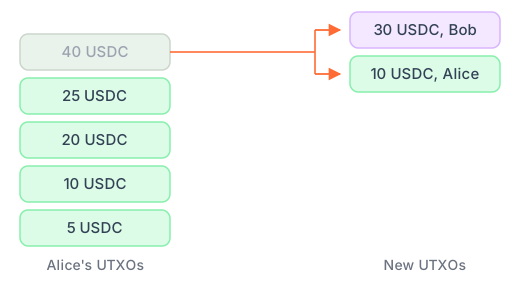


Supported transaction variants
Supported transaction variants
View source code: Spec · Supported variants
Merging UTXOs
Receiving many transfers without spending can fragment the private balance across many UTXOs. If a transfer needs more than 36 UTXOs, merge them first so the user can spend the entire balance in one transfer. Most users will rarely encounter a fragmented balance since one transfer can spend up to 36 UTXOs.- A merge combines UTXOs of the same owner and asset into one UTXO with the same total value.
- A merge cannot spend funds or change the owner.
- Merging can be done under the hood without impacting UX for end users.

Each merge is one Solana transaction with a ZK proof and turns up to 36 UTXOs into one.
Because the merge outcome is deterministic, the merge proofs and the transfer proof are generated in parallel.
Example Merge Instruction Usage
Your application can merge at two points:- When syncing the private balance: on wallet unlock, private wallet open, app resume, network reconnect, stream gap, or wallet restore.
- Before a transfer: when the transfer needs more than 36 UTXOs.
Merges run without a user signature. Custom Rings set their own merge permissions.
When using the embedded private wallet, merge is done for you under the hood.
Example for Merge
Example for Merge
For example, a private wallet holds 1,296 USDC in 1,296 UTXOs after receiving 1,296 private transfers of 1 USDC.
A transfer spends at most 36 UTXOs, so the wallet spends the balance in two stages:
- 36 merge transactions run in parallel and create 36 UTXOs of 36 USDC each.
- One 36-input transfer spends the entire 1,296 USDC balance.
UTXO Concurrency
Users can spend private balances as soon as transactions are final. A private balance can be spent concurrently when it is split across several UTXOs. Each UTXO can be spent in a separate transaction at the same time. For example, a balance of three UTXOs of 100 USDC each can fund three transfers of up to 100 USDC at once. The wallet selects which UTXOs to spend.
Learn More
Overview
Rings, privacy guarantees, and transaction flow.
Architecture
How wallets, RPC services, and Solana programs interact.
Encryption and Privacy Guarantees
How assets are encrypted and the role of the shielded keypair.
Custom Enterprise Rings
Learn how to configure a custom Ring.