Introduction to Rings

Every transaction on Solana is publicly readable: addresses, balances, and transfer history are visible to anyone. Rings encrypt onchain balances and are always non-custodial by default:
  • In confidential Rings, the asset and amount are private, while the sender and recipient stay visible.
  • In anonymous Rings the asset, amount, sender, and recipient are private.
Two Solana transaction cards side by side. The confidential card shows the transaction hash, sender, and recipient while the asset and amount are blacked out. The anonymous card shows only the transaction hash; the sender, asset, amount, and recipient are all blacked out. The transaction hash stays public on both. Different kinds of Rings exist:
  1. The Default Ring is permissionless and confidential. It encrypts asset and amount, can be used by anyone, and does not have custom policy controls.
  2. Custom Rings are Solana programs that make privacy on Solana programmable, similar to Token-2022. A Custom Ring can be confidential or anonymous with custom policy, reporting, and visibility rules.
For most applications we recommend the permissionless, confidential Default Ring. For custom policy and compliance controls, contact us to get started with a custom Ring.
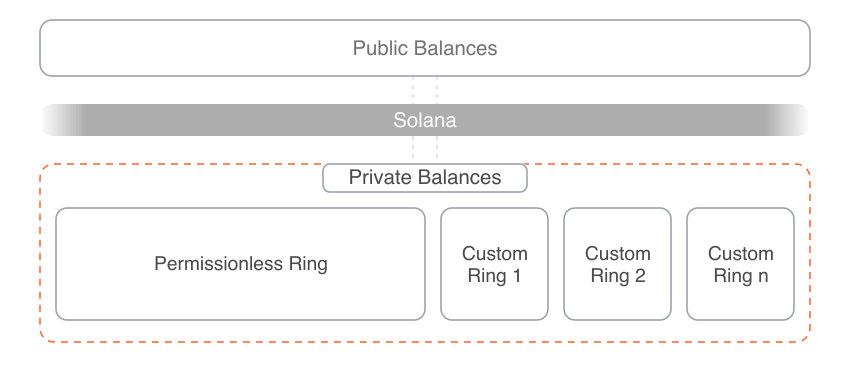
Private Balances shown as a dashed onchain zone holding two rings. The Default Ring is confidential, self-custodial, and permissionless. The Custom Ring is confidential or anonymous, self-custodial, and adds custom policy and custom compliance. A private transfer connects the rings, and each deposits into and withdraws from a Solana Public Balances layer below.

Custom Rings Are Programmable

Custom Rings are simple Solana programs that make privacy programmable, with features similar to Token-2022. A Custom Ring can define fully custom rules for transfers and visibility/auditing.
Ring authorities are declared at ring creation, so users can inspect the policy before choosing a ring. The Default Ring is permissionless and does not have a custom authority or auditor.
If you want to set up your own Custom Ring, contact us and we will get you set up. You can either bring your own compliance, or use Helius’ managed KYC and sanction screening solution.

User Flows and Privacy Guarantees

Transactions with Helius Privacy execute natively onchain and compose with other Solana programs in a single transaction. Users can enter, transfer privately within, or exit from a Ring: 1. Deposit or on ramp. Users send tokens from a public Solana balance, or a fiat balance, directly to a private balance. 2. Private transfer. Users send tokens between private balances in the same Ring, or to a different one. 3. Withdraw or off ramp. Users send tokens from a private to a public Solana balance, or directly to a fiat balance. Diagram of the Ring lifecycle. A public balance of 100 USDC deposits into a Ring and a fiat balance of USD / EUR / ... on-ramps into the same Ring, funds move between two private balances via private transfer, then withdraw to a public balance or off-ramp to a fiat balance. Users send tokens to a Solana wallet address, as they do with public balances. The Privacy API routes the transfer automatically to the Private Wallet, if the recipient has one. Otherwise the transfer is a withdrawal to the recipient’s public address. Anyone can deposit to any Private Wallet by knowing only the recipient’s public wallet address. When the sender’s app does not support privacy, the recipient receives the funds publicly and can encrypt them to their own private balance in a second step.

Deposit to a Private Balance: What Is Private

Users can deposit to a private balance in two ways:
  1. On-ramp from a fiat balance to a private crypto balance
  2. Deposit from a public to a private crypto balance

Private Transfer: What Is Private

Users can send a private transfer in two ways:
  1. Transfer in the same Ring
  2. Transfer to a different Ring
For most applications we recommend the permissionless, confidential Default Ring. For custom policy and compliance controls, contact us to get started with a custom Ring.

Withdraw from a Private Balance: What Is Private

Users can withdraw from a private balance in two ways:
  1. Off-ramp from private crypto to a fiat balance
  2. Withdraw from private crypto to a public crypto balance

High-Level Transaction Flow

A private transfer behaves similarly to public transfers and is executed in a single Solana transaction.
  1. The user’s SOL or SPL balance is encrypted onchain.
  2. Fetch encrypted state and decrypt locally, or a delegated provider decrypts and serves decrypted state.
  3. The wallet sets amount and recipient, then requests a ZK proof.
  4. The RPC provider generates the ZK proof by default and returns it. A Custom Ring also requires a policy proof.
  5. The wallet builds the Solana transaction. ZK proofs are verified without revealing the encrypted state. The invoked programs and who signs and submits depend on the Ring:
  1. The app tracks status via the Solana transaction hash.

Private Wallet

Users hold their encrypted balance in a Private Wallet. The Private Wallet receives transfers at the user’s public Solana address, serving as the inbox. This way, the sender always enters the recipient’s Solana address, as they do with public transfers.

Creation of a Private Wallet

Upon creation of a private wallet, the Solana address is registered in an onchain registry. The registry maps one Solana address to one . Transfers are encrypted under the hood to the Shielded Address. Multiple Solana addresses cannot share one Shielded Address. Each registry record is a PDA owned by the , which anyone can look up to see whether a Solana address can receive private transfers. User wallet showing two public Solana wallets and a private wallet. An inbox arrow connects Public Wallet A's public key to the private wallet's Shielded Address.
In your wallet app, you can let your users create private wallets only for a dedicated “Private Wallet” public key, or for any public key.

Transfers to a Private Wallet

On every transfer, the Privacy API looks up the wallet address in the onchain registry to check if the recipient has a private wallet. On a hit, it uses the Shielded Address under the hood to encrypt the transfer.
When the recipient of a private transfer does not have a Private Wallet, the Privacy API resolves the transfer to a private-to-public withdrawal.We recommend requesting a separate user signature in the UI to ensure the user does not withdraw to a public balance by accident.

Key Management

A Private Wallet adds a shielded keypair to a Solana wallet from your Solana keypair. The shielded keypair is a bundle of the signing, nullifier, and viewing keys. It is not a Solana keypair. The Shielded Address is the shielded keypair’s public keys. Transfers encrypt to it.

Creating a Shielded Keypair

A wallet can create the shielded keypair in two ways.
  1. Derive keys from the Seed phrase.
    • The recommended approach for seed based wallets.
    • Confidential Rings: the signing key is the same Ed25519 key a Solana wallet derives from that seed. The nullifier and viewing keys are additional keys derived from the same seed.
    • Custom Anonymous Rings: the signing key is an additional P-256 key derived from the wallet seed.
    • You can always recreate the shielded keypair the same way you recreate the Solana wallet.
  2. Derive keys from a fixed message with the existing Solana key.
    • Solana signatures are deterministic, hence the same Solana keypair always produces the same shielded keypair. The app never receives the private key.
    • The recommended approach for tests and wallets that do not use a seed phrase. The integrating wallet must ensure that the signature is not exposed to third parties.

Integrating a Shielded Keypair

A wallet can hold the shielded keypair itself via the native Wallet Integration. With the Embedded Privacy Wallet, a Wallet Provider holds the shielded keypair and runs its key operations instead.

Decryption Modes and Wallet Sync

Only the owner can decrypt a Private Wallet Balance with a Viewing Key. For selective disclosure, an owner can share a viewing key with an auditor, so the auditor can read activity without being able to spend. In custom rings, the policy can declare an auditor that can decrypt all balances from that custom ring. Confidential rings (the Default Ring and confidential Custom Rings) support local and delegated decryption. Anonymous rings (Custom Rings only) support only delegated decryption.
A wallet should decrypt and update balances wherever it runs backfills: on wallet unlock, private wallet open, app resume, network reconnect, stream gap, or wallet restore.

Local Decryption

In local decryption mode, the wallet decrypts and syncs balances and history locally. Helius servers do not receive the mnemonic, seed, signing private key, viewing private keys, or nullifier secret.

Delegated Decryption

In delegated decryption mode, the wallet and selected provider share a viewing key. This lets the provider decrypt balances and history, but it does not grant spending authority. A wallet may also share prior viewing keys when it authorizes the provider to sync historical activity. Auditor access is separate from delegated decryption. An auditor receives policy-defined Ring visibility, while a delegated provider receives wallet-scoped sync access.

Indexer Serves Encrypted State

Just as public wallets rely on a Solana RPC, Private Wallets rely on an indexer. The indexer serves the encrypted state a wallet needs to read balances and build private transactions. By default, the indexer is accessible via the ; anyone can also run their own indexer permissionlessly as a fallback.

Private Wallet Balance

The Private Wallet Balance is held onchain in Private Solana Token Accounts as UTXOs (unspent transaction outputs), not a Solana token account. The Default Ring and all Custom Rings store private balances in one state Merkle tree. The Private Wallet Balance is the sum of all UTXOs owned by a Private Wallet. Solana programs can own UTXOs similar to regular Solana accounts. This documentation uses Private Solana Token Accounts and UTXOs interchangeably. A Private Wallet connected by dashed lines to several UTXO notes, each holding one amount of one asset. The wallet balance is the sum of the notes.
For the user experience, it does not matter whether the balance is held in UTXOs or Solana token accounts.At a technical level, spending a public balance reduces the amount in a Solana token account. Spending a Private Balance does not overwrite the amount field of a UTXO. Instead, private transactions take existing UTXOs as inputs (automatically chosen by the SDK), consume the inputs and create new outputs for the recipient and for the sender’s remaining balance.For example, Alice has 50 USDC and sends Bob 35.
  • In a Solana token account, her amount field goes from 50 to 15, and Bob’s goes up by 35. The number changes in place.
  • With UTXOs, Alice holds one 50 USDC note. The transaction spends it and creates two new notes: a 35 USDC note for Bob, and a 15 USDC change note for Alice. Her old 50 note is now spent.
Alice sends Bob 35 of her 50 USDC. On a Solana token account the amount field changes in place from 50 to 15. With UTXOs, Alice's single 50 USDC note is spent and two new notes are created: a 35 USDC note for Bob and a 15 USDC change note for Alice.
At deposit to a private balance of SOL and SPL assets, an interface PDA owned by the Solana Privacy Program escrows tokens and creates UTXOs with the user as owner.At withdrawal to a public balance, existing UTXOs are marked as spent, and tokens are released to the Solana token accounts.
One Private Wallet can hold balances in multiple Rings at the same time without limits to the number of Rings. Which Ring a balance belongs to is not a property of the wallet. It is a property of each UTXO, stored in its policy_program_id field.

Private Solana Token Accounts

A Private Solana Token Account is a UTXO that behaves similarly to a Solana token account with two core differences:
  • a Private Solana Token Account does not require rent-exemption upon creation, and
  • its balance is encrypted onchain.
Still, Private Solana Token Accounts store the same data, such as:
  • Asset: the mint the UTXO holds units of. SOL is the default mint address. The asset can be SOL or any SPL or Token-2022 asset.
  • Amount: the number of units of asset the note holds, in the asset’s smallest unit.
  • Program and policy data: optional data for the configured ring policy to add Token-2022-like functionality
A Private Solana Token Account. The Solana Privacy Program owns a Private Token Account, which expands into its PrivateAccount fields: owner, asset, amount, policy data, and policy program id.
A Solana Token Account. The Token Program owns a Token Account, expanded into its AccountInfo fields (Data, Executable, Lamports, Owner) and the Data field expanded into Account Data (Mint, Owner, Amount).

On Concurrency

Users can spend private balances as soon as transactions are final. Namely, the balance of a keypair can be used concurrently when it is split up between a number of UTXOs. The wallet selects which UTXOs to spend. One Merkle tree stores private state for the permissionless Default Ring and all Custom Rings. The tree is stored in one writable Solana account. Private transfers that write to this account share Solana’s 12 million CU per-account write-lock limit per block. A private transfer consumes approximately 220,000 CU. One tree therefore supports approximately 54 private transfers per block, or approximately 130 transactions per second at current Solana block times of about 400 milliseconds. The protocol can add more trees to increase throughput. Each tree is a separate writable account with its own per-account compute budget, so transactions on different trees do not compete for the same write-lock budget.

On Proof Generation Time

Zero-knowledge proofs are currently generated by a prover server; a typical confidential transfer proves in tens of milliseconds; local proving for confidential Rings is planned. Proving time is actively being optimized to ensure a smooth user experience.

Terms

Didn’t find what you were looking for?

Reach out! Telegram | E-Mail | Contact