> ## Documentation Index
> Fetch the complete documentation index at: https://www.helius.dev/docs/llms.txt
> Use this file to discover all available pages before exploring further.
# Transaction v1 支持
> 为交易 v1 准备您的 Solana 集成:将 maxSupportedTransactionVersion 设置为 1,升级到支持 v1 的 SDK,并从 transactionConfig 中读取优先费用。
Agave 4.2 引入了交易 v1 ([SIMD-0385](https://github.com/solana-foundation/solana-improvement-documents/blob/main/proposals/0385-transaction-v1.md))。一旦功能门控在主网上激活,钱包和程序将开始提交 v1 交易,任何获取完整交易数据的请求都必须选择接收它们。
此页面涵盖了哪些更改,哪些 Helius 终端受到影响,以及如何更新您的代码。有关完整 Agave 4.2 清单,包括奖励类型、账户更新语义和槽时间,请参见 [Agave 4.2 迁移清单](https://www.helius.dev/blog/agave-4-2-migration-checklist)。
## 交易 v1 的变化
旧版和 v0 交易未更改。对于大多数集成,交易 v1 有两点需要注意:
* **您必须选择接收它。** 完整交易数据的请求需要 `maxSupportedTransactionVersion: 1`,并且您的客户端库需要能够反序列化 v1 的版本。
* **计算预算移入消息头。** v1 消息携带一个 `transactionConfig` 对象,包含 `computeUnitLimit`、`heapSize`、`loadedAccountsDataSizeLimit` 和 `priorityFee`。在 v1 交易中没有计算预算程序指令。
线格式也发生了变化(一个新的版本字节和交易结尾的签名),但这仅影响解码原始交易字节的代码。请参见下面的[用支持 v1 的解析器解码原始交易字节](#使用支持-v1-的解析器解码原始交易字节)。
在 JSON 响应中,v1 交易报告 `"version": 1` 及其 `message` 包括 `transactionConfig`:
```json theme={"system"}
{
"version": 1,
"transaction": {
"signatures": ["..."],
"message": {
"accountKeys": ["..."],
"instructions": [
{ "programIdIndex": 3, "accounts": [0, 1], "data": "3Bxs4..." }
],
"recentBlockhash": "...",
"transactionConfig": {
"computeUnitLimit": 200000,
"heapSize": null,
"loadedAccountsDataSizeLimit": 200000,
"priorityFee": 50000
}
}
}
}
```
`"priorityFee": 50000` 表示这笔交易总共支付了 50000 lamports。一个 `null` 字段表示发送者未设置。旧版和 v0 消息完全省略 `transactionConfig`。
## 设置 maxSupportedTransactionVersion 为 1
每个返回完整交易数据的请求都必须声明其能够处理的最高交易版本。在以下位置设置 `maxSupportedTransactionVersion: 1`:
* [`getTransaction`](/docs/zh/rpc/guides/gettransaction)
* [`getBlock`](/docs/zh/rpc/guides/getblock)
* [`getTransactionsForAddress`](/docs/zh/rpc/gettransactionsforaddress) with `transactionDetails: "full"`
* [`transactionSubscribe`](/docs/zh/rpc/websocket/transaction-subscribe) with `transactionDetails: "accounts"` or `"full"`
* [`blockSubscribe`](/docs/zh/api-reference/rpc/websocket/blocksubscribe)
省略该参数或将其设置为 `0` 的请求在触及 v1 交易时会由于 JSON-RPC 错误 `-32015` 而失败:
```json theme={"system"}
{
"jsonrpc": "2.0",
"error": {
"code": -32015,
"message": "Transaction version (1) is not supported by the requesting client. Please use \"maxSupportedTransactionVersion\" in your request."
},
"id": 1
}
```
对于 `getBlock`,区块中的任何一个 v1 交易都会导致整个请求失败。如果在日志中看到 `-32015`,表示该项目在版本化交易上已经失败。
```json getTransaction theme={"system"}
{
"jsonrpc": "2.0",
"id": 1,
"method": "getTransaction",
"params": [
"2id3YC2jK9G5Wo2phDx4gJVAew8DcY5NAojnVuao8rkxwPYPe8cSwE5GzhEgJA2y8fVjDEo6iR6ykBvDxrTQrtpb",
{
"encoding": "jsonParsed",
"commitment": "confirmed",
"maxSupportedTransactionVersion": 1
}
]
}
```
```json getBlock theme={"system"}
{
"jsonrpc": "2.0",
"id": 1,
"method": "getBlock",
"params": [
341197053,
{
"encoding": "jsonParsed",
"transactionDetails": "full",
"maxSupportedTransactionVersion": 1
}
]
}
```
```json getTransactionsForAddress theme={"system"}
{
"jsonrpc": "2.0",
"id": 1,
"method": "getTransactionsForAddress",
"params": [
"86xCnPeV69n6t3DnyGvkKobf9FdN2H9oiVDdaMpo2MMY",
{
"transactionDetails": "full",
"encoding": "jsonParsed",
"limit": 100,
"maxSupportedTransactionVersion": 1
}
]
}
```
```json transactionSubscribe theme={"system"}
{
"jsonrpc": "2.0",
"id": 1,
"method": "transactionSubscribe",
"params": [
{ "accountInclude": ["86xCnPeV69n6t3DnyGvkKobf9FdN2H9oiVDdaMpo2MMY"] },
{
"commitment": "confirmed",
"encoding": "jsonParsed",
"transactionDetails": "full",
"maxSupportedTransactionVersion": 1
}
]
}
```
## 在增加值之前升级您的 SDK
设置 `maxSupportedTransactionVersion: 1` 告诉节点返回 v1 交易。您的客户端库仍需反序列化这些交易。请先升级,然后更改参数:
| 客户端 | 支持交易 v1 的最低版本 |
| ----------------------------------------------- | ------------------ |
| `@solana/kit` | 8.0 |
| `@solana/web3.js` | v3 |
| Rust `solana-sdk` / `solana-transaction-status` | 基于 Agave 4.2 集的发行版 |
| `yellowstone-grpc-client` | 13.3.0 |
| `yellowstone-grpc-proto` | 12.6.0 |
| `helius-laserstream` (JavaScript) | 0.8.4 |
| `helius-laserstream` (Rust) | 0.6.3 |
| `helius-laserstream` (Go) | 0.2.0 |
旧的 `VersionedTransaction.deserialize` JavaScript 实现仅处理旧版和 v0,并在前导 `0x81` 字节上抛出错误。旧版 Yellowstone protos 早于 v1 消息字段版本,因此在这些版本上的 gRPC 使用者从未看到 `transactionConfig`。对于 Go gRPC 客户端,从最新的 Yellowstone protos 中重新生成并 `solana-storage-proto`。
## 从 transactionConfig 中读取优先费用
通过扫描计算预算程序指令 (`ComputeBudget111111111111111111111111111111`,`setComputeUnitPrice`,`setComputeUnitLimit`) 来估算交易优先费用的代码读取每个 v1 交易支付为零。在 v1 中,这些值位于 `message.transactionConfig`,单位不同:
| 格式 | 费用所在位置 | 单位 |
| ----- | ------------------------------- | ---------------- |
| 旧版,v0 | `setComputeUnitPrice` 指令 | 每计算单位的微 lamports |
| v1 | `transactionConfig.priorityFee` | 交易的总 lamports |
不要将旧版 `price × computeUnitLimit ÷ 1e6` 数学迁移到 `priorityFee`。它已经是总数。
```typescript priority-fee.ts theme={"system"}
import bs58 from "bs58";
const COMPUTE_BUDGET = "ComputeBudget111111111111111111111111111111";
/** Total priority fee in lamports for a `json`-encoded transaction. */
function priorityFeeLamports(tx: any): number {
const message = tx.transaction.message;
// v1: the header carries the total directly.
if (message.transactionConfig) {
return message.transactionConfig.priorityFee ?? 0;
}
// Legacy and v0: derive it from ComputeBudget instructions.
let microLamportsPerCu = 0n;
let computeUnitLimit: bigint | null = null;
let otherInstructions = 0;
for (const ix of message.instructions) {
if (message.accountKeys[ix.programIdIndex] !== COMPUTE_BUDGET) {
otherInstructions++;
continue;
}
const data = bs58.decode(ix.data);
const view = new DataView(data.buffer, data.byteOffset, data.byteLength);
if (data[0] === 2) computeUnitLimit = BigInt(view.getUint32(1, true));
if (data[0] === 3) microLamportsPerCu = view.getBigUint64(1, true);
}
// Without an explicit limit, the runtime grants 200,000 CU per non-ComputeBudget instruction, capped at 1,400,000.
const limit = computeUnitLimit ?? BigInt(Math.min(otherInstructions * 200_000, 1_400_000));
return Number((microLamportsPerCu * limit) / 1_000_000n);
}
```
基于 `transactionConfig`(或 `version === 1`)而不是计算预算指令的存在来分支,因为没有优先费用的旧版交易也没有。
## 使用支持 v1 的解析器解码原始交易字节
如果您使用原始交易字节,例如从 [preconfSubscribe](/docs/zh/pre-confirmations/preconf-subscribe)、[preprocessedSubscribe](/docs/zh/preprocessed-transactions/preprocessed-subscribe) 或 `base64` 编码的 RPC 响应中,那么此部分适用。如果您处理 `json` 或 `jsonParsed` 响应,请跳过此部分。
交易 v1 以两种方式改变了线路布局:
* **版本字节。** v1 交易以 `0x81` (十进制 129) 开始。v0 交易以 `0x80` 开始。
* **签名移到最后。** 旧版和 v0 先放置签名,然后是消息。交易 v1 先放置消息,然后将签名放在最后,因此期望前导签名数组的 `bincode` 样式解码器在 v1 字节上失败。
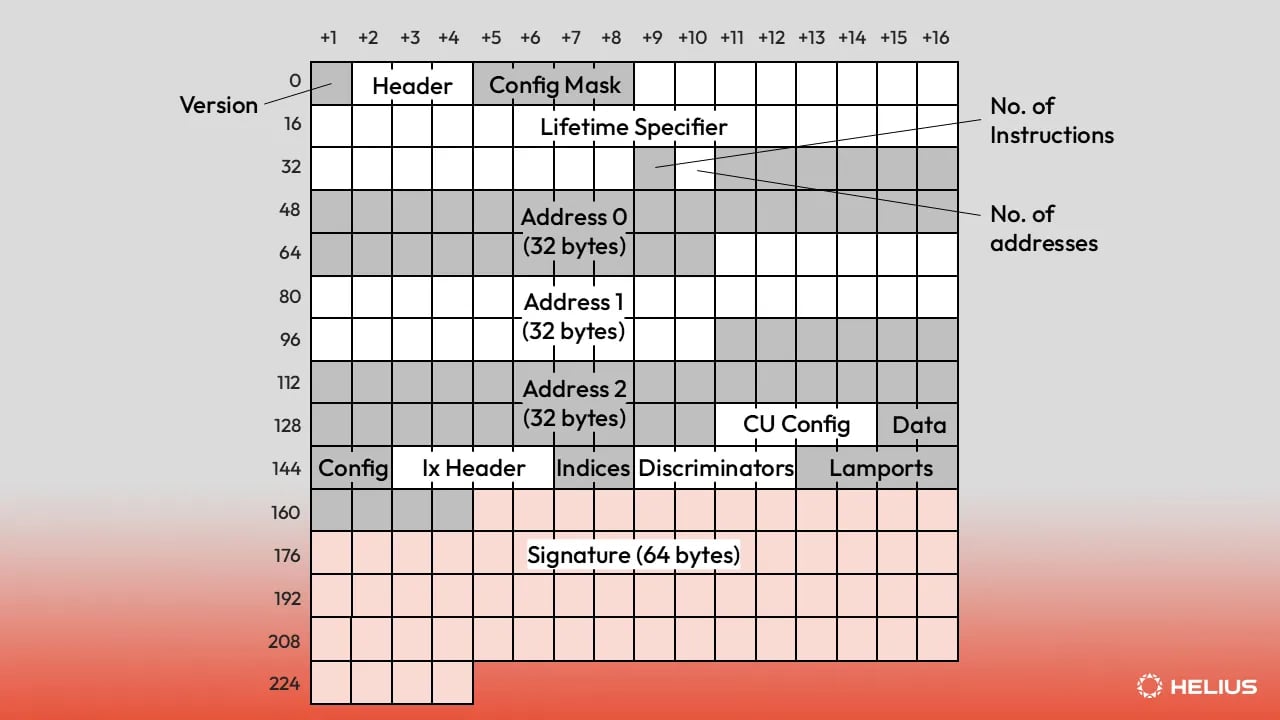 有关 v1 线路格式的逐字段演练,请参见 [Solana 交易版本文章中的交易 v1](https://www.helius.dev/blog/solana-transaction-versions#transaction-v1)。
使用能够理解 v1 布局的解码器:
* **Rust:** [`agave-transaction-view`](https://docs.rs/agave-transaction-view) 就地解析旧版、v0 和 v1。[`wincode`](https://docs.rs/wincode),用于当前 Solana SDK 的 bincode 兼容序列化器,也将 v1 解码到 `VersionedTransaction`。
* **JavaScript / TypeScript:** `@solana/kit` 8.0+ 或 `@solana/web3.js` v3。
自定义解码器需要检查第一个字节:`0x81` 表示 v1,签名在消息之后而不是之前。
## 清单
1. grep 搜索 `getBlock`、`getTransaction`、`getTransactionsForAddress`、`transactionSubscribe` 和 `blockSubscribe`,包括原始 JSON-RPC 主体和类似 `connection.getParsedTransaction` 的 SDK 包。
2. 升级到支持 v1 的 SDK。
3. 在步骤 1 中找到的每个调用上设置 `maxSupportedTransactionVersion: 1`。
4. 用 `transactionConfig` 检查替换计算预算指令扫描,并将 `priorityFee` 视为总 lamports。
5. 用 `agave-transaction-view` 或升级的 SDK 替换 `bincode` 样式的原始解码器。
6. 将流依赖项提高到上表中的版本。
7. 在更改后在日志中 grep 搜索 `-32015` 以确认没有任何失败。
有关 Solana 交易版本规范、线路格式和示例的技术深度介绍,请阅读我们的文章,[Solana 交易版本化:旧版,v0 和 v1](https://www.helius.dev/blog/solana-transaction-versions)。
## 相关
获取单个交易的参数、响应格式和示例。
获取完整区块,包括其包含的每笔交易。
在一次调用中获取任何地址的过滤、分页交易历史。
每个 Agave 4.2 的重大更改及补救步骤。
有关 v1 线路格式的逐字段演练,请参见 [Solana 交易版本文章中的交易 v1](https://www.helius.dev/blog/solana-transaction-versions#transaction-v1)。
使用能够理解 v1 布局的解码器:
* **Rust:** [`agave-transaction-view`](https://docs.rs/agave-transaction-view) 就地解析旧版、v0 和 v1。[`wincode`](https://docs.rs/wincode),用于当前 Solana SDK 的 bincode 兼容序列化器,也将 v1 解码到 `VersionedTransaction`。
* **JavaScript / TypeScript:** `@solana/kit` 8.0+ 或 `@solana/web3.js` v3。
自定义解码器需要检查第一个字节:`0x81` 表示 v1,签名在消息之后而不是之前。
## 清单
1. grep 搜索 `getBlock`、`getTransaction`、`getTransactionsForAddress`、`transactionSubscribe` 和 `blockSubscribe`,包括原始 JSON-RPC 主体和类似 `connection.getParsedTransaction` 的 SDK 包。
2. 升级到支持 v1 的 SDK。
3. 在步骤 1 中找到的每个调用上设置 `maxSupportedTransactionVersion: 1`。
4. 用 `transactionConfig` 检查替换计算预算指令扫描,并将 `priorityFee` 视为总 lamports。
5. 用 `agave-transaction-view` 或升级的 SDK 替换 `bincode` 样式的原始解码器。
6. 将流依赖项提高到上表中的版本。
7. 在更改后在日志中 grep 搜索 `-32015` 以确认没有任何失败。
有关 Solana 交易版本规范、线路格式和示例的技术深度介绍,请阅读我们的文章,[Solana 交易版本化:旧版,v0 和 v1](https://www.helius.dev/blog/solana-transaction-versions)。
## 相关
获取单个交易的参数、响应格式和示例。
获取完整区块,包括其包含的每笔交易。
在一次调用中获取任何地址的过滤、分页交易历史。
每个 Agave 4.2 的重大更改及补救步骤。