> ## Documentation Index
> Fetch the complete documentation index at: https://www.helius.dev/docs/llms.txt
> Use this file to discover all available pages before exploring further.
# Cách sử dụng transactionSubscribe
> Truyền trực tiếp các bản cập nhật giao dịch Solana theo thời gian thực bằng `transactionSubscribe`. Giám sát hoạt động blockchain, lọc theo tài khoản và nhận thông báo tức thì.
## `transactionSubscribe` là gì?
Phương thức WebSocket `transactionSubscribe` (một tiện ích mở rộng của Helius dành cho API WebSocket Solana tiêu chuẩn) cho phép nhận các sự kiện giao dịch theo thời gian thực.
Để sử dụng, hãy cung cấp một `TransactionSubscribeFilter` và tùy chọn thêm `TransactionSubscribeOptions` để tùy chỉnh thêm.
`transactionSubscribe` sử dụng cùng các [điểm cuối](https://www.helius.dev/docs/api-reference/endpoints) `wss://mainnet.helius-rpc.com` và `wss://devnet.helius-rpc.com` hợp nhất như các phương thức đăng ký Solana tiêu chuẩn.
### `TransactionSubscribeFilter`
* `vote`: cờ boolean để bao gồm/loại trừ các giao dịch liên quan đến biểu quyết
* `failed`: cờ boolean để bao gồm/loại trừ các giao dịch thất bại
* `signature`: lọc các bản cập nhật cho một giao dịch cụ thể dựa trên chữ ký của giao dịch đó
* `accountInclude`: danh sách tài khoản mà bạn muốn nhận bản cập nhật giao dịch. Chỉ cần một trong các tài khoản được bao gồm trong bản cập nhật giao dịch (ví dụ: Tài khoản 1 HOẶC 2).
* `accountExclude`: danh sách tài khoản mà bạn muốn loại trừ khỏi các bản cập nhật giao dịch
* `accountRequired`: giao dịch phải bao gồm tất cả các tài khoản đã chỉ định thì mới được đưa vào bản cập nhật (ví dụ: Tài khoản 1 VÀ 2)
* `tokenAccounts`: tùy chọn mở rộng tài khoản token liên kết (ATA) (`balanceChanged`, `all` hoặc `none`). Xem phần [Theo dõi ví, bao gồm cả các lượt chuyển token](#theo-dõi-ví-bao-gồm-cả-các-lượt-chuyển-token) bên dưới.
Bạn có thể thêm tối đa 50.000 địa chỉ vào các mảng `accountInclude`, `accountExclude` và `accountRequired`.
### TransactionSubscribeOptions (Không bắt buộc)
* `commitment`: mức cam kết để truy xuất dữ liệu (`processed`, `confirmed` hoặc `finalized`)
* `encoding`: định dạng mã hóa của dữ liệu được trả về (`base58`, `base64` hoặc `jsonParsed`)
* `transactionDetails`: mức độ chi tiết của dữ liệu được trả về (`full`, `signatures`, `accounts` và `none`)
* `showRewards`: cờ boolean cho biết có nên đưa dữ liệu phần thưởng vào các bản cập nhật hay không
* `maxSupportedTransactionVersion`: chỉ định phiên bản giao dịch cao nhất mà bạn muốn nhận bản cập nhật. Đặt giá trị thành `1` để nhận các giao dịch legacy, v0 và v1. Xem [Hỗ trợ giao dịch v1](/docs/vi/rpc/transaction-v1).
Cần có `maxSupportedTransactionVersion` để trả về các tài khoản và thông tin chi tiết ở cấp độ đầy đủ của một giao dịch nhất định (tức là `transactionDetails: "accounts" | "full"`).
## Ví dụ về đăng ký giao dịch
Trong ví dụ này, chúng ta đăng ký nhận thông tin về các giao dịch chứa tài khoản Raydium `675kPX9MHTjS2zt1qfr1NYHuzeLXfQM9H24wFSUt1Mp8`.
Khi xảy ra một giao dịch có chứa tài khoản `675k...1Mp8` trong `accountKeys` của giao dịch, chúng ta sẽ nhận được thông báo WSS.
Dựa trên các tùy chọn đăng ký, thông báo giao dịch sẽ được gửi ở mức cam kết `processed`, mã hóa `jsonParsed`, thông tin chi tiết giao dịch `full` và sẽ hiển thị phần thưởng.
```javascript theme={"system"}
const WebSocket = require('ws');
// Create a WebSocket connection
const ws = new WebSocket('wss://mainnet.helius-rpc.com/?api-key=');
// Function to send a request to the WebSocket server
function sendRequest(ws) {
const request = {
jsonrpc: "2.0",
id: 420,
method: "transactionSubscribe",
params: [
{
accountInclude: ["675kPX9MHTjS2zt1qfr1NYHuzeLXfQM9H24wFSUt1Mp8"]
},
{
commitment: "processed",
encoding: "jsonParsed",
transactionDetails: "full",
showRewards: true,
maxSupportedTransactionVersion: 1
}
]
};
ws.send(JSON.stringify(request));
}
// Function to send a ping to the WebSocket server
function startPing(ws) {
setInterval(() => {
if (ws.readyState === WebSocket.OPEN) {
ws.ping();
console.log('Ping sent');
}
}, 30000); // Ping every 30 seconds
}
// Define WebSocket event handlers
ws.on('open', function open() {
console.log('WebSocket is open');
sendRequest(ws); // Send a request once the WebSocket is open
startPing(ws); // Start sending pings
});
ws.on('message', function incoming(data) {
const messageStr = data.toString('utf8');
try {
const messageObj = JSON.parse(messageStr);
console.log('Received:', messageObj);
} catch (e) {
console.error('Failed to parse JSON:', e);
}
});
ws.on('error', function error(err) {
console.error('WebSocket error:', err);
});
ws.on('close', function close() {
console.log('WebSocket is closed');
});
```
### Ví dụ về thông báo
```json theme={"system"}
{
"jsonrpc": "2.0",
"method": "transactionNotification",
"params": {
"subscription": 4743323479349712,
"result": {
"transaction": {
"transaction": [
"Ae6zfSExLsJ/E1+q0jI+3ueAtSoW+6HnuDohmuFwagUo2BU4OpkSdUKYNI1dJfMOonWvjaumf4Vv1ghn9f3Avg0BAAEDGycH0OcYRpfnPNuu0DBQxTYPWpmwHdXPjb8y2P200JgK3hGiC2JyC9qjTd2lrug7O4cvSRUVWgwohbbefNgKQAAAAAAAAAAAAAAAAAAAAAAAAAAAAAAAAAAAAAAAAAAA0HcpwKokfYDDAJTaF/TWRFWm0Gz5/me17PRnnywHurMBAgIAAQwCAAAAoIYBAAAAAAA=",
"base64"
],
"meta": {
"err": null,
"status": {
"Ok": null
},
"fee": 5000,
"preBalances": [
28279852264,
158122684,
1
],
"postBalances": [
28279747264,
158222684,
1
],
"innerInstructions": [],
"logMessages": [
"Program 11111111111111111111111111111111 invoke [1]",
"Program 11111111111111111111111111111111 success"
],
"preTokenBalances": [],
"postTokenBalances": [],
"rewards": null,
"loadedAddresses": {
"writable": [],
"readonly": []
},
"computeUnitsConsumed": 0
}
},
"signature": "5moMXe6VW7L7aQZskcAkKGQ1y19qqUT1teQKBNAAmipzdxdqVLAdG47WrsByFYNJSAGa9TByv15oygnqYvP6Hn2p",
"slot": 224341380,
"transactionIndex": 42
}
}
}
```
## Theo dõi ví, bao gồm cả các lượt chuyển token
Khi theo dõi ví bằng `accountInclude`, bạn chỉ khớp với các giao dịch mà khóa công khai của ví xuất hiện trực tiếp trong các khóa tài khoản. Một trường hợp phổ biến sẽ bị bỏ sót: khi ai đó gửi token SPL (chẳng hạn như USDC) đến ví, lượt chuyển sẽ tác động đến **tài khoản token liên kết (ATA)** của ví chứ không phải khóa công khai của ví — vì vậy, đăng ký `accountInclude: [wallet]` thông thường sẽ không bao giờ phát hiện được giao dịch đó.
Đặt trường `tokenAccounts` để mở rộng phạm vi khớp, nhờ đó tài khoản được theo dõi cũng khớp với các giao dịch mà tài khoản đó **sở hữu** số dư token:
* `balanceChanged`: khớp khi ví sở hữu số dư token có số lượng thay đổi (hoặc tài khoản token bị đóng) trong giao dịch. Sử dụng tùy chọn này khi muốn "thông báo cho tôi khi tiền thực sự được chuyển". Đây là lựa chọn có phạm vi hẹp hơn, lưu lượng thấp hơn và phổ biến nhất.
* `all`: khớp với mọi giao dịch tham chiếu đến số dư token mà ví sở hữu, ngay cả khi số dư không thay đổi. Lưu lượng cao hơn.
* `none`: không mở rộng. Tương tự như khi bỏ qua trường này (mặc định).
Việc khớp dựa trên chủ sở hữu: tính năng này phát hiện mọi tài khoản token do ví sở hữu, bao gồm cả các tài khoản không chuẩn, chứ không chỉ địa chỉ ATA được dẫn xuất. Giá trị không hợp lệ sẽ trả về lỗi JSON-RPC `-32602`. Các lượt đăng ký bỏ qua `tokenAccounts` hoạt động giống hệt như trước đây. Để xem tổng quan đầy đủ về cách hoạt động của tính năng mở rộng ATA, hãy xem [Lọc tài khoản token (ATA) qua WebSocket](/docs/vi/rpc/websocket/token-account-filtering).
```javascript theme={"system"}
const ws = new WebSocket('wss://mainnet.helius-rpc.com/?api-key=');
ws.on('open', () => {
ws.send(JSON.stringify({
jsonrpc: '2.0',
id: 1,
method: 'transactionSubscribe',
params: [
{
accountInclude: [''],
tokenAccounts: 'balanceChanged' // also match the wallet's ATAs
},
{ commitment: 'confirmed', encoding: 'jsonParsed', maxSupportedTransactionVersion: 1 }
]
}));
setInterval(() => ws.ping(), 30_000);
});
ws.on('message', (data) => {
const msg = JSON.parse(data.toString());
const result = msg.params?.result;
if (!result) return;
// Token balances this wallet owns that changed in the tx
const owned = (result.transaction.meta.postTokenBalances || [])
.filter((b) => b.owner === '');
console.log(result.signature, owned);
});
```
## Giám sát các DCA Jupiter mới
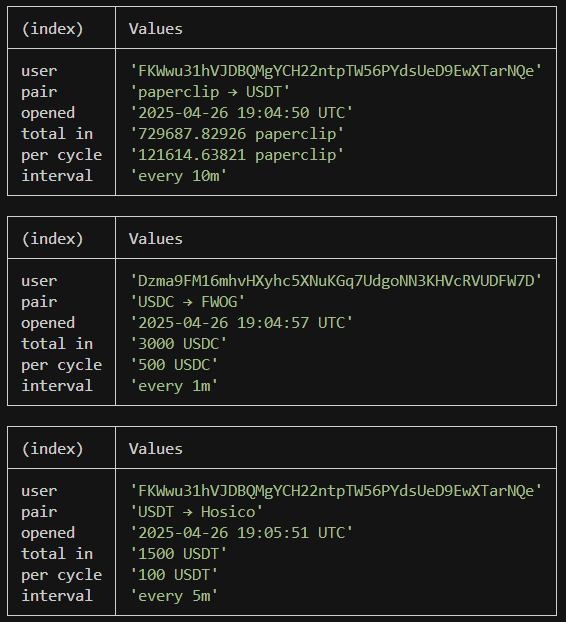
DCA Jupiter, hay phương pháp trung bình giá, là một cách để lên lịch giao dịch định kỳ trên Solana. Vì các lệnh mua/bán đã lên lịch này được ghi lại trên chuỗi, nhà giao dịch có thể sử dụng phương thức `transactionSubscribe` và [`getAsset`](/docs/vi/api-reference/das/getasset) để theo dõi các lệnh mới.
```javascript theme={"system"}
const WebSocket = require('ws');
const bs58 = require('bs58').default;
/* ───────────────────── 1. CONFIG ──────────────────────────── */
const API_KEY = process.env.HELIUS_API_KEY || (() => { throw new Error('Set HELIUS_API_KEY'); })();
const HELIUS_WS = `wss://mainnet.helius-rpc.com?api-key=${API_KEY}`;
const HELIUS_RPC = `https://mainnet.helius-rpc.com/?api-key=${API_KEY}`;
const DCA_PROGRAM_ID = 'DCA265Vj8a9CEuX1eb1LWRnDT7uK6q1xMipnNyatn23M';
/* ───────────────────── 2. BINARY DECODER ──────────────────── */
function decodeOpenDcaV2(base58Data) {
const buf = Buffer.from(bs58.decode(base58Data));
return {
appIdx: buf.readBigUInt64LE(8), // Application Index
inAmount: buf.readBigUInt64LE(16), // Input Amount
perCycle: buf.readBigUInt64LE(24), // Per Cycle
interval: buf.readBigUInt64LE(32) // Interval
};
}
const TOKEN_META = new Map(); // mint → { symbol, decimals }
/**
* Fetch symbol & decimals for a mint once then cache.
* Uses Helius getAsset DAS method: https://www.helius.dev/docs/api-reference/das/getasset
*/
async function getMeta(mint) {
if (TOKEN_META.has(mint)) return TOKEN_META.get(mint);
const body = {
jsonrpc: '2.0',
id: 'meow',
method: 'getAsset',
params: { id: mint, displayOptions: { showFungible: true } }
};
const { result } = await fetch(HELIUS_RPC, {
method: 'POST',
headers: { 'Content-Type': 'application/json' },
body: JSON.stringify(body)
}).then(r => r.json());
const tokenInfo = result.token_info || {};
const metadata = { symbol: tokenInfo.symbol || '?', decimals: tokenInfo.decimals ?? 0 };
TOKEN_META.set(mint, metadata);
return metadata;
}
/* ───────────────────── 4. PRETTY HELPERS ──────────────────── */
function formatTimestamp(unixSeconds) {
return new Date(Number(unixSeconds) * 1_000)
.toISOString()
.replace('T', ' ')
.replace('.000Z', ' UTC');
}
function formatInterval(seconds) {
if (seconds % 86_400 === 0) return `every ${seconds / 86_400}d`;
if (seconds % 3_600 === 0) return `every ${seconds / 3_600}h`;
if (seconds % 60 === 0) return `every ${seconds / 60}m`;
return `every ${seconds}s`;
}
function formatAmount(raw, decimals, symbol) {
const ui = Number(raw) / 10 ** decimals;
return `${ui} ${symbol}`;
}
/* ───────────────────── 5. WEBSOCKET SETUP ─────────────────── */
const ws = new WebSocket(HELIUS_WS);
ws.on('open', () => {
ws.send(JSON.stringify({
jsonrpc: '2.0',
id: 1,
method: 'transactionSubscribe',
params: [
{ failed: false, accountInclude: [DCA_PROGRAM_ID] },
{
commitment: 'confirmed',
encoding: 'jsonParsed',
transactionDetails: 'full',
maxSupportedTransactionVersion: 1
}
]
}));
setInterval(() => ws.ping(), 10_000);
});
/* ───────────────────── 6. MAIN MESSAGE HANDLER ────────────── */
ws.on('message', async raw => {
const payload = JSON.parse(raw);
const result = payload.params?.result;
if (!result) return;
// Look for the `OpenDcaV2` log message
const logs = result.transaction.meta.logMessages || [];
if (!logs.some(l => l.includes('OpenDcaV2'))) return;
// loop through all instructions in the transaction to find the DCA instruction
for (const ix of result.transaction.transaction.message.instructions) {
if (ix.programId !== DCA_PROGRAM_ID) continue;
try {
// 1) decode binary payload
const d = decodeOpenDcaV2(ix.data);
// 2) fetch token symbols / decimals (cached)
const [inMeta, outMeta] = await Promise.all([
getMeta(ix.accounts[3]), // input mint
getMeta(ix.accounts[4]) // output mint
]);
// 3) create a nice looking table
console.table({
user: ix.accounts[2],
pair: `${inMeta.symbol} → ${outMeta.symbol}`,
opened: formatTimestamp(d.appIdx),
'total in': formatAmount(d.inAmount, inMeta.decimals, inMeta.symbol),
'per cycle': formatAmount(d.perCycle, inMeta.decimals, inMeta.symbol),
interval: formatInterval(Number(d.interval))
});
} catch (e) {}
}
});
ws.on('error', console.error);
ws.on('close', () => process.exit(1));
```
### Ví dụ về thông báo
 ## Giám sát các token pump.fun mới
```javascript theme={"system"}
const WebSocket = require('ws');
const KEY = process.env.HELIUS_API_KEY ?? (() => { throw new Error('Set HELIUS_API_KEY'); })();
const WS_URL = `wss://mainnet.helius-rpc.com?api-key=${KEY}`;
const PUMP_FUN_PROG = '6EF8rrecthR5Dkzon8Nwu78hRvfCKubJ14M5uBEwF6P';
/* ────────── 2. OPEN WEBSOCKET & SUBSCRIBE ──────────────────── */
const ws = new WebSocket(WS_URL);
ws.on('open', () => {
ws.send(JSON.stringify({
jsonrpc : '2.0',
id : 1,
method : 'transactionSubscribe',
params : [
{ failed:false, accountInclude:[PUMP_FUN_PROG] },
{ commitment:'confirmed', encoding:'jsonParsed',
transactionDetails:'full', maxSupportedTransactionVersion:1 }
]
}));
// ping every 10 s so we don't get dropped
setInterval(() => ws.ping(), 10_000);
});
/* ────────── 3. MESSAGE HANDLER ─────────────────────────────── */
ws.on('message', raw => {
const payload = JSON.parse(raw);
const result = payload.params?.result;
if (!result) return;
const logs = result.transaction.meta.logMessages || [];
// filter for the pump.fun "InitializeMint2" log
if (!logs.some(l => l.includes('Instruction: InitializeMint2'))) return;
const sig = result.signature; // transaction signature
const keys = result.transaction.transaction.message.accountKeys
.map(k => k.pubkey);
// keys[0] → creator wallet
// keys[1] → the new token
console.table({
tx: sig,
creator: keys[0],
token: keys[1]
});
});
ws.on('error', console.error);
ws.on('close', () => process.exit(1));
```
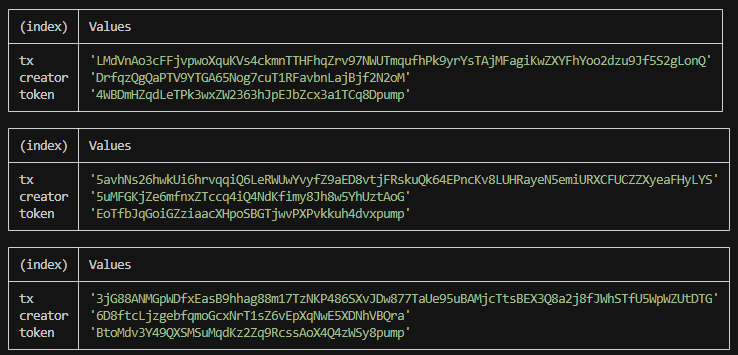
### Ví dụ về thông báo
## Giám sát các token pump.fun mới
```javascript theme={"system"}
const WebSocket = require('ws');
const KEY = process.env.HELIUS_API_KEY ?? (() => { throw new Error('Set HELIUS_API_KEY'); })();
const WS_URL = `wss://mainnet.helius-rpc.com?api-key=${KEY}`;
const PUMP_FUN_PROG = '6EF8rrecthR5Dkzon8Nwu78hRvfCKubJ14M5uBEwF6P';
/* ────────── 2. OPEN WEBSOCKET & SUBSCRIBE ──────────────────── */
const ws = new WebSocket(WS_URL);
ws.on('open', () => {
ws.send(JSON.stringify({
jsonrpc : '2.0',
id : 1,
method : 'transactionSubscribe',
params : [
{ failed:false, accountInclude:[PUMP_FUN_PROG] },
{ commitment:'confirmed', encoding:'jsonParsed',
transactionDetails:'full', maxSupportedTransactionVersion:1 }
]
}));
// ping every 10 s so we don't get dropped
setInterval(() => ws.ping(), 10_000);
});
/* ────────── 3. MESSAGE HANDLER ─────────────────────────────── */
ws.on('message', raw => {
const payload = JSON.parse(raw);
const result = payload.params?.result;
if (!result) return;
const logs = result.transaction.meta.logMessages || [];
// filter for the pump.fun "InitializeMint2" log
if (!logs.some(l => l.includes('Instruction: InitializeMint2'))) return;
const sig = result.signature; // transaction signature
const keys = result.transaction.transaction.message.accountKeys
.map(k => k.pubkey);
// keys[0] → creator wallet
// keys[1] → the new token
console.table({
tx: sig,
creator: keys[0],
token: keys[1]
});
});
ws.on('error', console.error);
ws.on('close', () => process.exit(1));
```
### Ví dụ về thông báo
 ## Quản lý lượt đăng ký
### ID đăng ký
Khi `transactionSubscribe` thành công, máy chủ trả về một ID đăng ký trong trường `result`. Đây cũng là số xuất hiện trong `params.subscription` trên mọi thông báo từ lượt đăng ký đó:
```json Subscribe Response theme={"system"}
{
"jsonrpc": "2.0",
"result": 4743323479349712,
"id": 420
}
```
```json Notification theme={"system"}
{
"jsonrpc": "2.0",
"method": "transactionNotification",
"params": {
"subscription": 4743323479349712,
"result": {}
}
}
```
Lưu ID đăng ký từ phản hồi. Bạn cần ID này để hủy đăng ký.
### Hủy đăng ký
Để ngừng nhận thông báo, hãy gọi `transactionUnsubscribe` với ID đăng ký. Mỗi lệnh gọi `transactionSubscribe` trên cùng một kết nối sẽ tạo một lượt đăng ký riêng với ID riêng. Vì vậy, hãy nhớ hủy đăng ký trước khi đăng ký lại để tránh nhận thông báo trùng lặp.
```json Request theme={"system"}
{
"jsonrpc": "2.0",
"id": 421,
"method": "transactionUnsubscribe",
"params": [4743323479349712]
}
```
```json Response theme={"system"}
{
"jsonrpc": "2.0",
"result": true,
"id": 421
}
```
Trong ví dụ này, chúng ta đăng ký nhận thông tin về các giao dịch Raydium, lấy ID đăng ký từ phản hồi của máy chủ, sau đó dùng ID đó để hủy đăng ký. Một vài thông báo đang được truyền có thể vẫn đến trong thời gian ngắn sau khi gọi `transactionUnsubscribe`. Đây là hành vi bình thường.
```javascript theme={"system"}
const WebSocket = require('ws');
const ws = new WebSocket('wss://mainnet.helius-rpc.com/?api-key=');
let subscriptionId = null;
ws.on('open', () => {
ws.send(JSON.stringify({
jsonrpc: '2.0',
id: 420,
method: 'transactionSubscribe',
params: [
{ accountInclude: ['675kPX9MHTjS2zt1qfr1NYHuzeLXfQM9H24wFSUt1Mp8'] },
{
commitment: 'processed',
encoding: 'jsonParsed',
transactionDetails: 'full',
maxSupportedTransactionVersion: 1,
},
],
}));
setInterval(() => ws.ping(), 30000);
});
ws.on('message', (data) => {
const msg = JSON.parse(data.toString());
// Capture the subscription ID from the subscribe response
if (msg.id === 420 && msg.result !== undefined) {
subscriptionId = msg.result;
console.log('Subscribed, ID:', subscriptionId);
return;
}
// Handle transaction notifications
if (msg.method === 'transactionNotification') {
console.log('Received:', msg.params.result.signature);
}
});
function unsubscribe() {
if (subscriptionId !== null) {
ws.send(JSON.stringify({
jsonrpc: '2.0',
id: 421,
method: 'transactionUnsubscribe',
params: [subscriptionId],
}));
subscriptionId = null;
}
}
```
## Quản lý lượt đăng ký
### ID đăng ký
Khi `transactionSubscribe` thành công, máy chủ trả về một ID đăng ký trong trường `result`. Đây cũng là số xuất hiện trong `params.subscription` trên mọi thông báo từ lượt đăng ký đó:
```json Subscribe Response theme={"system"}
{
"jsonrpc": "2.0",
"result": 4743323479349712,
"id": 420
}
```
```json Notification theme={"system"}
{
"jsonrpc": "2.0",
"method": "transactionNotification",
"params": {
"subscription": 4743323479349712,
"result": {}
}
}
```
Lưu ID đăng ký từ phản hồi. Bạn cần ID này để hủy đăng ký.
### Hủy đăng ký
Để ngừng nhận thông báo, hãy gọi `transactionUnsubscribe` với ID đăng ký. Mỗi lệnh gọi `transactionSubscribe` trên cùng một kết nối sẽ tạo một lượt đăng ký riêng với ID riêng. Vì vậy, hãy nhớ hủy đăng ký trước khi đăng ký lại để tránh nhận thông báo trùng lặp.
```json Request theme={"system"}
{
"jsonrpc": "2.0",
"id": 421,
"method": "transactionUnsubscribe",
"params": [4743323479349712]
}
```
```json Response theme={"system"}
{
"jsonrpc": "2.0",
"result": true,
"id": 421
}
```
Trong ví dụ này, chúng ta đăng ký nhận thông tin về các giao dịch Raydium, lấy ID đăng ký từ phản hồi của máy chủ, sau đó dùng ID đó để hủy đăng ký. Một vài thông báo đang được truyền có thể vẫn đến trong thời gian ngắn sau khi gọi `transactionUnsubscribe`. Đây là hành vi bình thường.
```javascript theme={"system"}
const WebSocket = require('ws');
const ws = new WebSocket('wss://mainnet.helius-rpc.com/?api-key=');
let subscriptionId = null;
ws.on('open', () => {
ws.send(JSON.stringify({
jsonrpc: '2.0',
id: 420,
method: 'transactionSubscribe',
params: [
{ accountInclude: ['675kPX9MHTjS2zt1qfr1NYHuzeLXfQM9H24wFSUt1Mp8'] },
{
commitment: 'processed',
encoding: 'jsonParsed',
transactionDetails: 'full',
maxSupportedTransactionVersion: 1,
},
],
}));
setInterval(() => ws.ping(), 30000);
});
ws.on('message', (data) => {
const msg = JSON.parse(data.toString());
// Capture the subscription ID from the subscribe response
if (msg.id === 420 && msg.result !== undefined) {
subscriptionId = msg.result;
console.log('Subscribed, ID:', subscriptionId);
return;
}
// Handle transaction notifications
if (msg.method === 'transactionNotification') {
console.log('Received:', msg.params.result.signature);
}
});
function unsubscribe() {
if (subscriptionId !== null) {
ws.send(JSON.stringify({
jsonrpc: '2.0',
id: 421,
method: 'transactionUnsubscribe',
params: [subscriptionId],
}));
subscriptionId = null;
}
}
```