> ## Documentation Index
> Fetch the complete documentation index at: https://www.helius.dev/docs/llms.txt
> Use this file to discover all available pages before exploring further.
# Thiết lập node chuyên dụng Solana: Hướng dẫn bắt đầu đầy đủ
> Hướng dẫn đầy đủ về cách thiết lập node chuyên dụng Solana với tính năng truyền phát gRPC, plugin Yellowstone và cấu hình tối ưu cho dữ liệu blockchain.
## Cách đặt mua node chuyên dụng
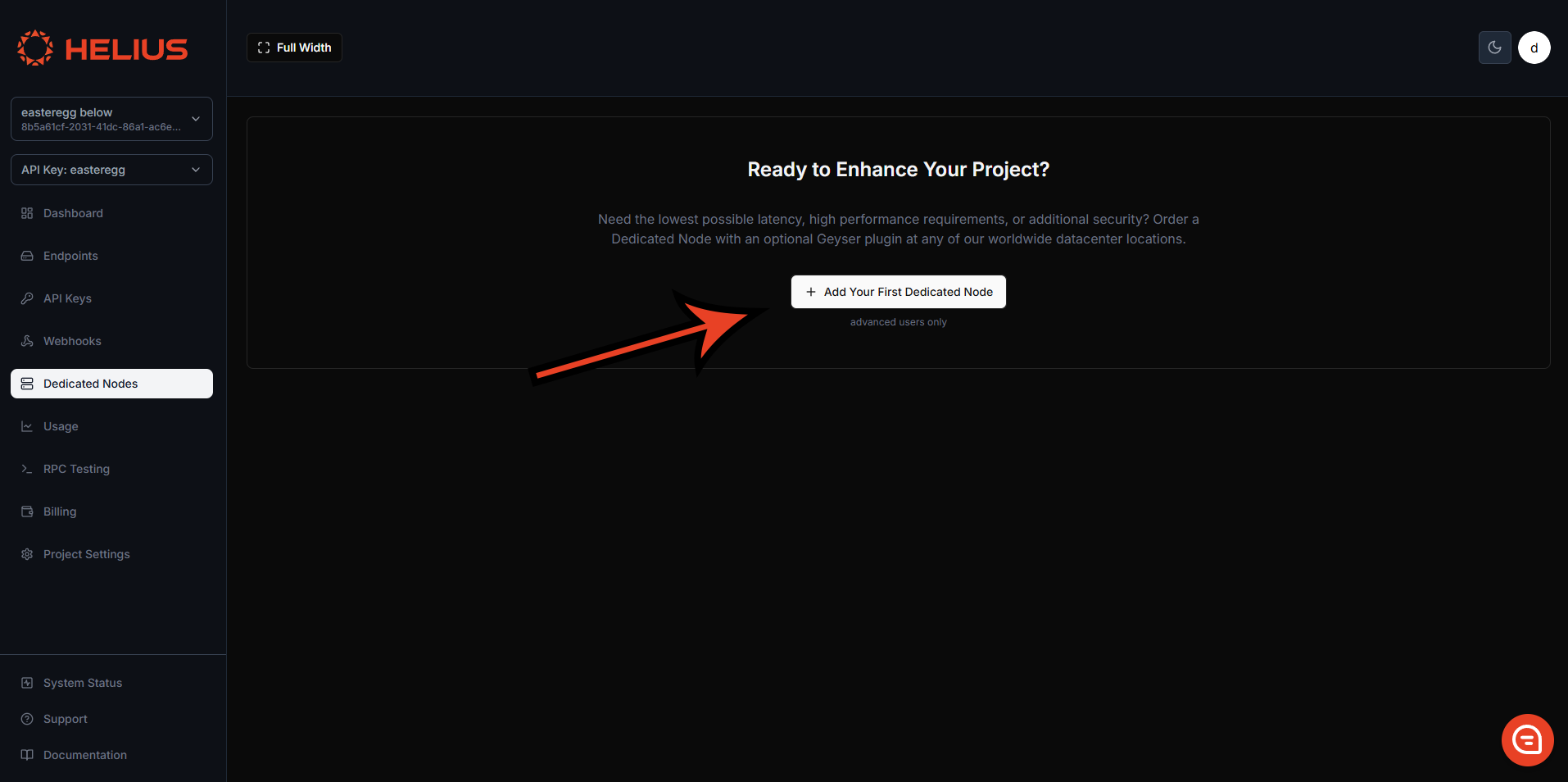
Bạn có thể đặt mua Node chuyên dụng trực tiếp từ [cổng thông tin dành cho nhà phát triển](https://dashboard.helius.dev/dedicated-nodes) trong thẻ Dedicated Nodes.
### Loại node
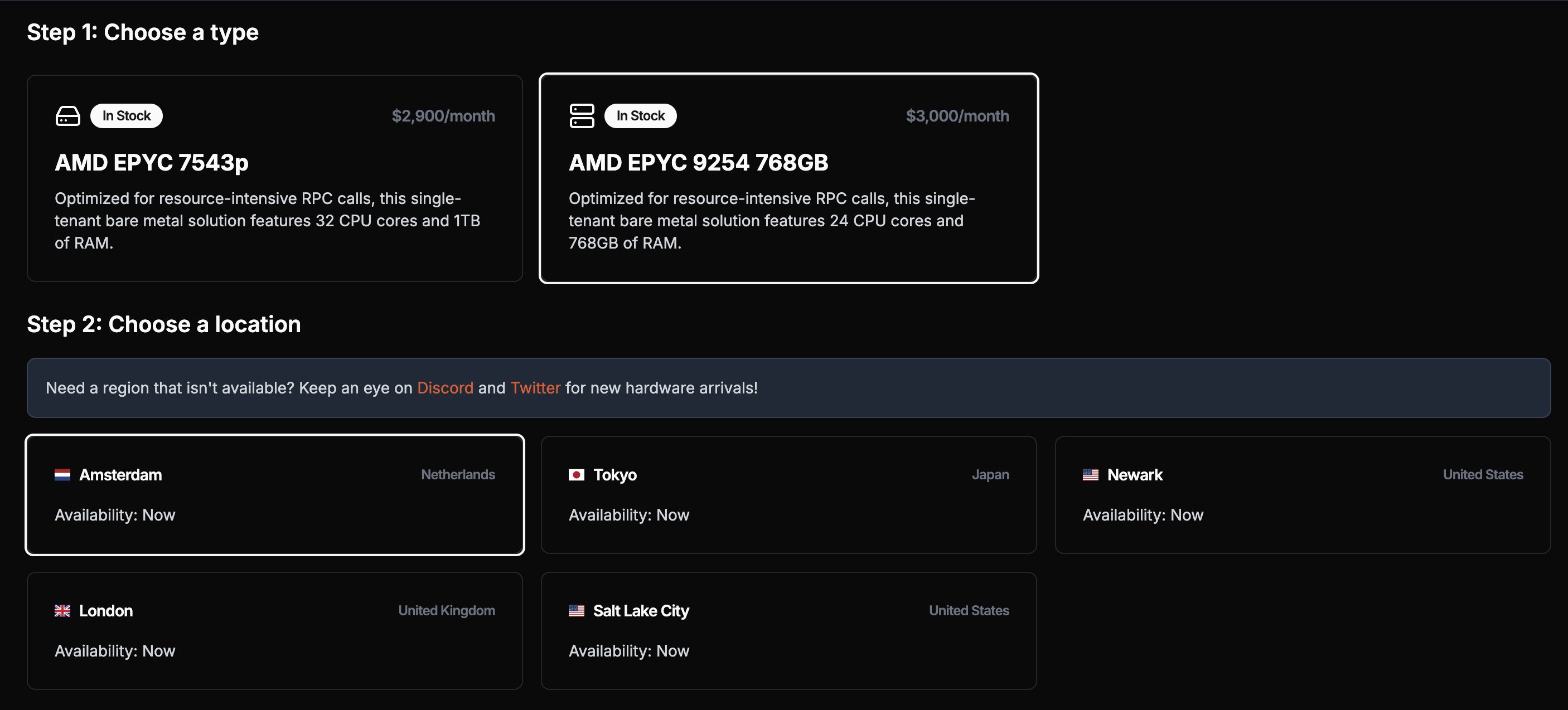
Loại node bạn chọn phụ thuộc vào yêu cầu của bạn. Vì chúng tôi không áp dụng giới hạn tốc độ, hiệu suất của node sẽ phụ thuộc hoàn toàn vào thông số kỹ thuật của node đó.
**Đối với các ứng dụng truyền phát gRPC** (trường hợp sử dụng chính), mọi loại node đều hoạt động tốt.
**Quan trọng**: Mặc dù [`getProgramAccounts`](/docs/vi/api-reference/rpc/http/getprogramaccounts) được hỗ trợ, node chuyên dụng không được tối ưu hóa cho các lệnh gọi này. Việc sử dụng ở mức độ cao có thể ảnh hưởng đến hiệu suất hoặc thậm chí khiến node gặp sự cố. Hãy sử dụng gói dùng chung cho các truy vấn `getProgramAccounts` vì gói này có bộ lập chỉ mục tùy chỉnh, giúp các lệnh gọi này nhanh và đáng tin cậy hơn nhiều.
### Vị trí node
Chúng tôi cung cấp node tại nhiều khu vực: Bắc Mỹ (Pittsburgh, Newark, Salt Lake City, Los Angeles, Vancouver), châu Âu (Dublin, London, Amsterdam, Frankfurt) và châu Á (Tokyo, Singapore), nhằm bảo đảm phạm vi địa lý tốt nhất cho cơ sở hạ tầng Solana toàn cầu.
Để có độ trễ tối ưu, hãy chọn node gần máy chủ của bạn nhất. Node sẽ được triển khai trong vòng ba giờ sau khi thanh toán.
### Client của node
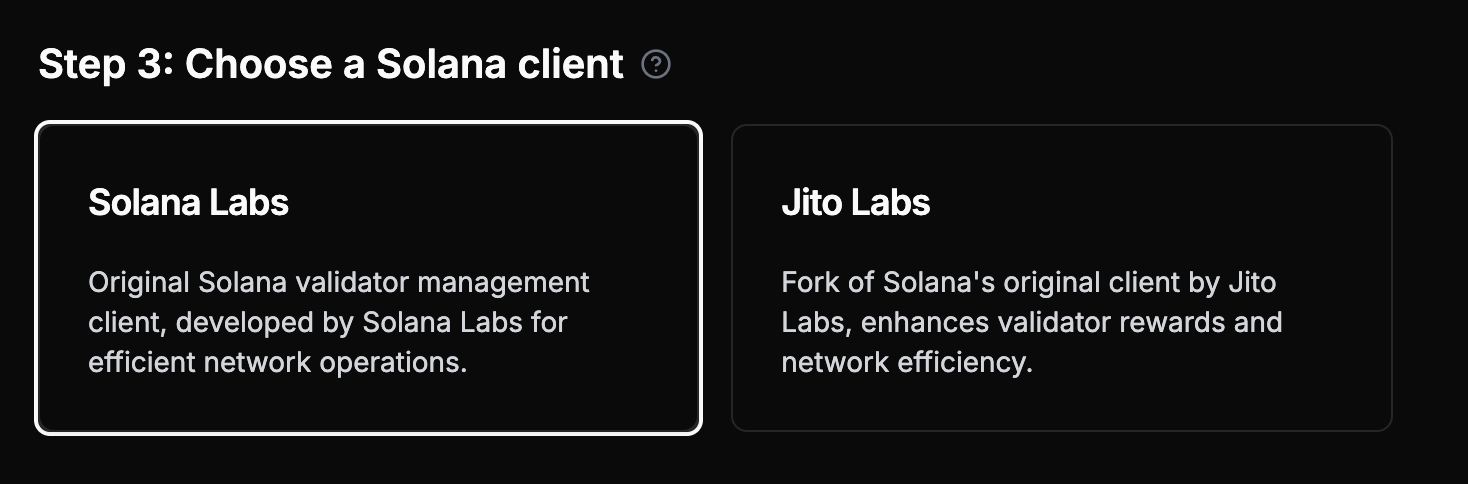
Bạn có thể tùy chỉnh node bằng cách chọn loại client — Agave hoặc Jito Labs (một fork của Agave có thêm phương thức `simulateBundle`)
Node chuyên dụng **không thể** tự gửi Jito Bundle. Để gửi Jito Bundle, bạn phải sử dụng Jito API. API này xử lý việc đóng gói và gửi các bundle thông qua hệ thống của Jito.
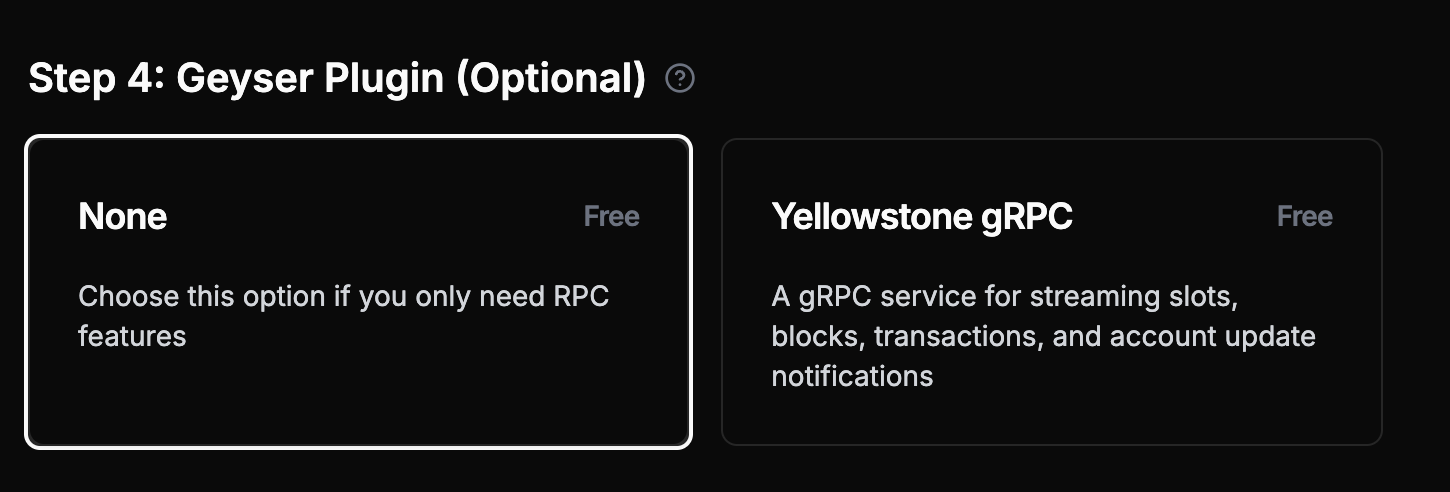
### Plugin Geyser (Khuyên dùng)
**Chúng tôi đặc biệt khuyên bạn nên thêm Plugin Geyser [Yellowstone](https://github.com/helius-labs/yellowstone-grpc)**, đây là trường hợp sử dụng chính của node chuyên dụng. Plugin này cung cấp khả năng [truyền phát gRPC](/docs/vi/grpc) hiệu suất cao cho slot, block, giao dịch và nội dung cập nhật tài khoản.
**Phương pháp tốt nhất**: Node chuyên dụng được tối ưu hóa cho việc truyền phát gRPC. Hãy sử dụng gói dùng chung để gửi giao dịch, truy vấn dữ liệu lưu trữ và thực hiện các thao tác RPC phức tạp.
### Tùy chọn thanh toán
Bạn có thể thanh toán bằng tiền pháp định hoặc tiền mã hóa (USDC). Sau khi thanh toán thành công, node sẽ được triển khai trong vòng 3 giờ.
Đối với việc lập hóa đơn, các khoản thanh toán bằng tiền pháp định sẽ được giảm giá trên hóa đơn của tháng tiếp theo theo số ngày cần để cấp phát node. Đối với thanh toán bằng tiền mã hóa, chu kỳ thanh toán bắt đầu sau khi node được bàn giao.
### Bản demo
## Bắt đầu
Sau khi Node chuyên dụng được thiết lập và sẵn sàng (trạng thái: **Succeeded**), bạn có thể bắt đầu sử dụng node.
## Kết nối với node chuyên dụng
### Truyền phát gRPC (Trường hợp sử dụng chính)
**Node chuyên dụng được tối ưu hóa cho việc truyền phát gRPC thông qua Plugin Geyser Yellowstone.** Đây là cách chính và được khuyên dùng để sử dụng node chuyên dụng.
**Cân nhắc LaserStream cho việc truyền phát gRPC**: LaserStream cung cấp hiệu suất và độ tin cậy vượt trội, cùng các tính năng nâng cao như phát lại dữ liệu lịch sử trong 48 giờ cho việc truyền phát gRPC. Giải pháp này được khuyên dùng cho 99% trường hợp truyền phát. Hãy [so sánh LaserStream với Node chuyên dụng](/docs/vi/laserstream/laserstream-vs-dedicated-nodes) để đánh giá giải pháp phù hợp nhất với nhu cầu của bạn hoặc [bắt đầu sử dụng LaserStream](https://dashboard.helius.dev/laserstream) từ Bảng điều khiển Helius.
### RPC cơ bản và WebSocket (Chức năng hạn chế)
Mỗi node chuyên dụng cũng cung cấp chức năng RPC cơ bản nhưng có một số hạn chế. **Đối với ứng dụng production, hãy kết hợp node chuyên dụng với gói dùng chung.**
Ở đây, chúng ta sử dụng Solana web3.js để gọi [`getSlot`](/docs/vi/api-reference/rpc/http/getslot) bằng node chuyên dụng:
```javascript theme={"system"}
// Using @solana/web3.js
const { Connection } = require('@solana/web3.js');
const connection = new Connection('https://liveried-grazings-gxzjabdgqa-dedicated.helius-rpc.com?api-key=465964ff-f718-47d2-a51c-66ddcce332d7');
// Get the current slot
const getSlot = async () => {
const slot = await connection.getSlot();
console.log('Current slot:', slot);
};
getSlot();
```
Sau đây là cách thiết lập kết nối WebSocket gốc để truyền phát các slot mới:
```javascript theme={"system"}
const Websocket = require('ws');
const ws = new Websocket('wss://liveried-grazings-gxzjabdgqa-dedicated.helius-rpc.com?api-key=465964ff-f718-47d2-a51c-66ddcce332d7 ');
ws.onopen = () => {
ws.send(JSON.stringify({
jsonrpc: '2.0',
id: 1,
method: 'slotSubscribe'
}));
};
ws.onmessage = (event) => {
console.log(JSON.parse(event.data));
};
```
**Lưu ý**: Các ví dụ RPC ở trên chỉ dành cho chức năng cơ bản. Node chuyên dụng có các hạn chế sau:
* Hỗ trợ [`sendTransaction`](/docs/vi/api-reference/rpc/http/sendtransaction) nhưng không được tối ưu hóa — hầu hết giao dịch sẽ không được ghi nhận (hãy sử dụng gói dùng chung để gửi giao dịch một cách đáng tin cậy)
* Không hỗ trợ truy vấn dữ liệu lưu trữ (hãy sử dụng gói dùng chung)
* Hỗ trợ [`getProgramAccounts`](/docs/vi/api-reference/rpc/http/getprogramaccounts) nhưng không được tối ưu hóa — việc sử dụng ở mức độ cao có thể ảnh hưởng đến hiệu suất hoặc khiến node gặp sự cố (hãy sử dụng gói dùng chung để bảo đảm độ tin cậy)
**Trường hợp sử dụng chính**: Hãy sử dụng cấu hình truyền phát gRPC bên dưới để có hiệu suất tối ưu.
### Thiết lập Plugin Geyser
Để bắt đầu sử dụng plugin Geyser, bạn cần sao chép repo Yellowstone:
```shell theme={"system"}
git clone https://github.com/helius-labs/yellowstone-grpc.git
```
#### Sử dụng CLI
```sh theme={"system"}
cd yellowstone-grpc/examples/rust/
cargo run --bin client -- -e "https://liveried-grazings-gxzjabdgqa-dedicated-lb.helius-rpc.com:2053" --x-token 42f03938-1daa-4162-a457-bb551ecaf590 subscribe --slots
```
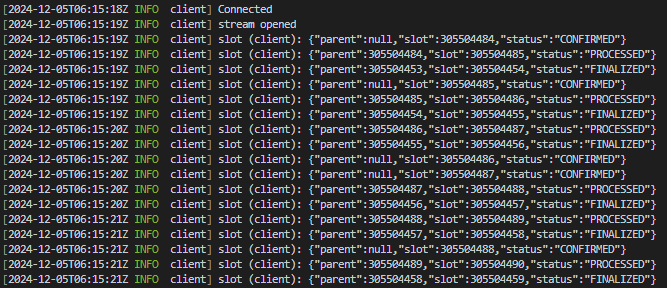
Sau khi hoàn tất, bạn sẽ thấy terminal hiển thị các slot mới. Đừng quên thay URL và token bằng thông tin của bạn.
### Ví dụ TypeScript
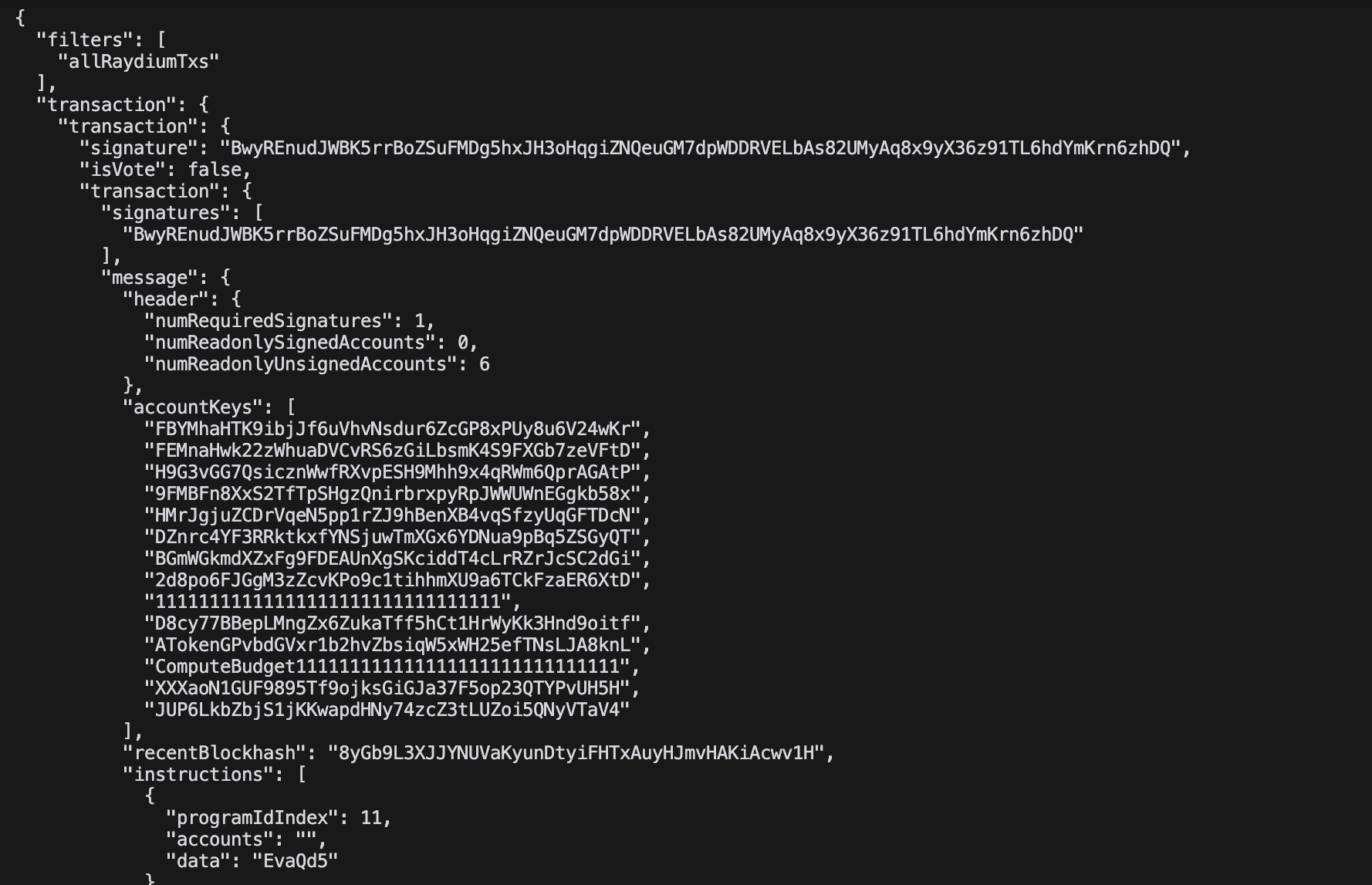
Ví dụ này truyền phát trực tiếp tất cả giao dịch Raydium ở định dạng JSON:
```typescript theme={"system"}
import Client, { CommitmentLevel, SubscribeRequest } from "@triton-one/yellowstone-grpc";
import * as bs58 from 'bs58';
const processBuffers = (obj: any): any =>
!obj ? obj :
Buffer.isBuffer(obj) || obj instanceof Uint8Array ? bs58.encode(obj) :
Array.isArray(obj) ? obj.map(processBuffers) :
typeof obj === 'object' ? Object.fromEntries(Object.entries(obj).map(([k, v]) => [k, processBuffers(v)])) :
obj;
const main = async () => {
const client = new Client("grpc_url",
"x_token",
{ "grpc.max_receive_message_length": 64 * 1024 * 1024 });
const stream = await client.subscribe();
const write = (req: SubscribeRequest) => new Promise((resolve, reject) =>
stream.write(req, (err) => err ? reject(err) : resolve()));
stream.on("data", (data) => {
try { console.log(JSON.stringify(processBuffers(data), null, 2)); }
catch (e) { console.error('Error:', e); }
});
await write({
slots: {},
accounts: {},
accountsDataSlice: [],
transactions: {
allRaydiumTxs: {
accountInclude: ["675kPX9MHTjS2zt1qfr1NYHuzeLXfQM9H24wFSUt1Mp8"],
accountExclude: [],
accountRequired: [],
}
},
blocks: {},
blocksMeta: {},
entry: {},
commitment: CommitmentLevel.PROCESSED,
});
setInterval(() => write({
ping: { id: 1 },
accounts: {},
accountsDataSlice: [],
transactions: {},
blocks: {},
blocksMeta: {},
entry: {},
slots: {},
}).catch(console.error), 30000);
await new Promise((resolve, reject) => {
stream.on("error", (e) => { console.error("Stream error:", e); reject(e); stream.end(); });
stream.on("end", resolve);
stream.on("close", resolve);
});
};
main().catch(console.error);
```
 ### Loại node
Loại node bạn chọn phụ thuộc vào yêu cầu của bạn. Vì chúng tôi không áp dụng giới hạn tốc độ, hiệu suất của node sẽ phụ thuộc hoàn toàn vào thông số kỹ thuật của node đó.
**Đối với các ứng dụng truyền phát gRPC** (trường hợp sử dụng chính), mọi loại node đều hoạt động tốt.
### Loại node
Loại node bạn chọn phụ thuộc vào yêu cầu của bạn. Vì chúng tôi không áp dụng giới hạn tốc độ, hiệu suất của node sẽ phụ thuộc hoàn toàn vào thông số kỹ thuật của node đó.
**Đối với các ứng dụng truyền phát gRPC** (trường hợp sử dụng chính), mọi loại node đều hoạt động tốt.
 ### Vị trí node
Chúng tôi cung cấp node tại nhiều khu vực: Bắc Mỹ (Pittsburgh, Newark, Salt Lake City, Los Angeles, Vancouver), châu Âu (Dublin, London, Amsterdam, Frankfurt) và châu Á (Tokyo, Singapore), nhằm bảo đảm phạm vi địa lý tốt nhất cho cơ sở hạ tầng Solana toàn cầu.
Để có độ trễ tối ưu, hãy chọn node gần máy chủ của bạn nhất. Node sẽ được triển khai trong vòng ba giờ sau khi thanh toán.
### Client của node
Bạn có thể tùy chỉnh node bằng cách chọn loại client — Agave hoặc Jito Labs (một fork của Agave có thêm phương thức `simulateBundle`)
### Vị trí node
Chúng tôi cung cấp node tại nhiều khu vực: Bắc Mỹ (Pittsburgh, Newark, Salt Lake City, Los Angeles, Vancouver), châu Âu (Dublin, London, Amsterdam, Frankfurt) và châu Á (Tokyo, Singapore), nhằm bảo đảm phạm vi địa lý tốt nhất cho cơ sở hạ tầng Solana toàn cầu.
Để có độ trễ tối ưu, hãy chọn node gần máy chủ của bạn nhất. Node sẽ được triển khai trong vòng ba giờ sau khi thanh toán.
### Client của node
Bạn có thể tùy chỉnh node bằng cách chọn loại client — Agave hoặc Jito Labs (một fork của Agave có thêm phương thức `simulateBundle`)
 ### Ví dụ TypeScript
Ví dụ này truyền phát trực tiếp tất cả giao dịch Raydium ở định dạng JSON:
```typescript theme={"system"}
import Client, { CommitmentLevel, SubscribeRequest } from "@triton-one/yellowstone-grpc";
import * as bs58 from 'bs58';
const processBuffers = (obj: any): any =>
!obj ? obj :
Buffer.isBuffer(obj) || obj instanceof Uint8Array ? bs58.encode(obj) :
Array.isArray(obj) ? obj.map(processBuffers) :
typeof obj === 'object' ? Object.fromEntries(Object.entries(obj).map(([k, v]) => [k, processBuffers(v)])) :
obj;
const main = async () => {
const client = new Client("grpc_url",
"x_token",
{ "grpc.max_receive_message_length": 64 * 1024 * 1024 });
const stream = await client.subscribe();
const write = (req: SubscribeRequest) => new Promise
### Ví dụ TypeScript
Ví dụ này truyền phát trực tiếp tất cả giao dịch Raydium ở định dạng JSON:
```typescript theme={"system"}
import Client, { CommitmentLevel, SubscribeRequest } from "@triton-one/yellowstone-grpc";
import * as bs58 from 'bs58';
const processBuffers = (obj: any): any =>
!obj ? obj :
Buffer.isBuffer(obj) || obj instanceof Uint8Array ? bs58.encode(obj) :
Array.isArray(obj) ? obj.map(processBuffers) :
typeof obj === 'object' ? Object.fromEntries(Object.entries(obj).map(([k, v]) => [k, processBuffers(v)])) :
obj;
const main = async () => {
const client = new Client("grpc_url",
"x_token",
{ "grpc.max_receive_message_length": 64 * 1024 * 1024 });
const stream = await client.subscribe();
const write = (req: SubscribeRequest) => new Promise