> ## Documentation Index
> Fetch the complete documentation index at: https://www.helius.dev/docs/llms.txt
> Use this file to discover all available pages before exploring further.
# Transaction v1 Support
> Prepare your Solana integration for transaction v1: set maxSupportedTransactionVersion to 1, upgrade to a v1-capable SDK, and read priority fees from transactionConfig.
Agave 4.2 introduces transaction v1 ([SIMD-0385](https://github.com/solana-foundation/solana-improvement-documents/blob/main/proposals/0385-transaction-v1.md)). Once the feature gate activates on mainnet, wallets and programs start submitting v1 transactions, and any request that fetches full transaction data has to opt in to receive them.
This page covers what changes, which Helius endpoints are affected, and how to update your code. For the full Agave 4.2 checklist, including reward types, account update semantics, and slot timing, see the [Agave 4.2 migration checklist](https://www.helius.dev/blog/agave-4-2-migration-checklist).
## What changes in transaction v1
Legacy and v0 transactions are unchanged. For most integrations, two things about transaction v1 matter:
* **You must opt in to receive it.** Requests for full transaction data need `maxSupportedTransactionVersion: 1`, and your client library needs a version that can deserialize v1.
* **The compute budget moves into the message header.** A v1 message carries a `transactionConfig` object with `computeUnitLimit`, `heapSize`, `loadedAccountsDataSizeLimit`, and `priorityFee`. There are no ComputeBudget program instructions in a v1 transaction.
The wire format also changes (a new version byte and signatures at the end of the transaction), but that only affects code that decodes raw transaction bytes. See [Decode raw transaction bytes](#decode-raw-transaction-bytes-with-a-v1-aware-parser) below.
In JSON responses, a v1 transaction reports `"version": 1` and its `message` includes `transactionConfig`:
```json theme={"system"}
{
"version": 1,
"transaction": {
"signatures": ["..."],
"message": {
"accountKeys": ["..."],
"instructions": [
{ "programIdIndex": 3, "accounts": [0, 1], "data": "3Bxs4..." }
],
"recentBlockhash": "...",
"transactionConfig": {
"computeUnitLimit": 200000,
"heapSize": null,
"loadedAccountsDataSizeLimit": 200000,
"priorityFee": 50000
}
}
}
}
```
`"priorityFee": 50000` means this transaction pays 50,000 lamports in total. A `null` field means the sender did not set it. Legacy and v0 messages omit `transactionConfig` entirely.
## Set maxSupportedTransactionVersion to 1
Every request that returns full transaction data must declare the highest transaction version it can handle. Set `maxSupportedTransactionVersion: 1` on:
* [`getTransaction`](/docs/rpc/guides/gettransaction)
* [`getBlock`](/docs/rpc/guides/getblock)
* [`getTransactionsForAddress`](/docs/rpc/gettransactionsforaddress) with `transactionDetails: "full"`
* [`transactionSubscribe`](/docs/rpc/websocket/transaction-subscribe) with `transactionDetails: "accounts"` or `"full"`
* [`blockSubscribe`](/docs/api-reference/rpc/websocket/blocksubscribe)
A request that omits the parameter, or sets it to `0`, fails with JSON-RPC error `-32015` as soon as it touches a v1 transaction:
```json theme={"system"}
{
"jsonrpc": "2.0",
"error": {
"code": -32015,
"message": "Transaction version (1) is not supported by the requesting client. Please use \"maxSupportedTransactionVersion\" in your request."
},
"id": 1
}
```
For `getBlock`, one v1 transaction anywhere in the block fails the whole request. If you see `-32015` in your logs, the project is already failing on versioned transactions.
```json getTransaction theme={"system"}
{
"jsonrpc": "2.0",
"id": 1,
"method": "getTransaction",
"params": [
"2id3YC2jK9G5Wo2phDx4gJVAew8DcY5NAojnVuao8rkxwPYPe8cSwE5GzhEgJA2y8fVjDEo6iR6ykBvDxrTQrtpb",
{
"encoding": "jsonParsed",
"commitment": "confirmed",
"maxSupportedTransactionVersion": 1
}
]
}
```
```json getBlock theme={"system"}
{
"jsonrpc": "2.0",
"id": 1,
"method": "getBlock",
"params": [
341197053,
{
"encoding": "jsonParsed",
"transactionDetails": "full",
"maxSupportedTransactionVersion": 1
}
]
}
```
```json getTransactionsForAddress theme={"system"}
{
"jsonrpc": "2.0",
"id": 1,
"method": "getTransactionsForAddress",
"params": [
"86xCnPeV69n6t3DnyGvkKobf9FdN2H9oiVDdaMpo2MMY",
{
"transactionDetails": "full",
"encoding": "jsonParsed",
"limit": 100,
"maxSupportedTransactionVersion": 1
}
]
}
```
```json transactionSubscribe theme={"system"}
{
"jsonrpc": "2.0",
"id": 1,
"method": "transactionSubscribe",
"params": [
{ "accountInclude": ["86xCnPeV69n6t3DnyGvkKobf9FdN2H9oiVDdaMpo2MMY"] },
{
"commitment": "confirmed",
"encoding": "jsonParsed",
"transactionDetails": "full",
"maxSupportedTransactionVersion": 1
}
]
}
```
## Upgrade your SDK before raising the value
Setting `maxSupportedTransactionVersion: 1` tells the node to return v1 transactions. Your client library still has to deserialize them. Upgrade first, then change the parameter:
| Client | Minimum version with transaction v1 support |
| ----------------------------------------------- | ------------------------------------------- |
| `@solana/kit` | 8.0 |
| `@solana/web3.js` | v3 |
| Rust `solana-sdk` / `solana-transaction-status` | A release built on Agave 4.2 crates |
| `yellowstone-grpc-client` | 13.3.0 |
| `yellowstone-grpc-proto` | 12.6.0 |
| `helius-laserstream` (JavaScript) | 0.8.4 |
| `helius-laserstream` (Rust) | 0.6.3 |
| `helius-laserstream` (Go) | 0.2.0 |
Older `VersionedTransaction.deserialize` implementations in JavaScript only handle legacy and v0 and throw on a leading `0x81` byte. Older Yellowstone protos predate the v1 message fields, so gRPC consumers on those versions never see `transactionConfig`. For Go gRPC clients, regenerate from the latest Yellowstone protos and `solana-storage-proto`.
## Read priority fees from transactionConfig
Code that estimates a transaction's priority fee by scanning for ComputeBudget program instructions (`ComputeBudget111111111111111111111111111111`, `setComputeUnitPrice`, `setComputeUnitLimit`) reads every v1 transaction as paying zero. On v1 the values live in `message.transactionConfig`, and the units differ:
| Format | Where the fee lives | Unit |
| ---------- | --------------------------------- | ---------------------------------- |
| Legacy, v0 | `setComputeUnitPrice` instruction | Micro-lamports per compute unit |
| v1 | `transactionConfig.priorityFee` | Total lamports for the transaction |
Do not port the legacy `price × computeUnitLimit ÷ 1e6` math onto `priorityFee`. It is already the total.
```typescript priority-fee.ts theme={"system"}
import bs58 from "bs58";
const COMPUTE_BUDGET = "ComputeBudget111111111111111111111111111111";
/** Total priority fee in lamports for a `json`-encoded transaction. */
function priorityFeeLamports(tx: any): number {
const message = tx.transaction.message;
// v1: the header carries the total directly.
if (message.transactionConfig) {
return message.transactionConfig.priorityFee ?? 0;
}
// Legacy and v0: derive it from ComputeBudget instructions.
let microLamportsPerCu = 0n;
let computeUnitLimit: bigint | null = null;
let otherInstructions = 0;
for (const ix of message.instructions) {
if (message.accountKeys[ix.programIdIndex] !== COMPUTE_BUDGET) {
otherInstructions++;
continue;
}
const data = bs58.decode(ix.data);
const view = new DataView(data.buffer, data.byteOffset, data.byteLength);
if (data[0] === 2) computeUnitLimit = BigInt(view.getUint32(1, true));
if (data[0] === 3) microLamportsPerCu = view.getBigUint64(1, true);
}
// Without an explicit limit, the runtime grants 200,000 CU per non-ComputeBudget instruction, capped at 1,400,000.
const limit = computeUnitLimit ?? BigInt(Math.min(otherInstructions * 200_000, 1_400_000));
return Number((microLamportsPerCu * limit) / 1_000_000n);
}
```
Branch on `transactionConfig` (or on `version === 1`) rather than on the presence of ComputeBudget instructions, since a legacy transaction with no priority fee also has none.
## Decode raw transaction bytes with a v1-aware parser
This section only applies if you consume raw transaction bytes, for example from [preconfSubscribe](/docs/pre-confirmations/preconf-subscribe), [preprocessedSubscribe](/docs/preprocessed-transactions/preprocessed-subscribe), or a `base64`-encoded RPC response. If you work with `json` or `jsonParsed` responses, skip it.
Transaction v1 changes the wire layout in two ways:
* **Version byte.** A v1 transaction starts with `0x81` (decimal 129). A v0 transaction starts with `0x80`.
* **Signatures move to the end.** Legacy and v0 put signatures first, then the message. Transaction v1 puts the message first and the signatures last, so `bincode`-style decoders that expect a leading signature array fail on v1 bytes.
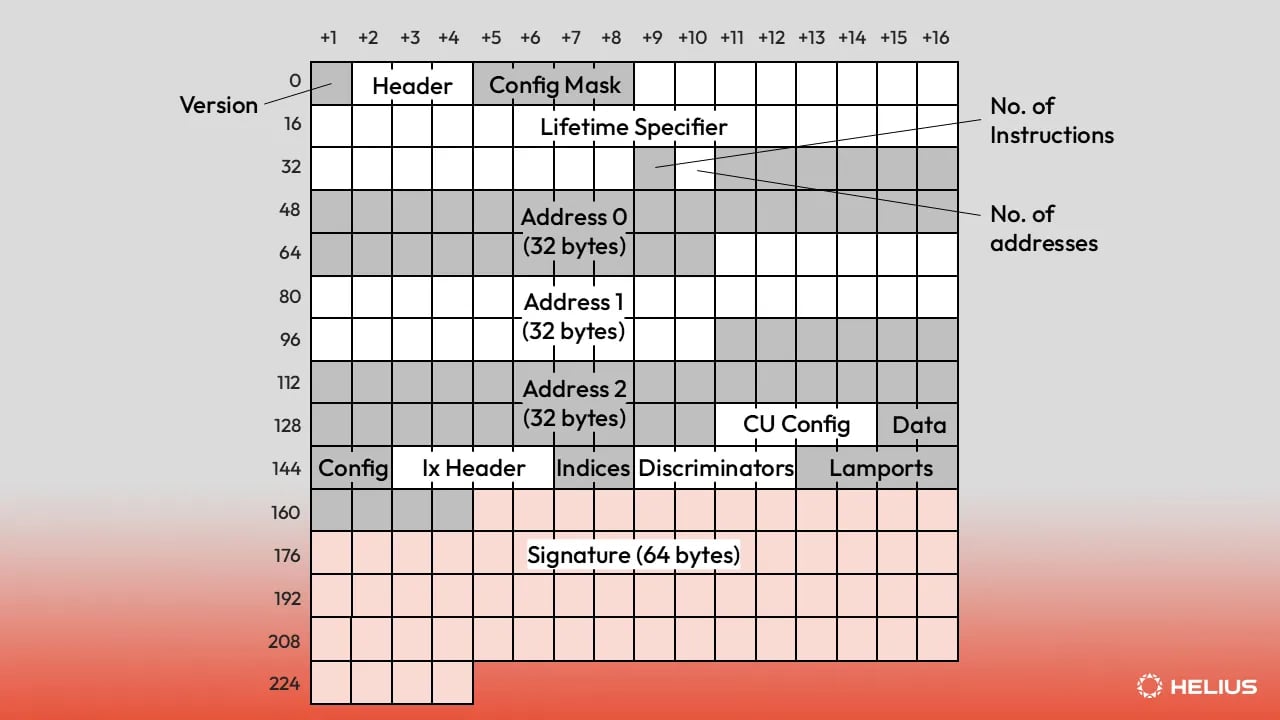 For a field-by-field walkthrough of the v1 wire format, see [Transaction v1 in the Solana transaction versions article](https://www.helius.dev/blog/solana-transaction-versions#transaction-v1).
Use a decoder that understands the v1 layout:
* **Rust:** [`agave-transaction-view`](https://docs.rs/agave-transaction-view) parses legacy, v0, and v1 in place. [`wincode`](https://docs.rs/wincode), the bincode-compatible serializer used by current Solana SDKs, also decodes v1 into `VersionedTransaction`.
* **JavaScript / TypeScript:** `@solana/kit` 8.0+ or `@solana/web3.js` v3.
Custom decoders need to check the first byte: `0x81` means v1 and the signatures follow the message instead of preceding it.
## Checklist
1. Grep for `getBlock`, `getTransaction`, `getTransactionsForAddress`, `transactionSubscribe`, and `blockSubscribe`, including raw JSON-RPC bodies and SDK wrappers such as `connection.getParsedTransaction`.
2. Upgrade to a v1-capable SDK.
3. Set `maxSupportedTransactionVersion: 1` on every call found in step 1.
4. Replace ComputeBudget instruction scanning with a `transactionConfig` check, and treat `priorityFee` as total lamports.
5. Replace `bincode`-style raw decoders with `agave-transaction-view` or an upgraded SDK.
6. Bump streaming dependencies to the versions in the table above.
7. Grep logs for `-32015` after the change to confirm nothing still fails.
For a technical deep dive on Solana transaction version specifications, wire formats, and examples, read our article, [Solana Transaction Versioning: Legacy, v0 and v1](https://www.helius.dev/blog/solana-transaction-versions).
## Related
Parameters, response shape, and examples for fetching a single transaction.
Fetch a full block, including every transaction it contains.
Filtered, paginated transaction history for any address in one call.
Every Agave 4.2 breaking change, with remediation steps.
For a field-by-field walkthrough of the v1 wire format, see [Transaction v1 in the Solana transaction versions article](https://www.helius.dev/blog/solana-transaction-versions#transaction-v1).
Use a decoder that understands the v1 layout:
* **Rust:** [`agave-transaction-view`](https://docs.rs/agave-transaction-view) parses legacy, v0, and v1 in place. [`wincode`](https://docs.rs/wincode), the bincode-compatible serializer used by current Solana SDKs, also decodes v1 into `VersionedTransaction`.
* **JavaScript / TypeScript:** `@solana/kit` 8.0+ or `@solana/web3.js` v3.
Custom decoders need to check the first byte: `0x81` means v1 and the signatures follow the message instead of preceding it.
## Checklist
1. Grep for `getBlock`, `getTransaction`, `getTransactionsForAddress`, `transactionSubscribe`, and `blockSubscribe`, including raw JSON-RPC bodies and SDK wrappers such as `connection.getParsedTransaction`.
2. Upgrade to a v1-capable SDK.
3. Set `maxSupportedTransactionVersion: 1` on every call found in step 1.
4. Replace ComputeBudget instruction scanning with a `transactionConfig` check, and treat `priorityFee` as total lamports.
5. Replace `bincode`-style raw decoders with `agave-transaction-view` or an upgraded SDK.
6. Bump streaming dependencies to the versions in the table above.
7. Grep logs for `-32015` after the change to confirm nothing still fails.
For a technical deep dive on Solana transaction version specifications, wire formats, and examples, read our article, [Solana Transaction Versioning: Legacy, v0 and v1](https://www.helius.dev/blog/solana-transaction-versions).
## Related
Parameters, response shape, and examples for fetching a single transaction.
Fetch a full block, including every transaction it contains.
Filtered, paginated transaction history for any address in one call.
Every Agave 4.2 breaking change, with remediation steps.