> ## Documentation Index
> Fetch the complete documentation index at: https://www.helius.dev/docs/llms.txt
> Use this file to discover all available pages before exploring further.
# Overview
> Learn how Helius Privacy works, including user flows, what stays public or private on a transfer, and rings with customizable policy.
## Introduction
Every transaction on Solana is publicly readable: addresses, balances, and transfer history are visible to anyone.
For Solana Privacy Rings, we define two levels of privacy:
* **Confidentiality** – encrypts the asset and amount
* **Anonymity** – encrypts the asset, amount, the sender and recipient
 ## Solana Privacy Rings
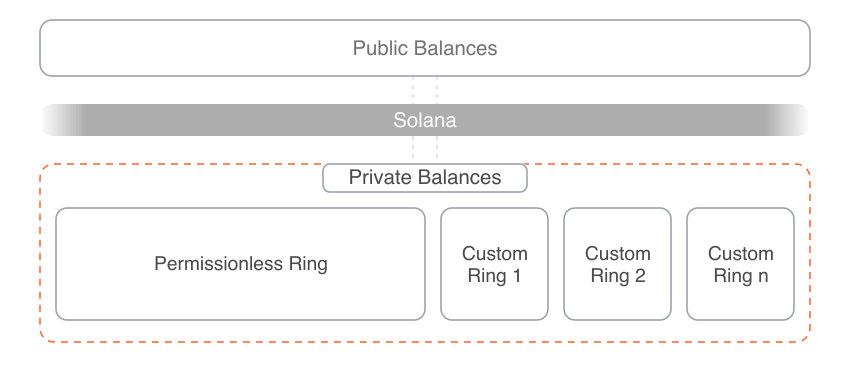
Rings are a programmable shielded pool with encrypted onchain balances and execution directly on Solana.
Different kind of Rings co-exist:
* Confidential
* Self-custodial
* Permissionless
* No auditor visibility
* Confidential or anonymous
* Self-custodial
* Custom compliance
* Auditor visibility
For most applications we recommend the permissionless, confidential default Ring.
Use a Custom Ring when your application needs custom compliance with auditor access and controls.
Custom Rings are Solana programs that define transfer permissions and any additional authorities, similar to Token-2022.
The Default Ring provides the foundation for confidential DeFi and other applications.
Independent Custom Rings can use existing applications or create their own while defining their own policies,
auditor access, and authorities, which apply only to balances within their Ring.
Rings are interoperable by default and share liquidity across Solana’s confidential DeFi ecosystem.
## Solana Privacy Rings
Rings are a programmable shielded pool with encrypted onchain balances and execution directly on Solana.
Different kind of Rings co-exist:
* Confidential
* Self-custodial
* Permissionless
* No auditor visibility
* Confidential or anonymous
* Self-custodial
* Custom compliance
* Auditor visibility
For most applications we recommend the permissionless, confidential default Ring.
Use a Custom Ring when your application needs custom compliance with auditor access and controls.
Custom Rings are Solana programs that define transfer permissions and any additional authorities, similar to Token-2022.
The Default Ring provides the foundation for confidential DeFi and other applications.
Independent Custom Rings can use existing applications or create their own while defining their own policies,
auditor access, and authorities, which apply only to balances within their Ring.
Rings are interoperable by default and share liquidity across Solana’s confidential DeFi ecosystem.
 ## Key Properties
* **Native Solana speed** – succinct zero-knowledge proofs are generated in tens of ms, preserving a familiar user experience. Think of it like another RPC call.
* **Onchain execution** – Encrypted balances stay on Solana. No offchain ledger, sidechain, or centralized sequencer.
* **Encrypt any asset** – Rings support SOL, SPL tokens, and Token-2022 tokens.
* **Self-custodial balances** – Private transactions always require the owners signature.
* **Smart account compatibility** – Rings can support smart accounts with their own authorization logic.
* **Solana composability** – compose with any Solana program in a single transaction.
* **Programmable privacy** – Create private escrows in Solana programs.
## User Flows and Privacy Guarantees
Users hold their encrypted balance in a Private Wallet. They can enter, transfer privately within, or exit from a Ring and compose with other Solana programs in a single transaction.
## Key Properties
* **Native Solana speed** – succinct zero-knowledge proofs are generated in tens of ms, preserving a familiar user experience. Think of it like another RPC call.
* **Onchain execution** – Encrypted balances stay on Solana. No offchain ledger, sidechain, or centralized sequencer.
* **Encrypt any asset** – Rings support SOL, SPL tokens, and Token-2022 tokens.
* **Self-custodial balances** – Private transactions always require the owners signature.
* **Smart account compatibility** – Rings can support smart accounts with their own authorization logic.
* **Solana composability** – compose with any Solana program in a single transaction.
* **Programmable privacy** – Create private escrows in Solana programs.
## User Flows and Privacy Guarantees
Users hold their encrypted balance in a Private Wallet. They can enter, transfer privately within, or exit from a Ring and compose with other Solana programs in a single transaction.
 Users send tokens to a Solana wallet address, as they do with public balances.
Anyone can deposit to any private wallet by knowing only the recipient’s wallet address.
### Deposit to a Private Balance
Users can deposit to a private balance in two ways:
1. On-ramp from a fiat balance to a private crypto balance
2. Deposit from a public to a private crypto balance
| Field | Visibility |
| - | - |
| Asset | Private. Encrypted onchain. |
| Amount | Private. Encrypted onchain. |
| Sender | The on-ramp provider. Public in a confidential Ring; private in an anonymous Ring. |
| Recipient | The user. Public in a confidential Ring; private in an anonymous Ring. |
| Memo (optional) | Private. Encrypted onchain. |
| Fiat balance and payment | Not onchain. The fiat payment happens through the on-ramp provider. |
Unlike depositing from a public balance, on-ramping to a private balance keeps the asset and amount private. The provider transfers from its private wallet to yours. In a confidential Ring, only the sender and recipient addresses are public.
| Field | Visibility |
| - | - |
| Asset | Public. Visible in the public deposit. |
| Amount | Public. Visible in the public deposit. |
| Sender | Public. The source wallet address is visible in the public deposit. |
| Recipient | Public. The destination wallet address is visible in the public deposit. |
| Memo (optional) | Public. Emitted with the public deposit. |
| Resulting private balance | Private. Encrypted onchain. |
### Transfer between Private Balances
Users can send a private transfer in two ways:
1. Transfer in the same Ring
2. Transfer to a different Ring
| Field | Visibility |
| - | - |
| Asset | Private. Encrypted onchain. |
| Amount | Private. Encrypted onchain. |
| Sender | Public. The Default Ring is confidential. |
| Recipient | Public. The Default Ring is confidential. |
| Memo (optional) | Private. Encrypted onchain. |
| Transfer | Asset | Amount | Sender | Recipient | Memo (optional) |
| - | - | - | - | - | - |
| Within a Custom confidential Ring | Private | Private | Public | Public | Private |
| Within a Custom anonymous Ring | Private | Private | Private | Private | Private |
| Default Ring to or from a Custom confidential Ring | Private | Private | Public | Public | Private |
| Confidential Ring to a Custom anonymous Ring | Private | Private | Public | Private | Private |
| Custom anonymous Ring to a confidential Ring | Private | Private | Private | Public | Private |
A relayer submits transfers from anonymous Rings, so the public ledger does not reveal the source private wallet. The Custom Ring program ID remains public.
Transfers between Rings must follow the source Ring's policy. One transaction can combine balances from the Default Ring and one Custom Ring. A transfer between two Custom Rings routes through the Default Ring.
### Withdraw to a Public Balance
Users can withdraw from a private balance in two ways:
1. Off-ramp from private crypto to a fiat balance
2. Withdraw from private crypto to a public crypto balance
| Field | Visibility |
| - | - |
| Asset | Private. Encrypted onchain. |
| Amount | Private. Encrypted onchain. |
| Sender | The user. Public in a confidential Ring; private in an anonymous Ring. |
| Recipient | The off-ramp provider. Public in a confidential Ring; private in an anonymous Ring. |
| Memo (optional) | Private. Encrypted onchain. |
| Fiat payout | Not onchain. The fiat payout happens through the off-ramp provider. |
Unlike withdrawing to a public balance, off-ramping from a private balance keeps the asset and amount private. You transfer from your private wallet to the provider’s private wallet, and the provider pays you in fiat. In a confidential Ring, only the sender and recipient addresses are public. Your remaining private balance stays private.
| Field | Visibility |
| - | - |
| Asset | Public. Visible in the public withdrawal. |
| Amount | Public. Visible in the public withdrawal. |
| Sender | Public in a confidential Ring; private in an anonymous Ring. |
| Recipient | Public. The destination wallet address is visible in the public withdrawal. |
| Memo (optional) | Private when attached to an encrypted output. |
| Resulting public balance | Public. Held in the recipient's public account. |
| Remaining private balance | Private. Encrypted onchain. |
## Programmability and Private Escrows
Solana programs can use private escrows to build confidential DeFi applications.
* **Private escrows** – ZK Solana programs can escrow private balances and define the conditions for release
* **Solana Composability** – Combine private transactions with other Solana programs in a single transaction
* **Shared liquidity** – ZK programs across confidential DeFi can share liquidity
**What you can build**
* **Conditional private payments** – Escrow encrypted assets and release them on a schedule or after required approvals, enabling payroll, vesting, milestone payments, and private multisig workflows.
* **Swaps and Trading** – exchange wrapped tokens, SOL, memecoins, stocks, and RWAs through private escrows, such as in token swaps or OTC trades.
* **Staking and Yield** – build private yield bearing applications, such as staking pools, tokenized treasuries, or other yield vaults.
* **Lending and Borrowing** – hold collateral in private escrows, such as for stablecoin loans backed by tokenized assets.
Users send tokens to a Solana wallet address, as they do with public balances.
Anyone can deposit to any private wallet by knowing only the recipient’s wallet address.
### Deposit to a Private Balance
Users can deposit to a private balance in two ways:
1. On-ramp from a fiat balance to a private crypto balance
2. Deposit from a public to a private crypto balance
| Field | Visibility |
| - | - |
| Asset | Private. Encrypted onchain. |
| Amount | Private. Encrypted onchain. |
| Sender | The on-ramp provider. Public in a confidential Ring; private in an anonymous Ring. |
| Recipient | The user. Public in a confidential Ring; private in an anonymous Ring. |
| Memo (optional) | Private. Encrypted onchain. |
| Fiat balance and payment | Not onchain. The fiat payment happens through the on-ramp provider. |
Unlike depositing from a public balance, on-ramping to a private balance keeps the asset and amount private. The provider transfers from its private wallet to yours. In a confidential Ring, only the sender and recipient addresses are public.
| Field | Visibility |
| - | - |
| Asset | Public. Visible in the public deposit. |
| Amount | Public. Visible in the public deposit. |
| Sender | Public. The source wallet address is visible in the public deposit. |
| Recipient | Public. The destination wallet address is visible in the public deposit. |
| Memo (optional) | Public. Emitted with the public deposit. |
| Resulting private balance | Private. Encrypted onchain. |
### Transfer between Private Balances
Users can send a private transfer in two ways:
1. Transfer in the same Ring
2. Transfer to a different Ring
| Field | Visibility |
| - | - |
| Asset | Private. Encrypted onchain. |
| Amount | Private. Encrypted onchain. |
| Sender | Public. The Default Ring is confidential. |
| Recipient | Public. The Default Ring is confidential. |
| Memo (optional) | Private. Encrypted onchain. |
| Transfer | Asset | Amount | Sender | Recipient | Memo (optional) |
| - | - | - | - | - | - |
| Within a Custom confidential Ring | Private | Private | Public | Public | Private |
| Within a Custom anonymous Ring | Private | Private | Private | Private | Private |
| Default Ring to or from a Custom confidential Ring | Private | Private | Public | Public | Private |
| Confidential Ring to a Custom anonymous Ring | Private | Private | Public | Private | Private |
| Custom anonymous Ring to a confidential Ring | Private | Private | Private | Public | Private |
A relayer submits transfers from anonymous Rings, so the public ledger does not reveal the source private wallet. The Custom Ring program ID remains public.
Transfers between Rings must follow the source Ring's policy. One transaction can combine balances from the Default Ring and one Custom Ring. A transfer between two Custom Rings routes through the Default Ring.
### Withdraw to a Public Balance
Users can withdraw from a private balance in two ways:
1. Off-ramp from private crypto to a fiat balance
2. Withdraw from private crypto to a public crypto balance
| Field | Visibility |
| - | - |
| Asset | Private. Encrypted onchain. |
| Amount | Private. Encrypted onchain. |
| Sender | The user. Public in a confidential Ring; private in an anonymous Ring. |
| Recipient | The off-ramp provider. Public in a confidential Ring; private in an anonymous Ring. |
| Memo (optional) | Private. Encrypted onchain. |
| Fiat payout | Not onchain. The fiat payout happens through the off-ramp provider. |
Unlike withdrawing to a public balance, off-ramping from a private balance keeps the asset and amount private. You transfer from your private wallet to the provider’s private wallet, and the provider pays you in fiat. In a confidential Ring, only the sender and recipient addresses are public. Your remaining private balance stays private.
| Field | Visibility |
| - | - |
| Asset | Public. Visible in the public withdrawal. |
| Amount | Public. Visible in the public withdrawal. |
| Sender | Public in a confidential Ring; private in an anonymous Ring. |
| Recipient | Public. The destination wallet address is visible in the public withdrawal. |
| Memo (optional) | Private when attached to an encrypted output. |
| Resulting public balance | Public. Held in the recipient's public account. |
| Remaining private balance | Private. Encrypted onchain. |
## Programmability and Private Escrows
Solana programs can use private escrows to build confidential DeFi applications.
* **Private escrows** – ZK Solana programs can escrow private balances and define the conditions for release
* **Solana Composability** – Combine private transactions with other Solana programs in a single transaction
* **Shared liquidity** – ZK programs across confidential DeFi can share liquidity
**What you can build**
* **Conditional private payments** – Escrow encrypted assets and release them on a schedule or after required approvals, enabling payroll, vesting, milestone payments, and private multisig workflows.
* **Swaps and Trading** – exchange wrapped tokens, SOL, memecoins, stocks, and RWAs through private escrows, such as in token swaps or OTC trades.
* **Staking and Yield** – build private yield bearing applications, such as staking pools, tokenized treasuries, or other yield vaults.
* **Lending and Borrowing** – hold collateral in private escrows, such as for stablecoin loans backed by tokenized assets.
 ## High-Level Transaction Flow
A private transfer behaves similarly to public transfers and is executed in a single Solana transaction.
1. The user's SOL or SPL balance is encrypted onchain.
2. Fetch encrypted state and decrypt locally, or a delegated provider decrypts and serves decrypted state.
3. The wallet sets amount and recipient, then requests a ZK proof.
4. The RPC provider generates the ZK proof by default and returns it. A Custom Ring also requires a policy proof.
5. The wallet builds the Solana transaction. ZK proofs are verified without revealing the encrypted state. The invoked programs and who signs and submits depend on the Ring:
| | Permissionless Confidential Ring | Custom Confidential Ring | Custom Anonymous Ring |
| - | - | - | - |
| Invoked Programs | Solana Privacy Program | Custom Ring program and Solana Privacy Program | Custom Ring program and Solana Privacy Program |
| Signer | The sender signs. A gas sponsor may pay the fee. | The sender signs. A gas sponsor may pay the fee. | A relayer, so the sender is not linked to the transaction. |
6. The app tracks status via the Solana transaction hash.
```mermaid theme={"system"}
%%{init: {
'theme': 'base',
'themeVariables': {
'lineColor': '#FF6B35',
'primaryTextColor': '#737373',
'primaryBorderColor': '#9CA3AF',
'actorBkg': '#FFFFFF',
'actorBorder': '#9CA3AF',
'actorTextColor': '#737373',
'signalColor': '#FF6B35',
'signalTextColor': '#737373',
'labelBoxBkgColor': '#FF6B351F',
'labelBoxBorderColor': '#FF6B35',
'noteBkgColor': '#F5F5F5',
'noteTextColor': '#737373',
'noteBorderColor': '#9CA3AF'
}
}}%%
sequenceDiagram
participant Wallet
participant RPC as RPC Provider
participant Solana
rect rgba(255, 107, 53, 0.06)
Note left of Wallet: Local
Wallet->>RPC: Fetch encrypted state
RPC-->>Wallet: Encrypted state
Note over Wallet: Decrypt locally
end
rect rgba(255, 107, 53, 0.06)
Note left of Wallet: Delegated
Wallet->>RPC: Get private balance
Note over RPC: Decrypt and serve decrypted state
RPC-->>Wallet: Decrypted state
end
Note over Wallet: Set amount and recipient
Wallet->>RPC: Request ZK proof
Note over RPC: Generate ZK proof
RPC-->>Wallet: ZK proof
Note over Wallet: Build transaction, sign
Wallet->>RPC: Submit Transaction
RPC->>Solana: Forward transaction
Note over Solana: Verify signatures
Note over Solana: CPI Solana Privacy Program
Note over Solana: Verify ZK proof
RPC-->>Wallet: Transaction signature
```
```mermaid theme={"system"}
%%{init: {
'theme': 'base',
'themeVariables': {
'lineColor': '#FF6B35',
'primaryTextColor': '#737373',
'primaryBorderColor': '#9CA3AF',
'actorBkg': '#FFFFFF',
'actorBorder': '#9CA3AF',
'actorTextColor': '#737373',
'signalColor': '#FF6B35',
'signalTextColor': '#737373',
'labelBoxBkgColor': '#FF6B351F',
'labelBoxBorderColor': '#FF6B35',
'noteBkgColor': '#F5F5F5',
'noteTextColor': '#737373',
'noteBorderColor': '#9CA3AF'
}
}}%%
sequenceDiagram
participant Wallet
participant RPC as RPC Provider
participant Solana
rect rgba(255, 107, 53, 0.06)
Note left of Wallet: Local
Wallet->>RPC: Fetch encrypted state
RPC-->>Wallet: Encrypted state
Note over Wallet: Decrypt locally
end
rect rgba(255, 107, 53, 0.06)
Note left of Wallet: Delegated
Wallet->>RPC: Get private balance
Note over RPC: Decrypt and serve decrypted state
RPC-->>Wallet: Decrypted state
end
Note over Wallet: Set amount and recipient
Wallet->>RPC: Request ZK proof
Note over RPC: Generate ZK proof and policy proof
RPC-->>Wallet: ZK proof and policy proof
Note over Wallet: Build transaction, sign
Wallet->>RPC: Submit Transaction
RPC->>Solana: Forward transaction
Note over Solana: Verify signatures
Note over Solana: CPI Custom Ring Program
Note over Solana: Verify policy ZK proof
Note over Solana: CPI Solana Privacy Program
Note over Solana: Verify SPP ZK proof
RPC-->>Wallet: Transaction signature
```
```mermaid theme={"system"}
%%{init: {
'theme': 'base',
'themeVariables': {
'lineColor': '#FF6B35',
'primaryTextColor': '#737373',
'primaryBorderColor': '#9CA3AF',
'actorBkg': '#FFFFFF',
'actorBorder': '#9CA3AF',
'actorTextColor': '#737373',
'signalColor': '#FF6B35',
'signalTextColor': '#737373',
'labelBoxBkgColor': '#FF6B351F',
'labelBoxBorderColor': '#FF6B35',
'noteBkgColor': '#F5F5F5',
'noteTextColor': '#737373',
'noteBorderColor': '#9CA3AF'
}
}}%%
sequenceDiagram
participant Wallet
participant RPC as RPC Provider
participant Relayer
participant Solana
rect rgba(255, 107, 53, 0.06)
Note left of Wallet: Delegated
Wallet->>RPC: Get private balance
Note over RPC: Decrypt and serve decrypted state
RPC-->>Wallet: Decrypted state
end
Note over Wallet: Set amount and recipient, sign
Wallet->>RPC: Request ZK proof
Note over RPC: Generate ZK proof and policy proof
RPC-->>Wallet: ZK proof and policy proof
Note over Wallet: Build transaction
Wallet->>Relayer: Submit Transaction
Relayer->>Solana: Forward transaction
Note over Solana: Verify signatures
Note over Solana: CPI Custom Ring Program
Note over Solana: Verify policy ZK proof
Note over Solana: CPI Solana Privacy Program
Note over Solana: Verify SPP ZK proof
Relayer-->>Wallet: Transaction signature
```
1. The user's SOL or SPL balance is public onchain.
2. The wallet reads public state, builds a transfer, and the owner signs.
3. The Solana runtime verifies the signatures and invokes the System Program or Token Program, which updates the public balance.
4. The app tracks status via the Solana transaction hash.
```mermaid theme={"system"}
%%{init: {
'theme': 'base',
'themeVariables': {
'lineColor': '#FF6B35',
'primaryTextColor': '#737373',
'primaryBorderColor': '#9CA3AF',
'actorBkg': '#FFFFFF',
'actorBorder': '#9CA3AF',
'actorTextColor': '#737373',
'signalColor': '#FF6B35',
'signalTextColor': '#737373',
'labelBoxBkgColor': '#FF6B351F',
'labelBoxBorderColor': '#FF6B35',
'noteBkgColor': '#F5F5F5',
'noteTextColor': '#737373',
'noteBorderColor': '#9CA3AF'
}
}}%%
sequenceDiagram
participant Wallet
participant RPC
participant Solana
Wallet->>RPC: Get public balance
RPC-->>Wallet: Public state
Note over Wallet: Build transfer, owner signs
Wallet->>RPC: sendTransaction
RPC->>Solana: Forward transaction
Note over Solana: Verify signatures
Note over Solana: CPI System / Token Program
Note over Solana: Update balance
RPC-->>Wallet: Transaction signature
```
Try confidential transfers and swaps on devnet.
## Learn More
How wallets, RPC services, and Solana programs interact.
How private balances are stored and spent.
How assets are encrypted and the role of the shielded keypair.
How to configure a custom Ring with auditor and compliance controls.
## Didn't find what you were looking for?
Reach out! [Telegram](https://t.me/tilo_light) | [E-Mail](mailto:sales@helius.xyz) | [Contact](https://www.helius.dev/contact)
This documentation is built and hosted on [Mintlify](https://mintlify.com), a developer documentation platform.
## High-Level Transaction Flow
A private transfer behaves similarly to public transfers and is executed in a single Solana transaction.
1. The user's SOL or SPL balance is encrypted onchain.
2. Fetch encrypted state and decrypt locally, or a delegated provider decrypts and serves decrypted state.
3. The wallet sets amount and recipient, then requests a ZK proof.
4. The RPC provider generates the ZK proof by default and returns it. A Custom Ring also requires a policy proof.
5. The wallet builds the Solana transaction. ZK proofs are verified without revealing the encrypted state. The invoked programs and who signs and submits depend on the Ring:
| | Permissionless Confidential Ring | Custom Confidential Ring | Custom Anonymous Ring |
| - | - | - | - |
| Invoked Programs | Solana Privacy Program | Custom Ring program and Solana Privacy Program | Custom Ring program and Solana Privacy Program |
| Signer | The sender signs. A gas sponsor may pay the fee. | The sender signs. A gas sponsor may pay the fee. | A relayer, so the sender is not linked to the transaction. |
6. The app tracks status via the Solana transaction hash.
```mermaid theme={"system"}
%%{init: {
'theme': 'base',
'themeVariables': {
'lineColor': '#FF6B35',
'primaryTextColor': '#737373',
'primaryBorderColor': '#9CA3AF',
'actorBkg': '#FFFFFF',
'actorBorder': '#9CA3AF',
'actorTextColor': '#737373',
'signalColor': '#FF6B35',
'signalTextColor': '#737373',
'labelBoxBkgColor': '#FF6B351F',
'labelBoxBorderColor': '#FF6B35',
'noteBkgColor': '#F5F5F5',
'noteTextColor': '#737373',
'noteBorderColor': '#9CA3AF'
}
}}%%
sequenceDiagram
participant Wallet
participant RPC as RPC Provider
participant Solana
rect rgba(255, 107, 53, 0.06)
Note left of Wallet: Local
Wallet->>RPC: Fetch encrypted state
RPC-->>Wallet: Encrypted state
Note over Wallet: Decrypt locally
end
rect rgba(255, 107, 53, 0.06)
Note left of Wallet: Delegated
Wallet->>RPC: Get private balance
Note over RPC: Decrypt and serve decrypted state
RPC-->>Wallet: Decrypted state
end
Note over Wallet: Set amount and recipient
Wallet->>RPC: Request ZK proof
Note over RPC: Generate ZK proof
RPC-->>Wallet: ZK proof
Note over Wallet: Build transaction, sign
Wallet->>RPC: Submit Transaction
RPC->>Solana: Forward transaction
Note over Solana: Verify signatures
Note over Solana: CPI Solana Privacy Program
Note over Solana: Verify ZK proof
RPC-->>Wallet: Transaction signature
```
```mermaid theme={"system"}
%%{init: {
'theme': 'base',
'themeVariables': {
'lineColor': '#FF6B35',
'primaryTextColor': '#737373',
'primaryBorderColor': '#9CA3AF',
'actorBkg': '#FFFFFF',
'actorBorder': '#9CA3AF',
'actorTextColor': '#737373',
'signalColor': '#FF6B35',
'signalTextColor': '#737373',
'labelBoxBkgColor': '#FF6B351F',
'labelBoxBorderColor': '#FF6B35',
'noteBkgColor': '#F5F5F5',
'noteTextColor': '#737373',
'noteBorderColor': '#9CA3AF'
}
}}%%
sequenceDiagram
participant Wallet
participant RPC as RPC Provider
participant Solana
rect rgba(255, 107, 53, 0.06)
Note left of Wallet: Local
Wallet->>RPC: Fetch encrypted state
RPC-->>Wallet: Encrypted state
Note over Wallet: Decrypt locally
end
rect rgba(255, 107, 53, 0.06)
Note left of Wallet: Delegated
Wallet->>RPC: Get private balance
Note over RPC: Decrypt and serve decrypted state
RPC-->>Wallet: Decrypted state
end
Note over Wallet: Set amount and recipient
Wallet->>RPC: Request ZK proof
Note over RPC: Generate ZK proof and policy proof
RPC-->>Wallet: ZK proof and policy proof
Note over Wallet: Build transaction, sign
Wallet->>RPC: Submit Transaction
RPC->>Solana: Forward transaction
Note over Solana: Verify signatures
Note over Solana: CPI Custom Ring Program
Note over Solana: Verify policy ZK proof
Note over Solana: CPI Solana Privacy Program
Note over Solana: Verify SPP ZK proof
RPC-->>Wallet: Transaction signature
```
```mermaid theme={"system"}
%%{init: {
'theme': 'base',
'themeVariables': {
'lineColor': '#FF6B35',
'primaryTextColor': '#737373',
'primaryBorderColor': '#9CA3AF',
'actorBkg': '#FFFFFF',
'actorBorder': '#9CA3AF',
'actorTextColor': '#737373',
'signalColor': '#FF6B35',
'signalTextColor': '#737373',
'labelBoxBkgColor': '#FF6B351F',
'labelBoxBorderColor': '#FF6B35',
'noteBkgColor': '#F5F5F5',
'noteTextColor': '#737373',
'noteBorderColor': '#9CA3AF'
}
}}%%
sequenceDiagram
participant Wallet
participant RPC as RPC Provider
participant Relayer
participant Solana
rect rgba(255, 107, 53, 0.06)
Note left of Wallet: Delegated
Wallet->>RPC: Get private balance
Note over RPC: Decrypt and serve decrypted state
RPC-->>Wallet: Decrypted state
end
Note over Wallet: Set amount and recipient, sign
Wallet->>RPC: Request ZK proof
Note over RPC: Generate ZK proof and policy proof
RPC-->>Wallet: ZK proof and policy proof
Note over Wallet: Build transaction
Wallet->>Relayer: Submit Transaction
Relayer->>Solana: Forward transaction
Note over Solana: Verify signatures
Note over Solana: CPI Custom Ring Program
Note over Solana: Verify policy ZK proof
Note over Solana: CPI Solana Privacy Program
Note over Solana: Verify SPP ZK proof
Relayer-->>Wallet: Transaction signature
```
1. The user's SOL or SPL balance is public onchain.
2. The wallet reads public state, builds a transfer, and the owner signs.
3. The Solana runtime verifies the signatures and invokes the System Program or Token Program, which updates the public balance.
4. The app tracks status via the Solana transaction hash.
```mermaid theme={"system"}
%%{init: {
'theme': 'base',
'themeVariables': {
'lineColor': '#FF6B35',
'primaryTextColor': '#737373',
'primaryBorderColor': '#9CA3AF',
'actorBkg': '#FFFFFF',
'actorBorder': '#9CA3AF',
'actorTextColor': '#737373',
'signalColor': '#FF6B35',
'signalTextColor': '#737373',
'labelBoxBkgColor': '#FF6B351F',
'labelBoxBorderColor': '#FF6B35',
'noteBkgColor': '#F5F5F5',
'noteTextColor': '#737373',
'noteBorderColor': '#9CA3AF'
}
}}%%
sequenceDiagram
participant Wallet
participant RPC
participant Solana
Wallet->>RPC: Get public balance
RPC-->>Wallet: Public state
Note over Wallet: Build transfer, owner signs
Wallet->>RPC: sendTransaction
RPC->>Solana: Forward transaction
Note over Solana: Verify signatures
Note over Solana: CPI System / Token Program
Note over Solana: Update balance
RPC-->>Wallet: Transaction signature
```
Try confidential transfers and swaps on devnet.
## Learn More
How wallets, RPC services, and Solana programs interact.
How private balances are stored and spent.
How assets are encrypted and the role of the shielded keypair.
How to configure a custom Ring with auditor and compliance controls.
## Didn't find what you were looking for?
Reach out! [Telegram](https://t.me/tilo_light) | [E-Mail](mailto:sales@helius.xyz) | [Contact](https://www.helius.dev/contact)
This documentation is built and hosted on [Mintlify](https://mintlify.com), a developer documentation platform.