> ## Documentation Index
> Fetch the complete documentation index at: https://www.helius.dev/docs/llms.txt
> Use this file to discover all available pages before exploring further.
# transactionSubscribe 사용 방법
> `transactionSubscribe`를 사용하여 실시간 Solana 거래 업데이트를 스트리밍합니다. 블록체인 활동을 모니터링하고 계정별로 필터링하여 즉시 알림을 받으세요.
## `transactionSubscribe`란 무엇인가요?
`transactionSubscribe` WebSocket 메서드(표준 Solana WebSocket API에 대한 Helius 확장)는 실시간 거래 이벤트를 가능하게 합니다.
사용하려면 `TransactionSubscribeFilter`을 제공하고 선택적으로 추가 맞춤화를 위해 `TransactionSubscribeOptions`을 포함할 수 있습니다.
`transactionSubscribe`는 표준 Solana 구독 메서드와 동일한 통합 `wss://mainnet.helius-rpc.com` 및 `wss://devnet.helius-rpc.com` [엔드포인트](https://www.helius.dev/docs/api-reference/endpoints)에 있습니다.
### `TransactionSubscribeFilter`
* `vote`: 투표 관련 거래 포함/제외 여부를 나타내는 불리언 플래그
* `failed`: 실패한 거래 포함/제외 여부를 나타내는 불리언 플래그
* `signature`: 서명을 기준으로 특정 거래에 대한 업데이트 필터링
* `accountInclude`: 거래 업데이트를 받고 싶은 계정 목록. 계정 중 하나만 거래 업데이트에 포함되어 있으면 됩니다(예: 계정 1 또는 2).
* `accountExclude`: 거래 업데이트에서 제외하려는 계정 목록
* `accountRequired`: 지정된 모든 계정이 업데이트에 포함되도록 거래에 포함되어야 함(예: 계정 1 및 2)
* `tokenAccounts`: 선택적 연결된 토큰 계정(ATA) 확장(`balanceChanged`, `all` 또는 `none`). 아래 [지갑 감시, 토큰 전송 포함](#지갑-감시-토큰-전송-포함)을 참조하세요.
`accountInclude`, `accountExclude` 및 `accountRequired` 배열에 최대 50,000개의 주소를 포함할 수 있습니다.
### TransactionSubscribeOptions (선택 사항)
* `commitment`: 데이터 가져오기 위한 커밋 수준(`processed`, `confirmed` 또는 `finalized`)
* `encoding`: 반환된 데이터의 인코딩 형식(`base58`, `base64` 또는 `jsonParsed`)
* `transactionDetails`: 반환된 데이터의 세부 수준(`full`, `signatures`, `accounts` 및 `none`)
* `showRewards`: 업데이트에 보상 데이터 포함 여부를 나타내는 불리언 플래그
* `maxSupportedTransactionVersion`: 업데이트를 받고자 하는 거래의 최고 버전을 지정합니다. 레거시 및 v0 거래 모두를 받으려면 값을 `0`로 설정하십시오.
`maxSupportedTransactionVersion`는 지정된 거래의 계정 및 전체 수준의 세부 정보를 반환하는 데 필요합니다(즉, `transactionDetails: "accounts" | "full"`).
## Transaction Subscribe 예제
이 예제에서는 Raydium 계정 `675kPX9MHTjS2zt1qfr1NYHuzeLXfQM9H24wFSUt1Mp8`을 포함하는 거래를 구독하고 있습니다.
`675k...1Mp8` 계정을 거래의 `accountKeys`에 포함하는 거래가 발생하면 WSS 알림을 받게 됩니다.
구독 옵션에 따라 거래 알림은 `processed` 커밋 수준, `jsonParsed` 인코딩, `full` 거래 세부 정보로 전송되며 보상이 표시됩니다.
```javascript theme={"system"}
const WebSocket = require('ws');
// Create a WebSocket connection
const ws = new WebSocket('wss://mainnet.helius-rpc.com/?api-key=');
// Function to send a request to the WebSocket server
function sendRequest(ws) {
const request = {
jsonrpc: "2.0",
id: 420,
method: "transactionSubscribe",
params: [
{
accountInclude: ["675kPX9MHTjS2zt1qfr1NYHuzeLXfQM9H24wFSUt1Mp8"]
},
{
commitment: "processed",
encoding: "jsonParsed",
transactionDetails: "full",
showRewards: true,
maxSupportedTransactionVersion: 0
}
]
};
ws.send(JSON.stringify(request));
}
// Function to send a ping to the WebSocket server
function startPing(ws) {
setInterval(() => {
if (ws.readyState === WebSocket.OPEN) {
ws.ping();
console.log('Ping sent');
}
}, 30000); // Ping every 30 seconds
}
// Define WebSocket event handlers
ws.on('open', function open() {
console.log('WebSocket is open');
sendRequest(ws); // Send a request once the WebSocket is open
startPing(ws); // Start sending pings
});
ws.on('message', function incoming(data) {
const messageStr = data.toString('utf8');
try {
const messageObj = JSON.parse(messageStr);
console.log('Received:', messageObj);
} catch (e) {
console.error('Failed to parse JSON:', e);
}
});
ws.on('error', function error(err) {
console.error('WebSocket error:', err);
});
ws.on('close', function close() {
console.log('WebSocket is closed');
});
```
### 예제 알림
```json theme={"system"}
{
"jsonrpc": "2.0",
"method": "transactionNotification",
"params": {
"subscription": 4743323479349712,
"result": {
"transaction": {
"transaction": [
"Ae6zfSExLsJ/E1+q0jI+3ueAtSoW+6HnuDohmuFwagUo2BU4OpkSdUKYNI1dJfMOonWvjaumf4Vv1ghn9f3Avg0BAAEDGycH0OcYRpfnPNuu0DBQxTYPWpmwHdXPjb8y2P200JgK3hGiC2JyC9qjTd2lrug7O4cvSRUVWgwohbbefNgKQAAAAAAAAAAAAAAAAAAAAAAAAAAAAAAAAAAAAAAAAAAA0HcpwKokfYDDAJTaF/TWRFWm0Gz5/me17PRnnywHurMBAgIAAQwCAAAAoIYBAAAAAAA=",
"base64"
],
"meta": {
"err": null,
"status": {
"Ok": null
},
"fee": 5000,
"preBalances": [
28279852264,
158122684,
1
],
"postBalances": [
28279747264,
158222684,
1
],
"innerInstructions": [],
"logMessages": [
"Program 11111111111111111111111111111111 invoke [1]",
"Program 11111111111111111111111111111111 success"
],
"preTokenBalances": [],
"postTokenBalances": [],
"rewards": null,
"loadedAddresses": {
"writable": [],
"readonly": []
},
"computeUnitsConsumed": 0
}
},
"signature": "5moMXe6VW7L7aQZskcAkKGQ1y19qqUT1teQKBNAAmipzdxdqVLAdG47WrsByFYNJSAGa9TByv15oygnqYvP6Hn2p",
"slot": 224341380,
"transactionIndex": 42
}
}
}
```
## 지갑 감시, 토큰 전송 포함
`accountInclude`를 사용하여 지갑을 감시하면 지갑 공개키가 계정 키에 직접 나타나는 거래만 일치합니다. 일반적인 경우는 누락됩니다: 누군가가 지갑에 SPL 토큰(예: USDC)을 보낼 때 전송은 지갑의 \*\*연결된 토큰 계정 (ATA)\*\*에 접근하며 지갑 공개키에는 나타나지 않습니다. 따라서 단순 `accountInclude: [wallet]` 구독으로는 이를 볼 수 없습니다.
일치 확장을 위해 `tokenAccounts` 필드를 설정하여 감시 계정이 토큰 잔액을 **소유하는** 거래도 일치하도록 설정하세요:
* `balanceChanged`: 지갑이 소유한 토큰 잔액의 금액이 변경된 경우(또는 토큰 계정이 닫힌 경우) 일치합니다. "실제로 돈이 움직였을 때 알려줘"라는 목적으로 사용합니다. 이는 더 좁고, 낮은 볼륨이며 가장 일반적인 선택입니다.
* `all`: 지갑이 소유한 토큰 잔액을 참조하는 모든 거래에 일치합니다, 비록 변경되지 않았더라도. 더 많은 볼륨.
* `none`: 확장 없음. 필드를 생략한 것과 동일(기본값).
일치는 소유자 기반입니다: 지갑이 소유한 모든 토큰 계정을 포착하며 비정형적 계정도 포함, 파생된 ATA 주소에 한정되지 않습니다. 잘못된 값은 JSON-RPC 오류 `-32602`를 반환합니다. `tokenAccounts`를 생략한 구독은 이전과 동일하게 작동합니다. ATA 확장이 어떻게 작동하는지에 대한 전체 개요는 [토큰 계정 (ATA) 필터링 웹소켓](/docs/ko/rpc/websocket/token-account-filtering)을 참조하세요.
```javascript theme={"system"}
const ws = new WebSocket('wss://mainnet.helius-rpc.com/?api-key=');
ws.on('open', () => {
ws.send(JSON.stringify({
jsonrpc: '2.0',
id: 1,
method: 'transactionSubscribe',
params: [
{
accountInclude: [''],
tokenAccounts: 'balanceChanged' // also match the wallet's ATAs
},
{ commitment: 'confirmed', encoding: 'jsonParsed', maxSupportedTransactionVersion: 0 }
]
}));
setInterval(() => ws.ping(), 30_000);
});
ws.on('message', (data) => {
const msg = JSON.parse(data.toString());
const result = msg.params?.result;
if (!result) return;
// Token balances this wallet owns that changed in the tx
const owned = (result.transaction.meta.postTokenBalances || [])
.filter((b) => b.owner === '');
console.log(result.signature, owned);
});
```
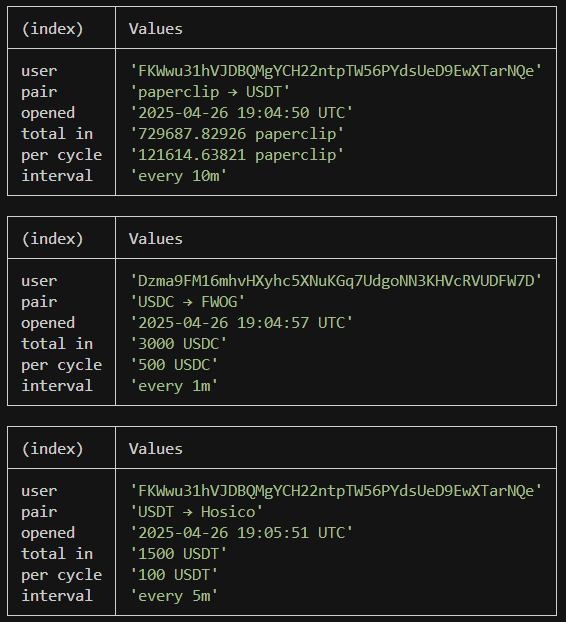
## 새로운 Jupiter DCA 모니터링
Jupiter DCA 또는 Dollar Cost Averaging은 Solana에서 반복 거래를 예약하는 방법입니다. 이러한 예약된 매수/매도 주문은 온체인에 기록되므로 트레이더는 `transactionSubscribe` 메서드 및 [`getAsset`](/docs/ko/api-reference/das/getasset)를 사용하여 새로운 주문을 감지할 수 있습니다.
```javascript theme={"system"}
const WebSocket = require('ws');
const bs58 = require('bs58').default;
/* ───────────────────── 1. CONFIG ──────────────────────────── */
const API_KEY = process.env.HELIUS_API_KEY || (() => { throw new Error('Set HELIUS_API_KEY'); })();
const HELIUS_WS = `wss://mainnet.helius-rpc.com?api-key=${API_KEY}`;
const HELIUS_RPC = `https://mainnet.helius-rpc.com/?api-key=${API_KEY}`;
const DCA_PROGRAM_ID = 'DCA265Vj8a9CEuX1eb1LWRnDT7uK6q1xMipnNyatn23M';
/* ───────────────────── 2. BINARY DECODER ──────────────────── */
function decodeOpenDcaV2(base58Data) {
const buf = Buffer.from(bs58.decode(base58Data));
return {
appIdx: buf.readBigUInt64LE(8), // Application Index
inAmount: buf.readBigUInt64LE(16), // Input Amount
perCycle: buf.readBigUInt64LE(24), // Per Cycle
interval: buf.readBigUInt64LE(32) // Interval
};
}
const TOKEN_META = new Map(); // mint → { symbol, decimals }
/**
* Fetch symbol & decimals for a mint once then cache.
* Uses Helius getAsset DAS method: https://www.helius.dev/docs/api-reference/das/getasset
*/
async function getMeta(mint) {
if (TOKEN_META.has(mint)) return TOKEN_META.get(mint);
const body = {
jsonrpc: '2.0',
id: 'meow',
method: 'getAsset',
params: { id: mint, displayOptions: { showFungible: true } }
};
const { result } = await fetch(HELIUS_RPC, {
method: 'POST',
headers: { 'Content-Type': 'application/json' },
body: JSON.stringify(body)
}).then(r => r.json());
const tokenInfo = result.token_info || {};
const metadata = { symbol: tokenInfo.symbol || '?', decimals: tokenInfo.decimals ?? 0 };
TOKEN_META.set(mint, metadata);
return metadata;
}
/* ───────────────────── 4. PRETTY HELPERS ──────────────────── */
function formatTimestamp(unixSeconds) {
return new Date(Number(unixSeconds) * 1_000)
.toISOString()
.replace('T', ' ')
.replace('.000Z', ' UTC');
}
function formatInterval(seconds) {
if (seconds % 86_400 === 0) return `every ${seconds / 86_400}d`;
if (seconds % 3_600 === 0) return `every ${seconds / 3_600}h`;
if (seconds % 60 === 0) return `every ${seconds / 60}m`;
return `every ${seconds}s`;
}
function formatAmount(raw, decimals, symbol) {
const ui = Number(raw) / 10 ** decimals;
return `${ui} ${symbol}`;
}
/* ───────────────────── 5. WEBSOCKET SETUP ─────────────────── */
const ws = new WebSocket(HELIUS_WS);
ws.on('open', () => {
ws.send(JSON.stringify({
jsonrpc: '2.0',
id: 1,
method: 'transactionSubscribe',
params: [
{ failed: false, accountInclude: [DCA_PROGRAM_ID] },
{
commitment: 'confirmed',
encoding: 'jsonParsed',
transactionDetails: 'full',
maxSupportedTransactionVersion: 0
}
]
}));
setInterval(() => ws.ping(), 10_000);
});
/* ───────────────────── 6. MAIN MESSAGE HANDLER ────────────── */
ws.on('message', async raw => {
const payload = JSON.parse(raw);
const result = payload.params?.result;
if (!result) return;
// Look for the `OpenDcaV2` log message
const logs = result.transaction.meta.logMessages || [];
if (!logs.some(l => l.includes('OpenDcaV2'))) return;
// loop through all instructions in the transaction to find the DCA instruction
for (const ix of result.transaction.transaction.message.instructions) {
if (ix.programId !== DCA_PROGRAM_ID) continue;
try {
// 1) decode binary payload
const d = decodeOpenDcaV2(ix.data);
// 2) fetch token symbols / decimals (cached)
const [inMeta, outMeta] = await Promise.all([
getMeta(ix.accounts[3]), // input mint
getMeta(ix.accounts[4]) // output mint
]);
// 3) create a nice looking table
console.table({
user: ix.accounts[2],
pair: `${inMeta.symbol} → ${outMeta.symbol}`,
opened: formatTimestamp(d.appIdx),
'total in': formatAmount(d.inAmount, inMeta.decimals, inMeta.symbol),
'per cycle': formatAmount(d.perCycle, inMeta.decimals, inMeta.symbol),
interval: formatInterval(Number(d.interval))
});
} catch (e) {}
}
});
ws.on('error', console.error);
ws.on('close', () => process.exit(1));
```
### 예제 알림
 ## 새로운 pump.fun 토큰 모니터링
```javascript theme={"system"}
const WebSocket = require('ws');
const KEY = process.env.HELIUS_API_KEY ?? (() => { throw new Error('Set HELIUS_API_KEY'); })();
const WS_URL = `wss://mainnet.helius-rpc.com?api-key=${KEY}`;
const PUMP_FUN_PROG = '6EF8rrecthR5Dkzon8Nwu78hRvfCKubJ14M5uBEwF6P';
/* ────────── 2. OPEN WEBSOCKET & SUBSCRIBE ──────────────────── */
const ws = new WebSocket(WS_URL);
ws.on('open', () => {
ws.send(JSON.stringify({
jsonrpc : '2.0',
id : 1,
method : 'transactionSubscribe',
params : [
{ failed:false, accountInclude:[PUMP_FUN_PROG] },
{ commitment:'confirmed', encoding:'jsonParsed',
transactionDetails:'full', maxSupportedTransactionVersion:0 }
]
}));
// ping every 10 s so we don't get dropped
setInterval(() => ws.ping(), 10_000);
});
/* ────────── 3. MESSAGE HANDLER ─────────────────────────────── */
ws.on('message', raw => {
const payload = JSON.parse(raw);
const result = payload.params?.result;
if (!result) return;
const logs = result.transaction.meta.logMessages || [];
// filter for the pump.fun "InitializeMint2" log
if (!logs.some(l => l.includes('Instruction: InitializeMint2'))) return;
const sig = result.signature; // transaction signature
const keys = result.transaction.transaction.message.accountKeys
.map(k => k.pubkey);
// keys[0] → creator wallet
// keys[1] → the new token
console.table({
tx: sig,
creator: keys[0],
token: keys[1]
});
});
ws.on('error', console.error);
ws.on('close', () => process.exit(1));
```
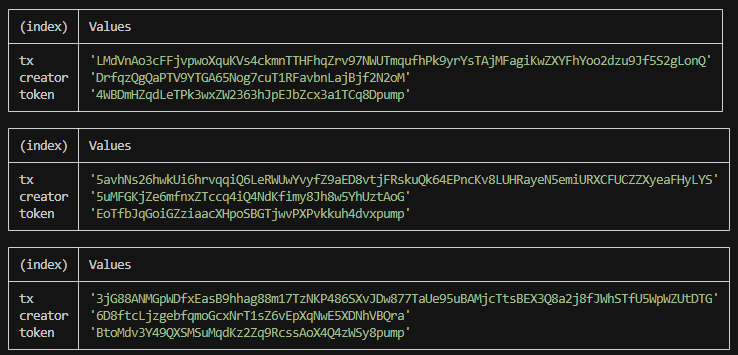
### 예제 알림
## 새로운 pump.fun 토큰 모니터링
```javascript theme={"system"}
const WebSocket = require('ws');
const KEY = process.env.HELIUS_API_KEY ?? (() => { throw new Error('Set HELIUS_API_KEY'); })();
const WS_URL = `wss://mainnet.helius-rpc.com?api-key=${KEY}`;
const PUMP_FUN_PROG = '6EF8rrecthR5Dkzon8Nwu78hRvfCKubJ14M5uBEwF6P';
/* ────────── 2. OPEN WEBSOCKET & SUBSCRIBE ──────────────────── */
const ws = new WebSocket(WS_URL);
ws.on('open', () => {
ws.send(JSON.stringify({
jsonrpc : '2.0',
id : 1,
method : 'transactionSubscribe',
params : [
{ failed:false, accountInclude:[PUMP_FUN_PROG] },
{ commitment:'confirmed', encoding:'jsonParsed',
transactionDetails:'full', maxSupportedTransactionVersion:0 }
]
}));
// ping every 10 s so we don't get dropped
setInterval(() => ws.ping(), 10_000);
});
/* ────────── 3. MESSAGE HANDLER ─────────────────────────────── */
ws.on('message', raw => {
const payload = JSON.parse(raw);
const result = payload.params?.result;
if (!result) return;
const logs = result.transaction.meta.logMessages || [];
// filter for the pump.fun "InitializeMint2" log
if (!logs.some(l => l.includes('Instruction: InitializeMint2'))) return;
const sig = result.signature; // transaction signature
const keys = result.transaction.transaction.message.accountKeys
.map(k => k.pubkey);
// keys[0] → creator wallet
// keys[1] → the new token
console.table({
tx: sig,
creator: keys[0],
token: keys[1]
});
});
ws.on('error', console.error);
ws.on('close', () => process.exit(1));
```
### 예제 알림
 ## 구독 관리
### 구독 ID
`transactionSubscribe`가 성공하면 서버는 `result` 필드에 구독 ID를 반환합니다. 이는 해당 구독에서 발생하는 모든 알림의 `params.subscription`에 나타나는 동일한 번호입니다:
```json Subscribe Response theme={"system"}
{
"jsonrpc": "2.0",
"result": 4743323479349712,
"id": 420
}
```
```json Notification theme={"system"}
{
"jsonrpc": "2.0",
"method": "transactionNotification",
"params": {
"subscription": 4743323479349712,
"result": {}
}
}
```
응답에서 구독 ID를 저장하세요. 구독 취소에 필요합니다.
### 구독 취소
알림 수신을 중지하려면 구독 ID로 `transactionUnsubscribe`를 호출하세요. 같은 연결에서 `transactionSubscribe` 호출마다 별도의 구독이 생성되며 각 구독에는 고유한 ID가 있습니다. 중복 알림 수신을 피하려면 재구독 전 구독을 취소하세요.
```json Request theme={"system"}
{
"jsonrpc": "2.0",
"id": 421,
"method": "transactionUnsubscribe",
"params": [4743323479349712]
}
```
```json Response theme={"system"}
{
"jsonrpc": "2.0",
"result": true,
"id": 421
}
```
이 예제에서는 Raydium 거래를 구독하고 서버의 응답에서 구독 ID를 캡처한 후 해당 ID를 사용하여 구독을 취소합니다. 메시지가 `transactionUnsubscribe` 호출 후 잠시 동안 여전히 도착할 수 있습니다. 이는 예상된 동작입니다.
```javascript theme={"system"}
const WebSocket = require('ws');
const ws = new WebSocket('wss://mainnet.helius-rpc.com/?api-key=');
let subscriptionId = null;
ws.on('open', () => {
ws.send(JSON.stringify({
jsonrpc: '2.0',
id: 420,
method: 'transactionSubscribe',
params: [
{ accountInclude: ['675kPX9MHTjS2zt1qfr1NYHuzeLXfQM9H24wFSUt1Mp8'] },
{
commitment: 'processed',
encoding: 'jsonParsed',
transactionDetails: 'full',
maxSupportedTransactionVersion: 0,
},
],
}));
setInterval(() => ws.ping(), 30000);
});
ws.on('message', (data) => {
const msg = JSON.parse(data.toString());
// Capture the subscription ID from the subscribe response
if (msg.id === 420 && msg.result !== undefined) {
subscriptionId = msg.result;
console.log('Subscribed, ID:', subscriptionId);
return;
}
// Handle transaction notifications
if (msg.method === 'transactionNotification') {
console.log('Received:', msg.params.result.signature);
}
});
function unsubscribe() {
if (subscriptionId !== null) {
ws.send(JSON.stringify({
jsonrpc: '2.0',
id: 421,
method: 'transactionUnsubscribe',
params: [subscriptionId],
}));
subscriptionId = null;
}
}
```
## 구독 관리
### 구독 ID
`transactionSubscribe`가 성공하면 서버는 `result` 필드에 구독 ID를 반환합니다. 이는 해당 구독에서 발생하는 모든 알림의 `params.subscription`에 나타나는 동일한 번호입니다:
```json Subscribe Response theme={"system"}
{
"jsonrpc": "2.0",
"result": 4743323479349712,
"id": 420
}
```
```json Notification theme={"system"}
{
"jsonrpc": "2.0",
"method": "transactionNotification",
"params": {
"subscription": 4743323479349712,
"result": {}
}
}
```
응답에서 구독 ID를 저장하세요. 구독 취소에 필요합니다.
### 구독 취소
알림 수신을 중지하려면 구독 ID로 `transactionUnsubscribe`를 호출하세요. 같은 연결에서 `transactionSubscribe` 호출마다 별도의 구독이 생성되며 각 구독에는 고유한 ID가 있습니다. 중복 알림 수신을 피하려면 재구독 전 구독을 취소하세요.
```json Request theme={"system"}
{
"jsonrpc": "2.0",
"id": 421,
"method": "transactionUnsubscribe",
"params": [4743323479349712]
}
```
```json Response theme={"system"}
{
"jsonrpc": "2.0",
"result": true,
"id": 421
}
```
이 예제에서는 Raydium 거래를 구독하고 서버의 응답에서 구독 ID를 캡처한 후 해당 ID를 사용하여 구독을 취소합니다. 메시지가 `transactionUnsubscribe` 호출 후 잠시 동안 여전히 도착할 수 있습니다. 이는 예상된 동작입니다.
```javascript theme={"system"}
const WebSocket = require('ws');
const ws = new WebSocket('wss://mainnet.helius-rpc.com/?api-key=');
let subscriptionId = null;
ws.on('open', () => {
ws.send(JSON.stringify({
jsonrpc: '2.0',
id: 420,
method: 'transactionSubscribe',
params: [
{ accountInclude: ['675kPX9MHTjS2zt1qfr1NYHuzeLXfQM9H24wFSUt1Mp8'] },
{
commitment: 'processed',
encoding: 'jsonParsed',
transactionDetails: 'full',
maxSupportedTransactionVersion: 0,
},
],
}));
setInterval(() => ws.ping(), 30000);
});
ws.on('message', (data) => {
const msg = JSON.parse(data.toString());
// Capture the subscription ID from the subscribe response
if (msg.id === 420 && msg.result !== undefined) {
subscriptionId = msg.result;
console.log('Subscribed, ID:', subscriptionId);
return;
}
// Handle transaction notifications
if (msg.method === 'transactionNotification') {
console.log('Received:', msg.params.result.signature);
}
});
function unsubscribe() {
if (subscriptionId !== null) {
ws.send(JSON.stringify({
jsonrpc: '2.0',
id: 421,
method: 'transactionUnsubscribe',
params: [subscriptionId],
}));
subscriptionId = null;
}
}
```