> ## Documentation Index
> Fetch the complete documentation index at: https://www.helius.dev/docs/llms.txt
> Use this file to discover all available pages before exploring further.
# 거래 v1 지원
> "거래 v1에 대비하여 Solana 통합 준비: maxSupportedTransactionVersion을 1로 설정하고, v1을 지원하는 SDK로 업그레이드하며 transactionConfig에서 우선 수수료를 읽습니다."
Agave 4.2는 거래 v1([SIMD-0385](https://github.com/solana-foundation/solana-improvement-documents/blob/main/proposals/0385-transaction-v1.md))을 도입합니다. 메인넷에서 기능 게이트가 활성화되면 지갑과 프로그램이 v1 거래를 제출하기 시작하며, 전체 거래 데이터를 가져오는 모든 요청은 이를 수신하기 위한 선택권을 가져야 합니다.
이 페이지에서는 어떤 변화가 있는지, 어떤 Helius 엔드포인트가 영향을 받는지, 코드를 업데이트하는 방법을 다룹니다. 보상 유형, 계정 업데이트 의미론, 슬롯 타이밍 등을 포함한 전체 Agave 4.2 체크리스트는 [Agave 4.2 마이그레이션 체크리스트](https://www.helius.dev/blog/agave-4-2-migration-checklist)에서 확인하세요.
## 거래 v1에서의 변화
레거시 및 v0 거래는 변경되지 않습니다. 대부분의 통합에서 거래 v1에 대한 두 가지 주요 사항은 다음과 같습니다:
* **수신하려면 선택해야 합니다.** 전체 거래 데이터를 요청하려면 `maxSupportedTransactionVersion: 1`가 필요하며, 클라이언트 라이브러리는 v1을 디시리얼라이즈할 수 있는 버전이 필요합니다.
* **컴퓨팅 예산이 메시지 헤더로 이동합니다.** v1 메시지는 `transactionConfig` 객체를 가지고 있으며 `computeUnitLimit`, `heapSize`, `loadedAccountsDataSizeLimit`, `priorityFee`를 포함합니다. v1 거래에는 ComputeBudget 프로그램 명령어가 없습니다.
와이어 포맷도 변경됩니다 (새 버전 바이트와 거래 끝에서의 서명). 단, 이것은 원시 거래 바이트를 디코드하는 코드에만 영향을 미칩니다. 아래의 [v1 인식 파서를 사용하여 원시 거래 바이트 해독](#v1-인식-파서를-사용하여-원시-거래-바이트-해독) 참조하세요.
JSON 응답에서 v1 거래는 `"version": 1`와 `message`에 `transactionConfig`를 포함합니다:
```json theme={"system"}
{
"version": 1,
"transaction": {
"signatures": ["..."],
"message": {
"accountKeys": ["..."],
"instructions": [
{ "programIdIndex": 3, "accounts": [0, 1], "data": "3Bxs4..." }
],
"recentBlockhash": "...",
"transactionConfig": {
"computeUnitLimit": 200000,
"heapSize": null,
"loadedAccountsDataSizeLimit": 200000,
"priorityFee": 50000
}
}
}
}
```
`"priorityFee": 50000`는 이 거래가 총 50,000 람포트를 지불함을 의미합니다. `null` 필드는 발신자가 설정하지 않았음을 의미합니다. 레거시 및 v0 메시지는 `transactionConfig`를 전혀 포함하지 않습니다.
## maxSupportedTransactionVersion을 1로 설정
전체 거래 데이터를 반환하는 모든 요청은 처리할 수 있는 가장 높은 거래 버전을 선언해야 합니다. 다음에 `maxSupportedTransactionVersion: 1`를 설정하세요:
* [`getTransaction`](/docs/ko/rpc/guides/gettransaction)
* [`getBlock`](/docs/ko/rpc/guides/getblock)
* [`getTransactionsForAddress`](/docs/ko/rpc/gettransactionsforaddress) with `transactionDetails: "full"`
* [`transactionSubscribe`](/docs/ko/rpc/websocket/transaction-subscribe) with `transactionDetails: "accounts"` or `"full"`
* [`blockSubscribe`](/docs/ko/api-reference/rpc/websocket/blocksubscribe)
매개변수를 생략하거나 `0`로 설정한 요청은 v1 거래에 도달하면 JSON-RPC 오류 `-32015`로 실패합니다:
```json theme={"system"}
{
"jsonrpc": "2.0",
"error": {
"code": -32015,
"message": "Transaction version (1) is not supported by the requesting client. Please use \"maxSupportedTransactionVersion\" in your request."
},
"id": 1
}
```
`getBlock`의 경우, 블록 내 어디든지 v1 거래가 포함되어 있으면 전체 요청이 실패합니다. 로그에서 `-32015`를 확인하면 프로젝트가 이미 버전별 거래에서 실패하고 있음을 알 수 있습니다.
```json getTransaction theme={"system"}
{
"jsonrpc": "2.0",
"id": 1,
"method": "getTransaction",
"params": [
"2id3YC2jK9G5Wo2phDx4gJVAew8DcY5NAojnVuao8rkxwPYPe8cSwE5GzhEgJA2y8fVjDEo6iR6ykBvDxrTQrtpb",
{
"encoding": "jsonParsed",
"commitment": "confirmed",
"maxSupportedTransactionVersion": 1
}
]
}
```
```json getBlock theme={"system"}
{
"jsonrpc": "2.0",
"id": 1,
"method": "getBlock",
"params": [
341197053,
{
"encoding": "jsonParsed",
"transactionDetails": "full",
"maxSupportedTransactionVersion": 1
}
]
}
```
```json getTransactionsForAddress theme={"system"}
{
"jsonrpc": "2.0",
"id": 1,
"method": "getTransactionsForAddress",
"params": [
"86xCnPeV69n6t3DnyGvkKobf9FdN2H9oiVDdaMpo2MMY",
{
"transactionDetails": "full",
"encoding": "jsonParsed",
"limit": 100,
"maxSupportedTransactionVersion": 1
}
]
}
```
```json transactionSubscribe theme={"system"}
{
"jsonrpc": "2.0",
"id": 1,
"method": "transactionSubscribe",
"params": [
{ "accountInclude": ["86xCnPeV69n6t3DnyGvkKobf9FdN2H9oiVDdaMpo2MMY"] },
{
"commitment": "confirmed",
"encoding": "jsonParsed",
"transactionDetails": "full",
"maxSupportedTransactionVersion": 1
}
]
}
```
## 값을 올리기 전에 SDK 업그레이드
`maxSupportedTransactionVersion: 1`를 설정하면 노드가 v1 거래를 반환하도록 지시합니다. 클라이언트 라이브러리는 여전히 이를 디시리얼라이즈해야 합니다. 먼저 업그레이드하고, 그런 다음 매개변수를 변경하십시오:
| 클라이언트 | 거래 v1 지원 최소 버전 |
| ----------------------------------------------- | --------------------- |
| `@solana/kit` | 8.0 |
| `@solana/web3.js` | v3 |
| Rust `solana-sdk` / `solana-transaction-status` | Agave 4.2 크레이트 기반 릴리스 |
| `yellowstone-grpc-client` | 13.3.0 |
| `yellowstone-grpc-proto` | 12.6.0 |
| `helius-laserstream` (자바스크립트) | 0.8.4 |
| `helius-laserstream` (Rust) | 0.6.3 |
| `helius-laserstream` (고) | 0.2.0 |
구형 `VersionedTransaction.deserialize` 구현은 JavaScript에서 레거시 및 v0만 처리하며, 선행 `0x81` 바이트에서 오류를 발생시킵니다. 구형 Yellowstone 프로토는 v1 메시지 필드 이전에 있으므로, 해당 버전의 gRPC 소비자는 `transactionConfig`를 전혀 보지 않습니다. Go gRPC 클라이언트를 위해서는 최신 Yellowstone 프로토 기준으로 재생성하고 `solana-storage-proto`를 사용합니다.
## transactionConfig에서 우선 수수료 읽기
ComputeBudget 프로그램 명령어 (`ComputeBudget111111111111111111111111111111`, `setComputeUnitPrice`, `setComputeUnitLimit`)를 스캔하여 거래의 우선 수수료를 추정하는 코드는 v1 거래를 모두 0으로 지불한다고 읽습니다. v1에서는 값이 `message.transactionConfig`에 있으며 단위가 다릅니다:
| 형식 | 수수료 위치 | 단위 |
| ------- | ------------------------------- | --------------- |
| 레거시, v0 | `setComputeUnitPrice` 명령어 | 계산 단위당 마이크로 람포트 |
| v1 | `transactionConfig.priorityFee` | 거래의 총 람포트 |
레거시 `price × computeUnitLimit ÷ 1e6` 수학을 `priorityFee`로 포팅하지 마세요. 이미 총합입니다.
```typescript priority-fee.ts theme={"system"}
import bs58 from "bs58";
const COMPUTE_BUDGET = "ComputeBudget111111111111111111111111111111";
/** Total priority fee in lamports for a `json`-encoded transaction. */
function priorityFeeLamports(tx: any): number {
const message = tx.transaction.message;
// v1: the header carries the total directly.
if (message.transactionConfig) {
return message.transactionConfig.priorityFee ?? 0;
}
// Legacy and v0: derive it from ComputeBudget instructions.
let microLamportsPerCu = 0n;
let computeUnitLimit: bigint | null = null;
let otherInstructions = 0;
for (const ix of message.instructions) {
if (message.accountKeys[ix.programIdIndex] !== COMPUTE_BUDGET) {
otherInstructions++;
continue;
}
const data = bs58.decode(ix.data);
const view = new DataView(data.buffer, data.byteOffset, data.byteLength);
if (data[0] === 2) computeUnitLimit = BigInt(view.getUint32(1, true));
if (data[0] === 3) microLamportsPerCu = view.getBigUint64(1, true);
}
// Without an explicit limit, the runtime grants 200,000 CU per non-ComputeBudget instruction, capped at 1,400,000.
const limit = computeUnitLimit ?? BigInt(Math.min(otherInstructions * 200_000, 1_400_000));
return Number((microLamportsPerCu * limit) / 1_000_000n);
}
```
ComputeBudget 지시의 존재보다 `transactionConfig` (또는 `version === 1`)에 따라 분기하십시오. 왜냐하면 우선 수수료가 없는 레거시 거래에도 역시 지시가 없기 때문입니다.
## v1 인식 파서를 사용하여 원시 거래 바이트 해독
이 섹션은 [preconfSubscribe](/docs/ko/pre-confirmations/preconf-subscribe), [preprocessedSubscribe](/docs/ko/preprocessed-transactions/preprocessed-subscribe) 또는 `base64`-encoded RPC 응답에서 원시 거래 바이트를 사용하는 경우에만 적용됩니다. `json` 또는 `jsonParsed` 응답을 사용하는 경우 이 단계를 건너뛰세요.
거래 v1은 두 가지 방식으로 와이어 레이아웃을 변경합니다:
* **버전 바이트.** v1 거래는 `0x81` (십진수 129)로 시작합니다. v0 거래는 `0x80`로 시작합니다.
* **서명이 끝으로 이동합니다.** 레거시 및 v0는 서명을 먼저 두고, 그 다음 메시지를 두지만 거래 v1은 메시지를 먼저 두고 서명을 마지막에 두므로, 선행 서명 배열을 기대하는 `bincode` 스타일 디코더가 v1 바이트에서 실패합니다.
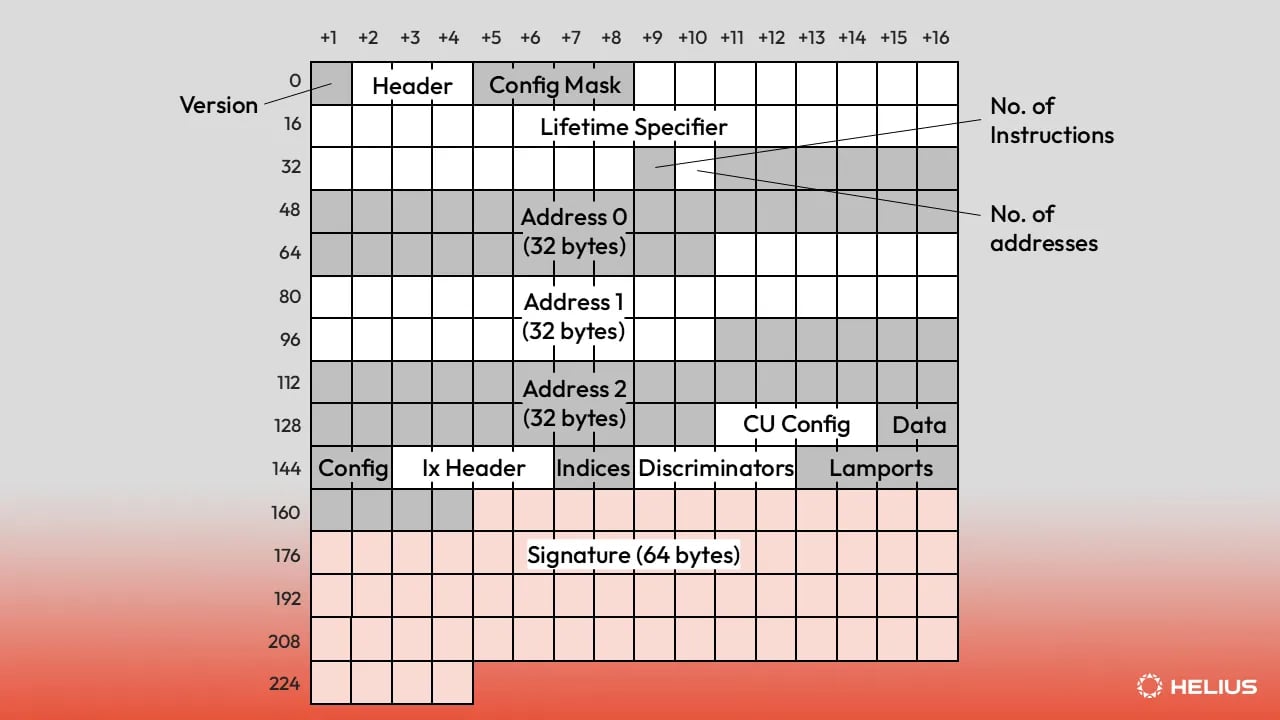 v1 와이어 포맷의 필드별 안내는 [Solana 거래 버전별 명세 기사](https://www.helius.dev/blog/solana-transaction-versions#transaction-v1)를 참조하세요.
v1 레이아웃을 이해하는 디코더를 사용하세요:
* **Rust:** [`agave-transaction-view`](https://docs.rs/agave-transaction-view)는 레거시, v0, v1을 현장에 디코드합니다. 현재 Solana SDK에서 사용하는 bincode 호환 시리얼라이저인 [`wincode`](https://docs.rs/wincode)도 v1을 `VersionedTransaction`로 디코드합니다.
* **자바스크립트 / 타입스크립트:** `@solana/kit` 8.0+ 또는 `@solana/web3.js` v3.
커스텀 디코더는 첫 번째 바이트를 확인해야 합니다: `0x81`는 v1을 의미하며 서명이 메시지 뒤에 따라온다는 것을 의미합니다.
## 체크리스트
1. `getBlock`, `getTransaction`, `getTransactionsForAddress`, `transactionSubscribe`, 그리고 `blockSubscribe`를 포함하여 원시 JSON-RPC 본문과 `connection.getParsedTransaction` 같은 SDK 래퍼를 그랩합니다.
2. v1 지원 SDK로 업그레이드합니다.
3. 1단계에서 찾은 모든 호출에 `maxSupportedTransactionVersion: 1`를 설정합니다.
4. ComputeBudget 명령어 스캔을 `transactionConfig` 확인으로 대체하고 `priorityFee`를 총 람포트로 취급합니다.
5. `bincode` 스타일 원시 디코더를 `agave-transaction-view`나 업그레이드된 SDK로 대체합니다.
6. 위 테이블의 버전으로 스트리밍 종속성을 증가시킵니다.
7. 변경 후 로그에서 `-32015`를 검색하여 여전히 실패하는 것이 없는지 확인합니다.
Solana 거래 버전 사양, 와이어 포맷 및 예시의 기술적인 심층 분석은 [Solana 거래 버전화: 레거시, v0 및 v1](https://www.helius.dev/blog/solana-transaction-versions) 기사를 읽어보세요.
## 관련
단일 거래를 가져오기 위한 매개변수, 응답 형식 및 예시.
포함된 모든 거래를 포함한 전체 블록 가져오기.
한 번의 호출로 주소에 대한 필터링되고 페이지가 매겨진 거래 기록.
모든 Agave 4.2 중단 변경 사항과 수정 단계.
v1 와이어 포맷의 필드별 안내는 [Solana 거래 버전별 명세 기사](https://www.helius.dev/blog/solana-transaction-versions#transaction-v1)를 참조하세요.
v1 레이아웃을 이해하는 디코더를 사용하세요:
* **Rust:** [`agave-transaction-view`](https://docs.rs/agave-transaction-view)는 레거시, v0, v1을 현장에 디코드합니다. 현재 Solana SDK에서 사용하는 bincode 호환 시리얼라이저인 [`wincode`](https://docs.rs/wincode)도 v1을 `VersionedTransaction`로 디코드합니다.
* **자바스크립트 / 타입스크립트:** `@solana/kit` 8.0+ 또는 `@solana/web3.js` v3.
커스텀 디코더는 첫 번째 바이트를 확인해야 합니다: `0x81`는 v1을 의미하며 서명이 메시지 뒤에 따라온다는 것을 의미합니다.
## 체크리스트
1. `getBlock`, `getTransaction`, `getTransactionsForAddress`, `transactionSubscribe`, 그리고 `blockSubscribe`를 포함하여 원시 JSON-RPC 본문과 `connection.getParsedTransaction` 같은 SDK 래퍼를 그랩합니다.
2. v1 지원 SDK로 업그레이드합니다.
3. 1단계에서 찾은 모든 호출에 `maxSupportedTransactionVersion: 1`를 설정합니다.
4. ComputeBudget 명령어 스캔을 `transactionConfig` 확인으로 대체하고 `priorityFee`를 총 람포트로 취급합니다.
5. `bincode` 스타일 원시 디코더를 `agave-transaction-view`나 업그레이드된 SDK로 대체합니다.
6. 위 테이블의 버전으로 스트리밍 종속성을 증가시킵니다.
7. 변경 후 로그에서 `-32015`를 검색하여 여전히 실패하는 것이 없는지 확인합니다.
Solana 거래 버전 사양, 와이어 포맷 및 예시의 기술적인 심층 분석은 [Solana 거래 버전화: 레거시, v0 및 v1](https://www.helius.dev/blog/solana-transaction-versions) 기사를 읽어보세요.
## 관련
단일 거래를 가져오기 위한 매개변수, 응답 형식 및 예시.
포함된 모든 거래를 포함한 전체 블록 가져오기.
한 번의 호출로 주소에 대한 필터링되고 페이지가 매겨진 거래 기록.
모든 Agave 4.2 중단 변경 사항과 수정 단계.