> ## Documentation Index
> Fetch the complete documentation index at: https://www.helius.dev/docs/llms.txt
> Use this file to discover all available pages before exploring further.
# Solana 트랜잭션 추적 방법
> 새로운 Solana 블록 탐색기인 Orb를 사용하여 요약, 잔액, 내부 명령, 원시 JSON을 포함한 트랜잭션 조사 방법을 배웁니다.
대부분의 사람들은 Solana 블록 탐색기를 사용하여 트랜잭션을 보고 분석하며, 이는 온체인에서 어떤 일이 일어나고 있는지 볼 수 있게 합니다.
지갑과 DeFi 애플리케이션은 블록 탐색기와 통합되어 사용자가 트랜잭션 상태를 확인하고, 트랜잭션 기록을 보고, 온체인에서 일어나는 일을 더 잘 이해할 수 있도록 합니다.
[Orb에서 Solana 트랜잭션 조회](https://orbmarkets.io/)를 하려면 지갑이나 앱의 UI에서 트랜잭션 서명을 복사하여 Orb의 검색창에 붙여넣기만 하면 됩니다.
일반적인 토큰 스왑을 살펴보겠습니다.
이 예에서는 Jupiter를 통해 [USDC가 ORE로 교환됩니다](https://orbmarkets.io/tx/52Vrdcyxp9TsfWByYdJ6nrufSBNi17oX6EmkftVcLd9YV2o4A86n8ZQCQpkvm68UyFX5eKUFfAm9PqPk5Pa7ZhXa?cluster=mainnet-beta\&tab=summary).
## AI 개요 및 요약
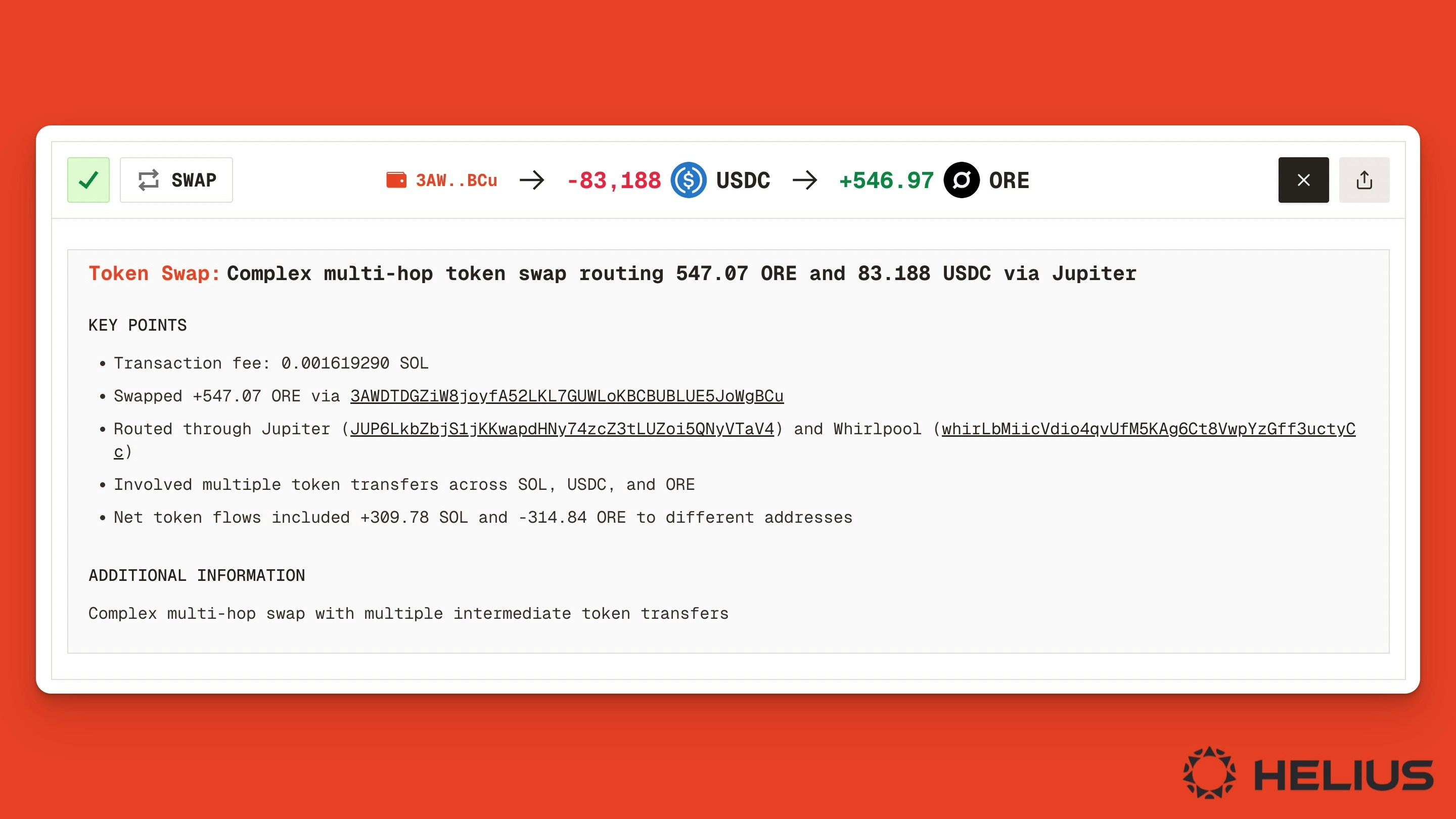
기본적인 트랜잭션 정보만 필요하다면 요약을 읽거나 "AI로 설명" 버튼을 클릭하여 이 트랜잭션에서 일어난 일에 대한 고수준 개요를 얻을 수 있습니다.
예를 들어, **AI로 설명** 버튼을 클릭하면 이 트랜잭션이 [Jupiter Aggregator v6 프로그램](https://orbmarkets.io/address/JUP6LkbZbjS1jKKwapdHNy74zcZ3tLUZoi5QNyVTaV4/history?cluster=mainnet-beta)을 사용하여 $83,188 $USDC를 546.97 \$ORE로 교환하는 것임을 보여줍니다.
 ## 명령 요약 및 세부 정보
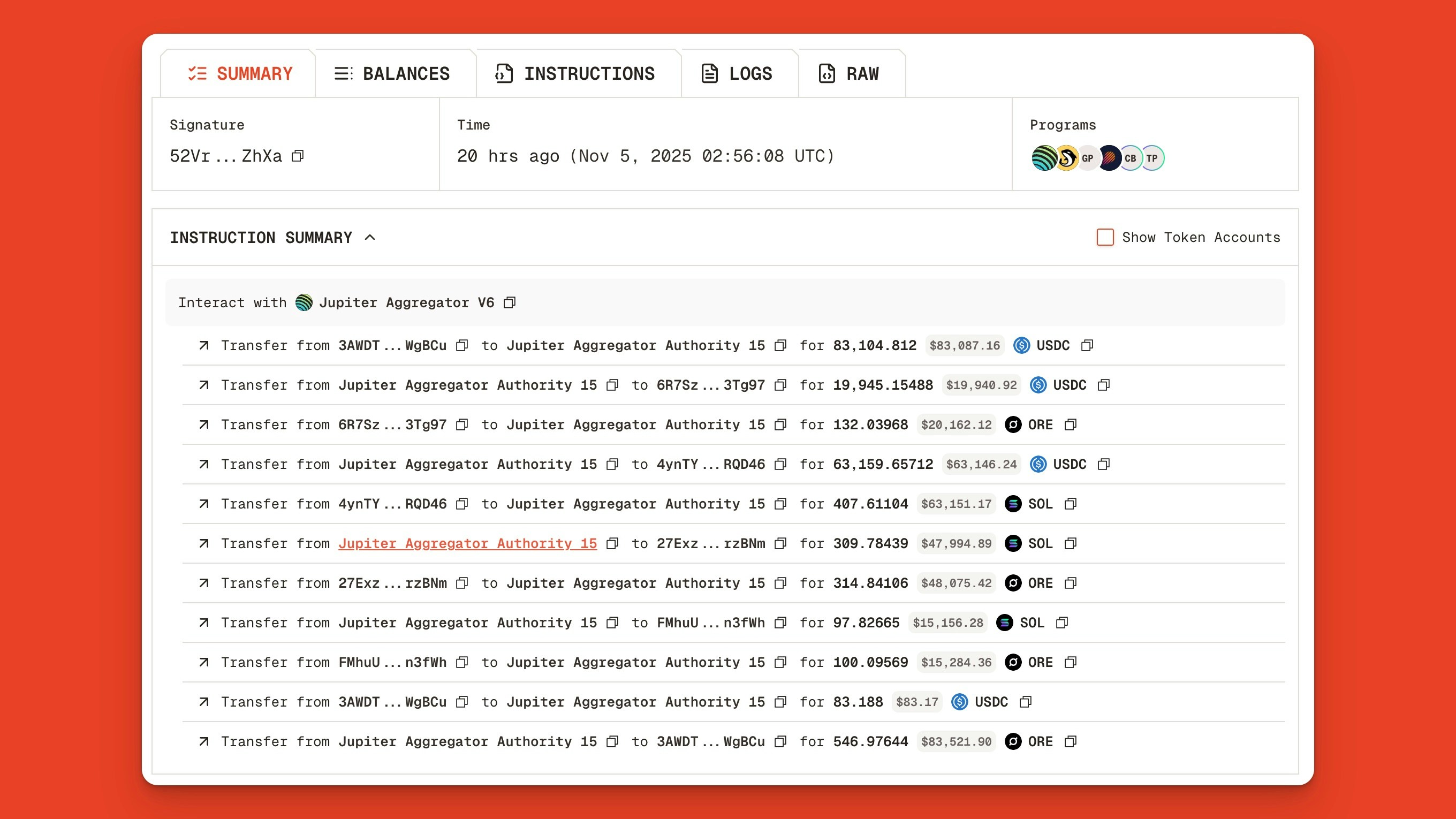
페이지를 아래로 스크롤하면 **명령 요약**이 소유자의 지갑에서 Jupiter 집계 기관 계정으로 \$USDC를 전송하는 등의 모든 중간 단계들을 보여줍니다.
## 명령 요약 및 세부 정보
페이지를 아래로 스크롤하면 **명령 요약**이 소유자의 지갑에서 Jupiter 집계 기관 계정으로 \$USDC를 전송하는 등의 모든 중간 단계들을 보여줍니다.
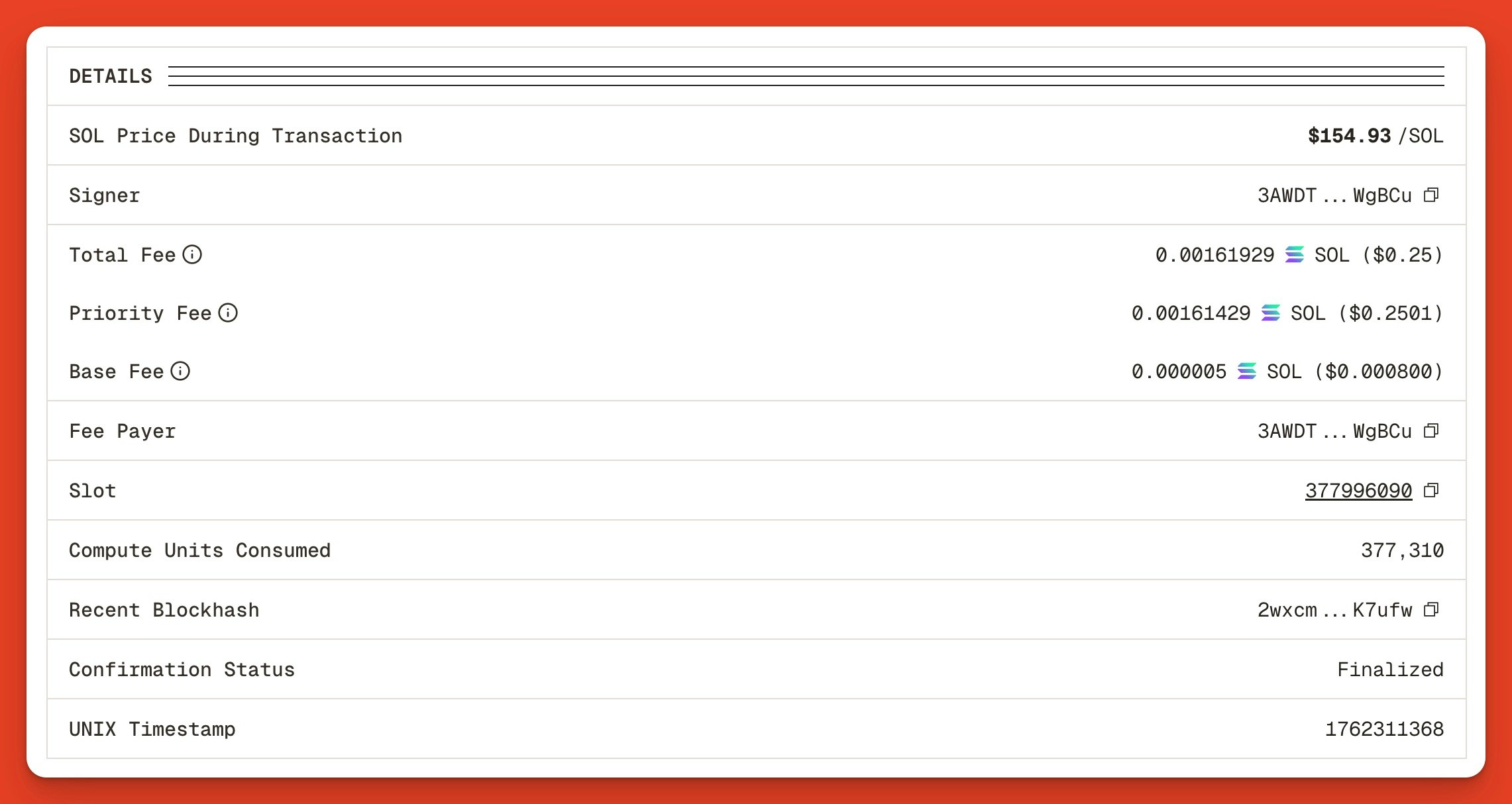
 다음으로 요약 **세부 정보** 섹션을 봅니다:
 ## 트랜잭션 잔액
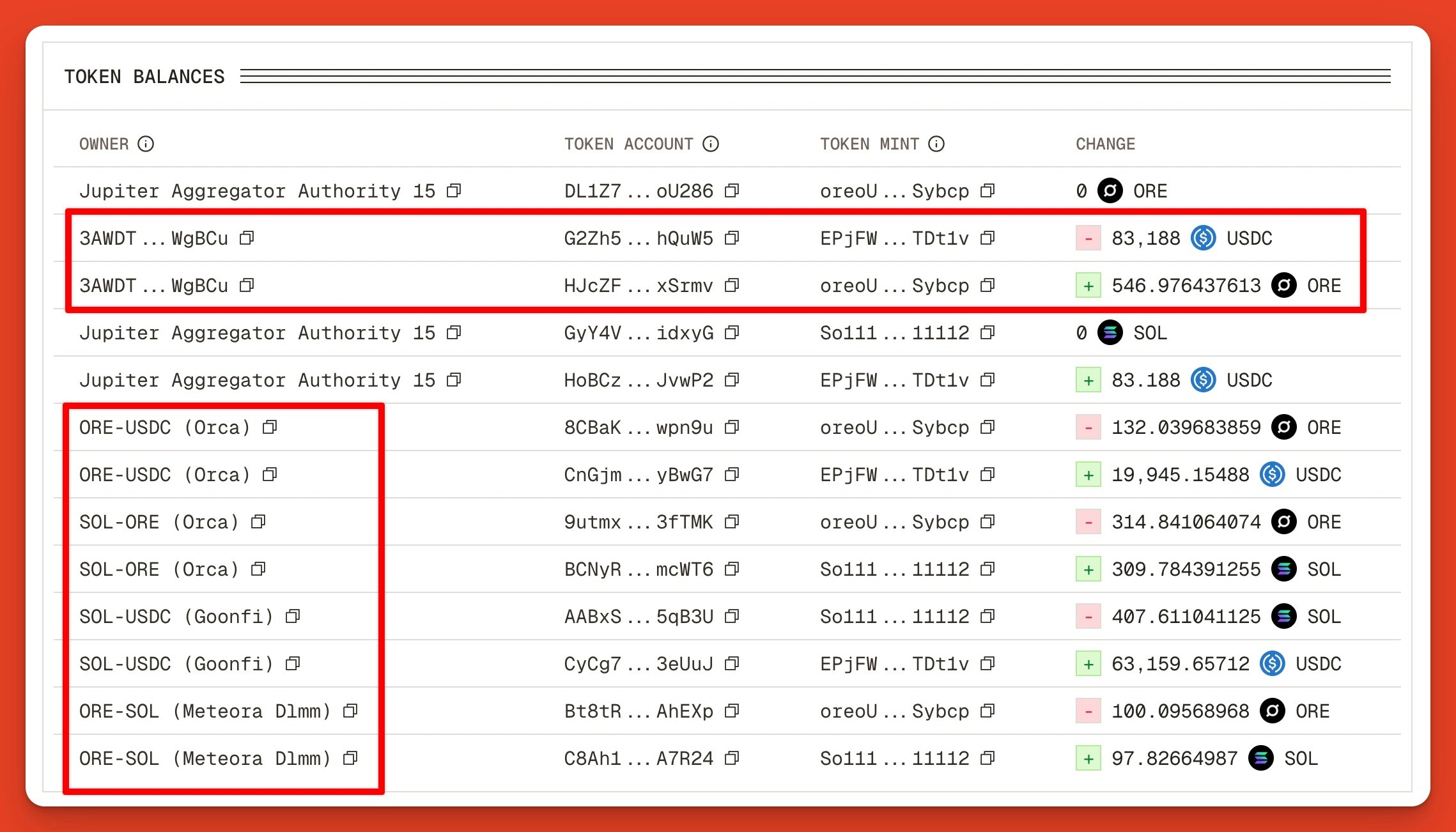
**잔액** 탭을 클릭하면 각 주소와 시장의 토큰 잔액 변동을 명확하게 요약한 내용을 볼 수 있습니다.
우리는 원래 지갑 `3AWDT…WgBCu`가 Orca, Goonfi, Meteora DLMM 포함 여러 시장에서 USDC를 ORE로 교환하고 있으며, 이 시장들이 거래의 일부를 처리하고 있음을 봅니다.
## 트랜잭션 잔액
**잔액** 탭을 클릭하면 각 주소와 시장의 토큰 잔액 변동을 명확하게 요약한 내용을 볼 수 있습니다.
우리는 원래 지갑 `3AWDT…WgBCu`가 Orca, Goonfi, Meteora DLMM 포함 여러 시장에서 USDC를 ORE로 교환하고 있으며, 이 시장들이 거래의 일부를 처리하고 있음을 봅니다.
 ## 트랜잭션 명령
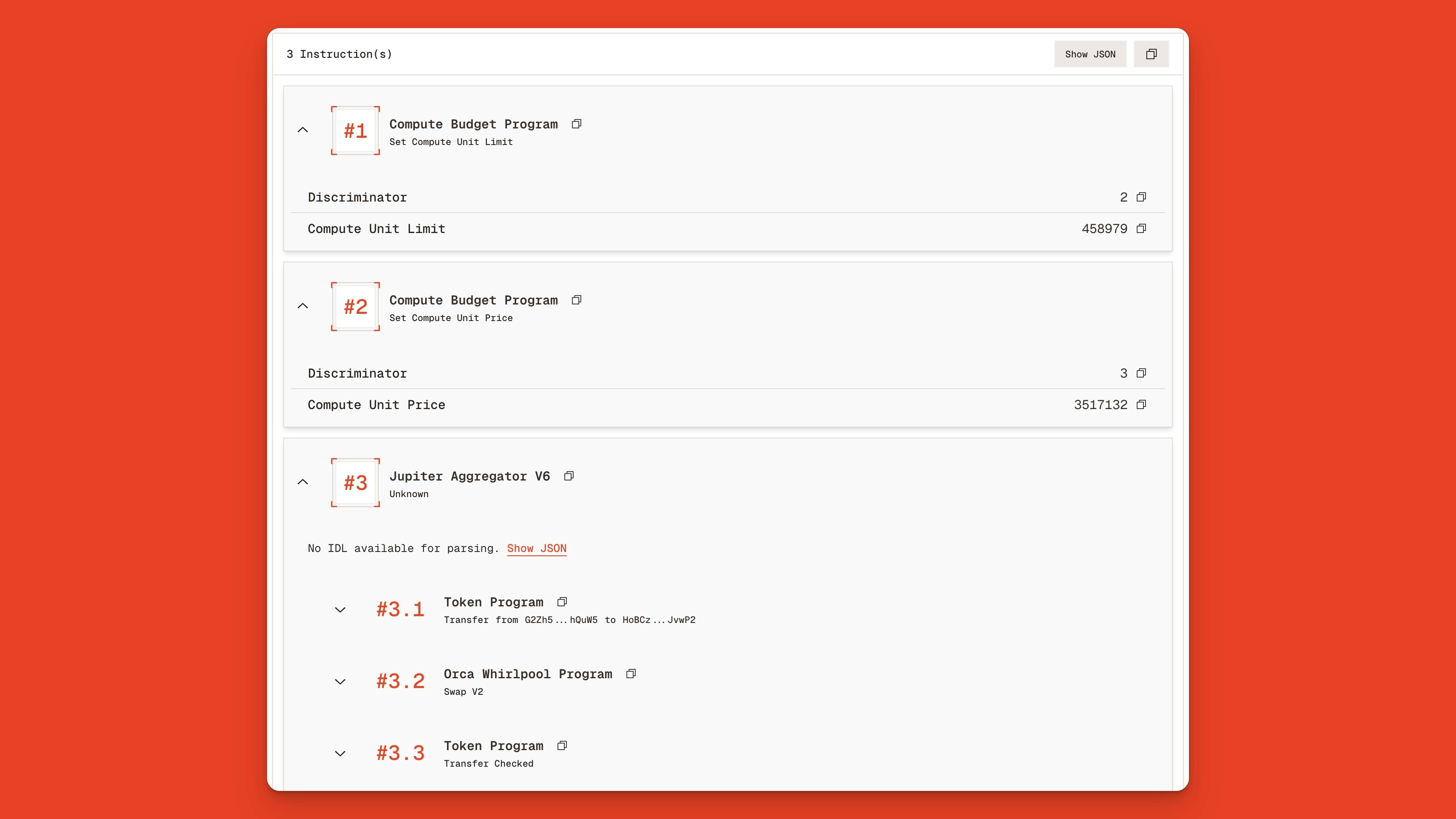
**명령** 탭을 클릭하면 Compute Budget Program과 Jupiter Aggregator v6 프로그램 호출이 포함된 트랜잭션을 볼 수 있습니다.
Jupiter 프로그램을 확장하면 Solana의 토큰 프로그램, Orca의 Whirlpool Program, Meteora의 DLMM Program, GoonFi 프로그램([Solana Prop AMM](https://www.helius.dev/blog/solanas-proprietary-amm-revolution))을 호출하는 15개 이상의 내부 명령을 볼 수 있습니다.
## 트랜잭션 명령
**명령** 탭을 클릭하면 Compute Budget Program과 Jupiter Aggregator v6 프로그램 호출이 포함된 트랜잭션을 볼 수 있습니다.
Jupiter 프로그램을 확장하면 Solana의 토큰 프로그램, Orca의 Whirlpool Program, Meteora의 DLMM Program, GoonFi 프로그램([Solana Prop AMM](https://www.helius.dev/blog/solanas-proprietary-amm-revolution))을 호출하는 15개 이상의 내부 명령을 볼 수 있습니다.
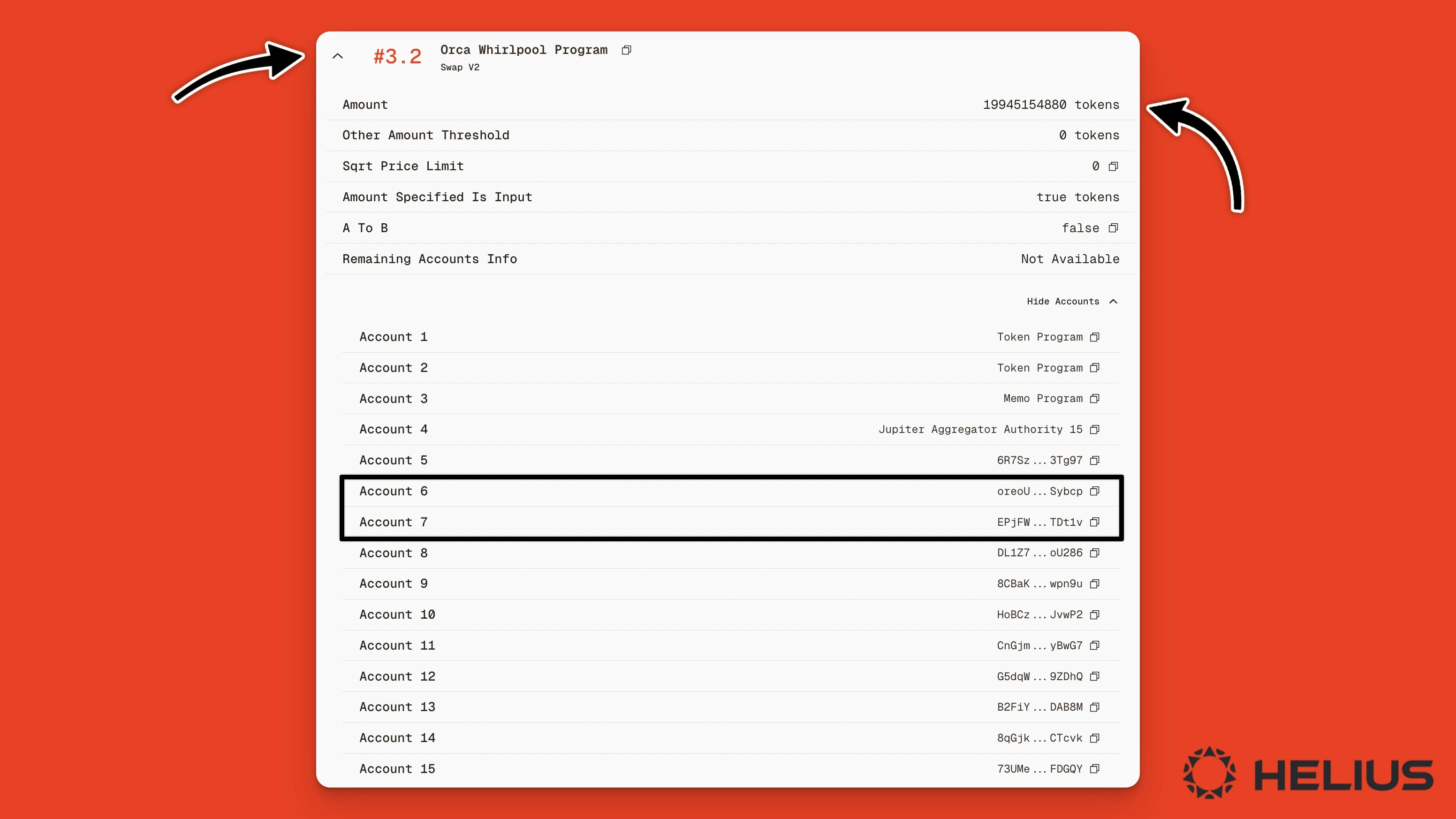
 단일 내부 명령(3.2)을 보면, Orca Whirlpool Program에서 19945154880 토큰과 거래에 관련된 계정 목록을 포함하는 Swap V2 액션을 볼 수 있으며, 이 중 계정 6은 $ORE 토큰이고 계정 7은 $USDC 토큰입니다.
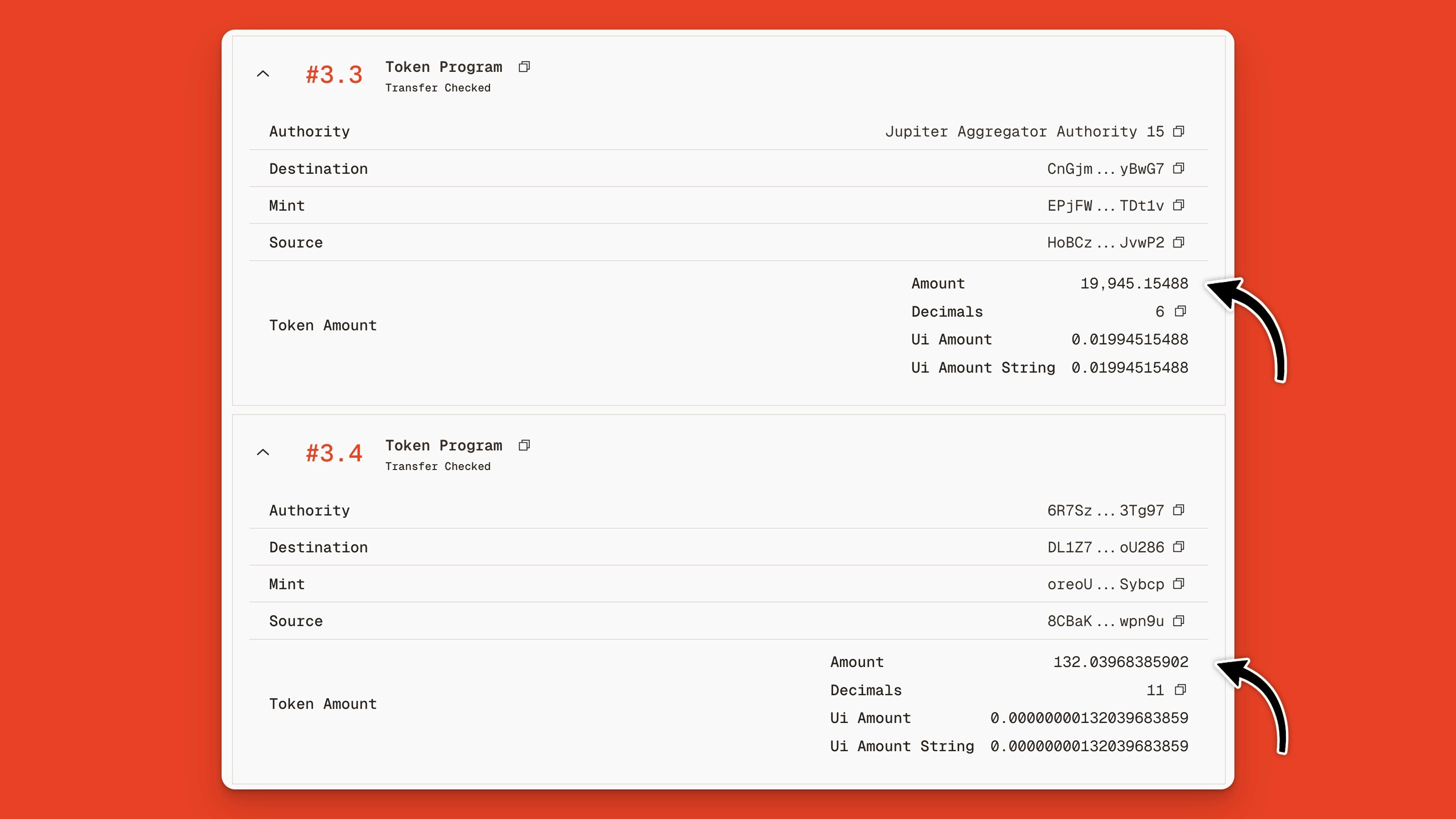
 명령 3.3을 보면 19945154880 토큰이 $19,945.154880 USDC(왜냐하면 $USDC 토큰은 소수점 이하 6자리이기 때문으로)로 변환되고, 명령 3.4는 토큰 양이 132.03968385902 \$ORE임을 보여줍니다.
 ## 트랜잭션 명령 로그
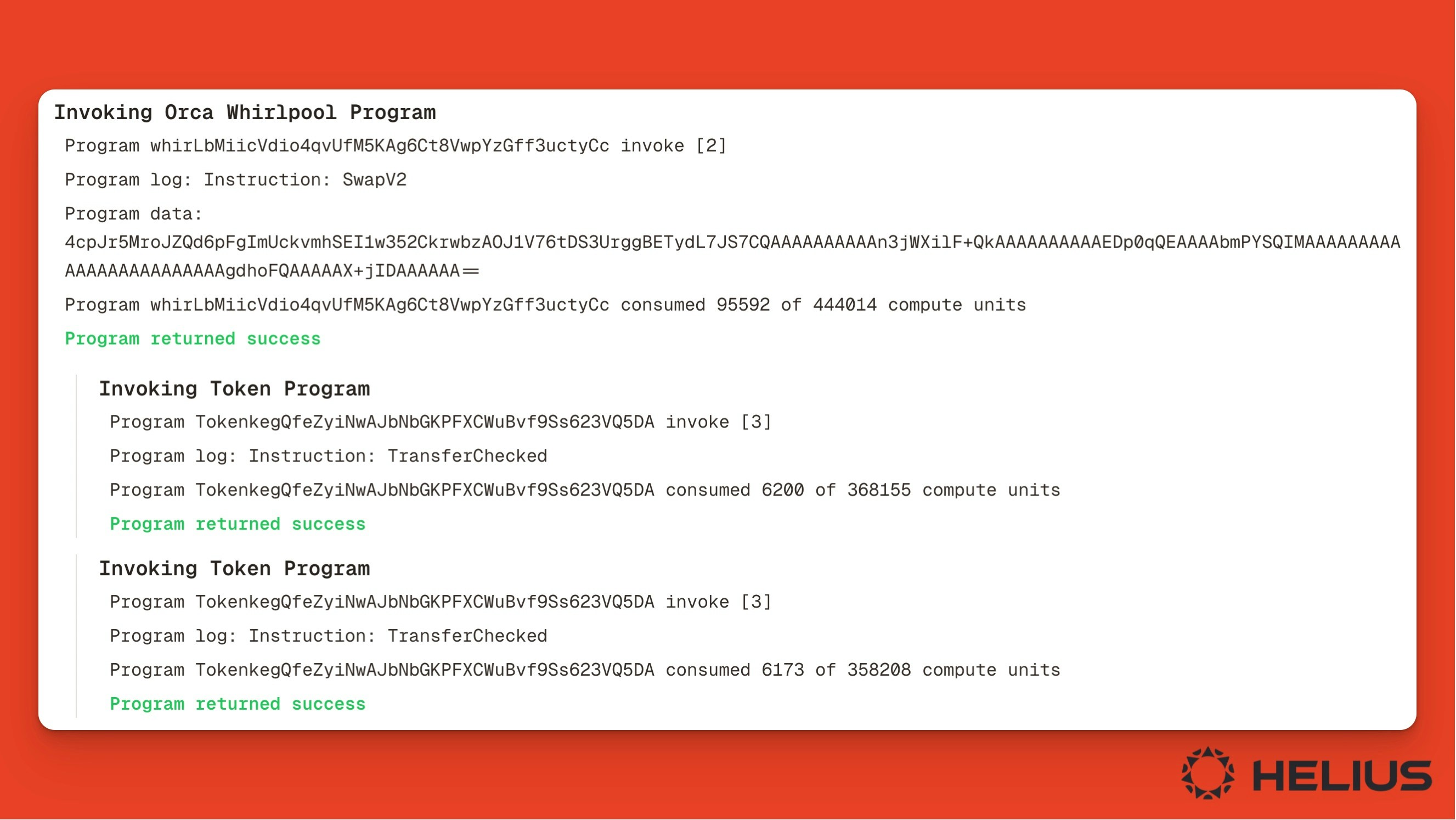
트랜잭션 로그를 검사하려면 **로그** 탭을 클릭하세요. 여기에서 각 프로그램에 의해 생성된 로그를 볼 수 있으며, 호출된 명령의 이름, 상태(즉, 성공/실패), 소비된 계산 단위 수를 보통 표시합니다.
## 트랜잭션 명령 로그
트랜잭션 로그를 검사하려면 **로그** 탭을 클릭하세요. 여기에서 각 프로그램에 의해 생성된 로그를 볼 수 있으며, 호출된 명령의 이름, 상태(즉, 성공/실패), 소비된 계산 단위 수를 보통 표시합니다.
 ## 원시 트랜잭션 JSON
가장 세밀한 출력을 보려면 **Raw** 탭을 클릭하세요.
여기에서 각 명령을 원시 JSON 출력으로 보거나 "Helius Enhanced" 토글을 활성화하여 더 읽기 쉽게 만들 수 있습니다.
## 원시 트랜잭션 JSON
가장 세밀한 출력을 보려면 **Raw** 탭을 클릭하세요.
여기에서 각 명령을 원시 JSON 출력으로 보거나 "Helius Enhanced" 토글을 활성화하여 더 읽기 쉽게 만들 수 있습니다.
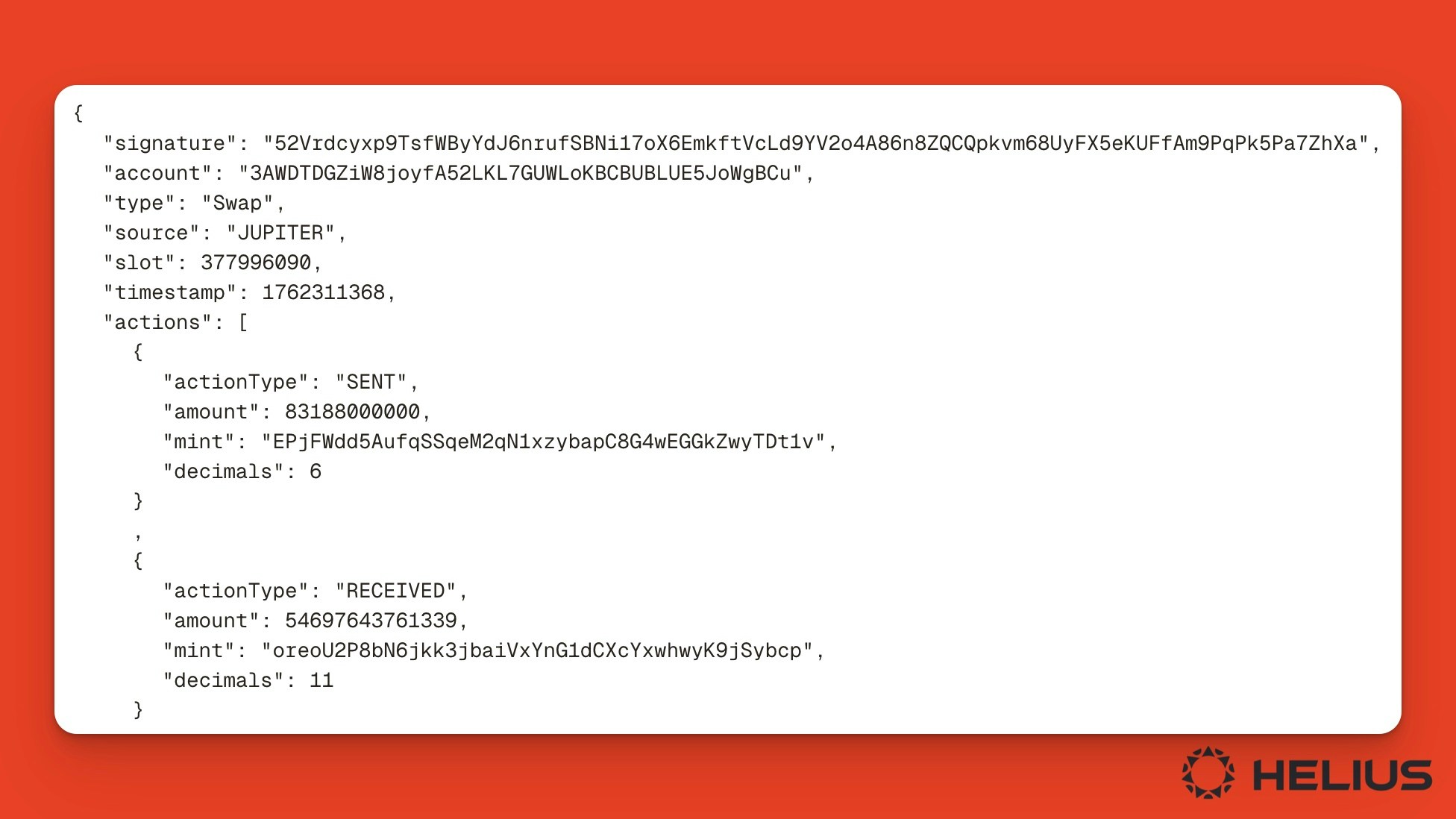 저수준 명령 로그 및 원시 출력은 프로그램을 디버깅하는 개발자와 프로그램이 어떻게 작동하는지 이해하려는 분석가에게 가장 유용합니다.
## 결론
Solana 트랜잭션을 검사하는 것은 [Orb](https://orbmarkets.io)와 같은 블록체인 탐색기의 주요 사용 사례입니다.
높은 수준의 확인 상태에서 거래 디버깅을 위한 저수준 원시 JSON 출력에 이르기까지, [최고의 블록 탐색기](https://www.helius.dev/blog/top-solana-block-explorers)인 Orb는 모든 사람들이 Solana의 트랜잭션을 읽고 분석하는 데 필요한 도구를 제공합니다.
저수준 명령 로그 및 원시 출력은 프로그램을 디버깅하는 개발자와 프로그램이 어떻게 작동하는지 이해하려는 분석가에게 가장 유용합니다.
## 결론
Solana 트랜잭션을 검사하는 것은 [Orb](https://orbmarkets.io)와 같은 블록체인 탐색기의 주요 사용 사례입니다.
높은 수준의 확인 상태에서 거래 디버깅을 위한 저수준 원시 JSON 출력에 이르기까지, [최고의 블록 탐색기](https://www.helius.dev/blog/top-solana-block-explorers)인 Orb는 모든 사람들이 Solana의 트랜잭션을 읽고 분석하는 데 필요한 도구를 제공합니다.