> ## Documentation Index
> Fetch the complete documentation index at: https://www.helius.dev/docs/llms.txt
> Use this file to discover all available pages before exploring further.
# Solana 전용 노드 설정: 완벽한 시작 가이드
> gRPC 스트리밍, Yellowstone 플러그인, 및 블록체인 데이터에 대한 최적의 구성으로 Solana 전용 노드를 설정하는 완벽한 가이드.
## 전용 노드 주문 방법
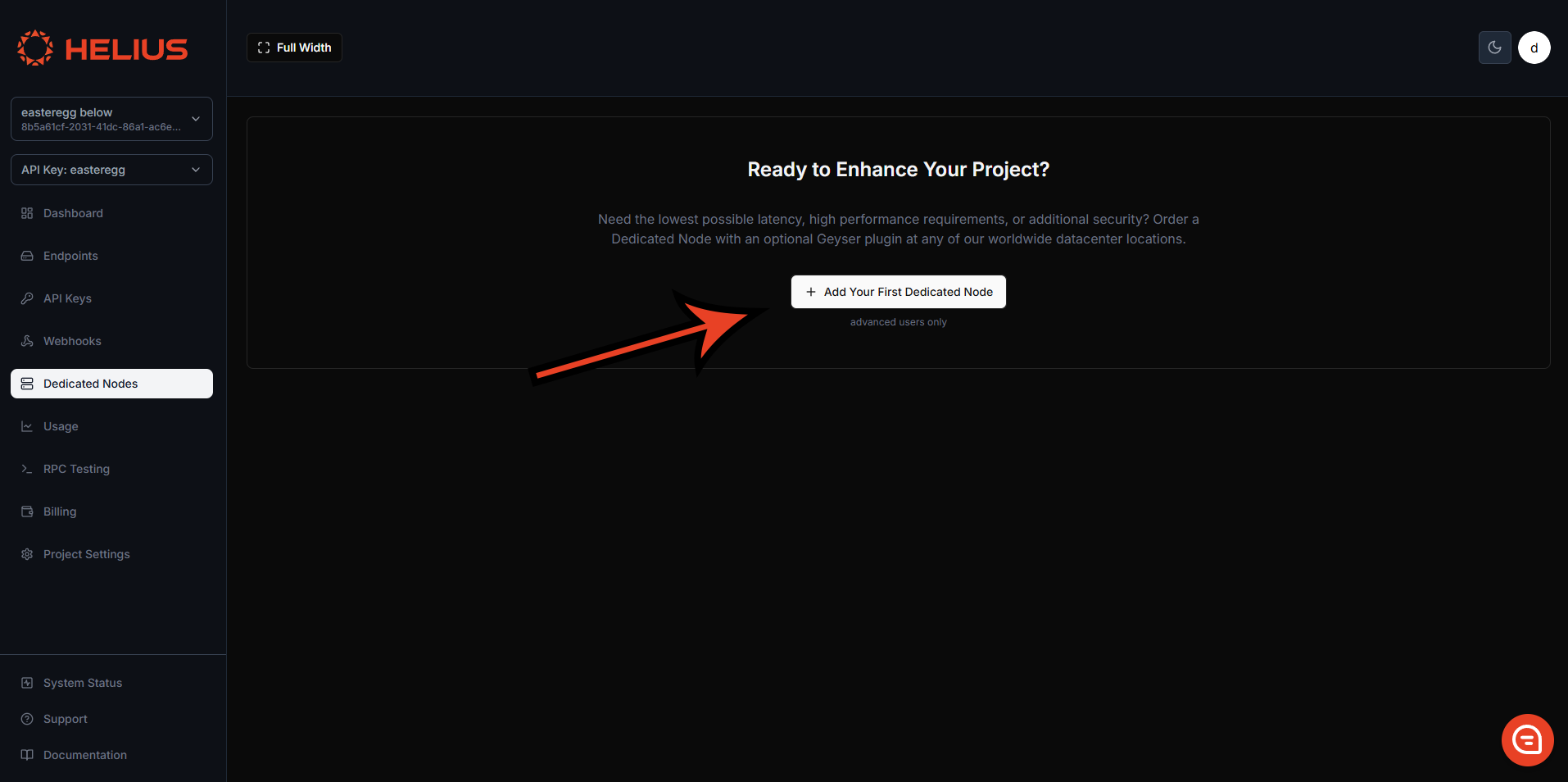
전용 노드는 [개발자 포털](https://dashboard.helius.dev/dedicated-nodes)에서 전용 노드 탭을 통해 직접 주문할 수 있습니다.
### 노드 유형
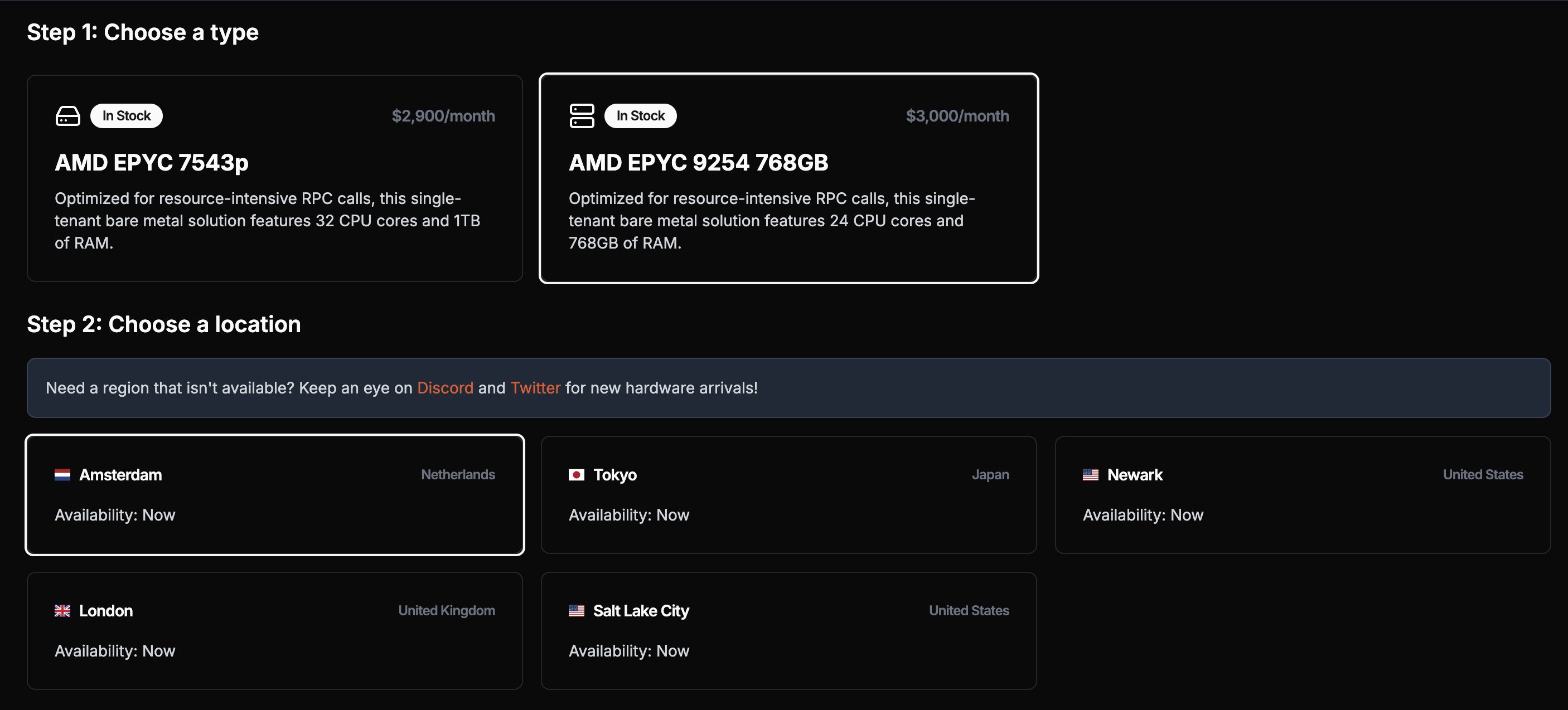
선택한 노드의 유형은 귀하의 요구사항에 따라 다릅니다. 우리는 속도 제한을 부과하지 않으므로 노드의 성능은 전적으로 사양에 의존합니다.
**gRPC 스트리밍 애플리케이션의 경우** (주요 사용 사례), 모든 노드 유형이 잘 작동합니다.
**중요**: [`getProgramAccounts`](/docs/ko/api-reference/rpc/http/getprogramaccounts)는 지원되지만, 전용 노드는 이러한 호출에 최적화되어 있지 않습니다. 과도한 사용은 노드 성능에 영향을 미치거나 심지어 노드 장애를 유발할 수 있습니다. 이러한 쿼리에는 맞춤 인덱서를 사용하여 이러한 호출을 훨씬 더 빠르고 안정적으로 만들어주는 공유 계획을 사용하십시오.
### 노드 위치
우리는 북미(피츠버그, 뉴어크, 솔트레이크시티, 로스앤젤레스, 밴쿠버), 유럽(더블린, 런던, 암스테르담, 프랑크푸르트), 아시아(도쿄, 싱가포르) 등 여러 지역에 걸쳐 노드를 제공하여 글로벌 Solana 인프라와 최고의 지리적 커버리지를 보장합니다.
최적의 지연을 위해 서버와 가장 가까운 노드를 선택하세요. 결제 후 3시간 이내에 노드가 배포됩니다.
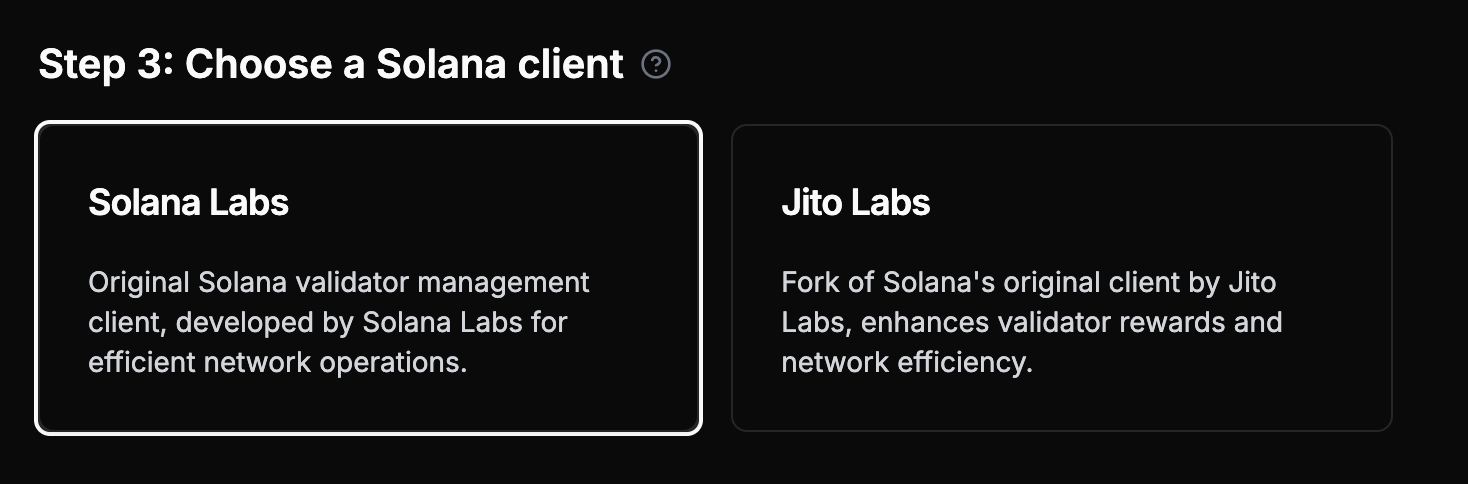
### 노드 클라이언트
클라이언트 유형을 선택하여 노드를 맞춤화할 수 있습니다 — Agave 또는 Jito Labs (Agave의 포크로 추가 메서드 포함)
전용 노드는 Jito 번들을 자체적으로 보낼 수 **없습니다**. Jito 번들을 보내려면 Jito 시스템을 통해 번들을 패키징하고 전송하는 Jito API를 사용해야 합니다.
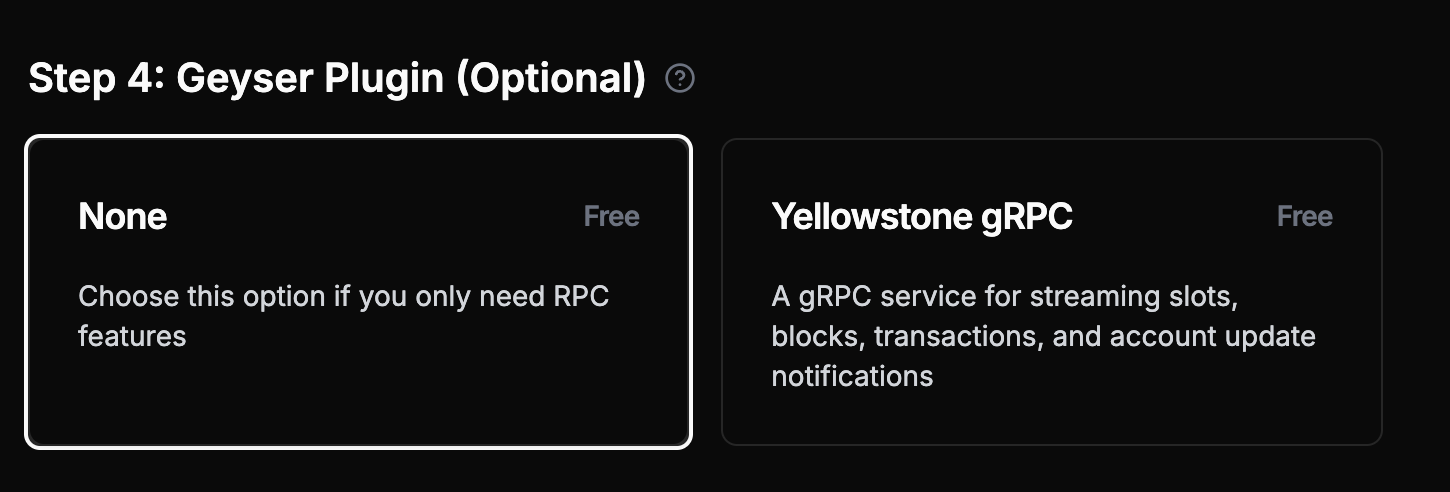
### Geyser 플러그인 (권장)
**[Yellowstone](https://github.com/helius-labs/yellowstone-grpc) Geyser Plugin을 추가하는 것을 강력히 권장합니다**, 이는 전용 노드의 주요 사용 사례입니다. 슬롯, 블록, 트랜잭션 및 계정 업데이트의 고성능 [gRPC 스트리밍](/docs/ko/grpc)을 제공합니다.
**모범 사례**: 전용 노드는 gRPC 스트리밍에 최적화되어 있습니다. 거래 제출, 아카이브 쿼리 및 복잡한 RPC 작업에는 공유 계획을 사용하십시오.
### 결제 옵션
법정 화폐 또는 암호화폐(USDC)로 결제할 수 있습니다. 결제가 완료되면 3시간 이내에 노드가 배포됩니다.
결제에 있어, 법정 화폐 결제는 노드를 공급하는 데 걸린 일 수에 따라 다음 달 청구서에 할인을 받을 수 있습니다. 암호화폐 결제는 노드가 전달된 후에 청구 주기가 시작됩니다.
### 데모
## 시작하기
전용 노드를 설정하고 준비가 완료되면(상태: **성공**), 작업을 시작할 수 있습니다.
## 전용 노드에 연결하기
### gRPC 스트리밍 (주요 사용 사례)
**전용 노드는 Yellowstone Geyser Plugin을 통해 gRPC 스트리밍에 최적화되어 있습니다.** 이것은 전용 노드를 사용하는 데 있어 주요하고 권장되는 방법입니다.
**gRPC 스트리밍을 위한 LaserStream 고려**: LaserStream은 우수한 성능, 신뢰성, 그리고 gRPC 스트리밍을 위한 24시간 역사적 재생과 같은 고급 기능을 제공합니다. 99%의 스트리밍 사용 사례에 권장됩니다. 귀하의 필요에 가장 적합한 솔루션을 평가하기 위해 [LaserStream vs 전용 노드 비교](/docs/ko/laserstream/laserstream-vs-dedicated-nodes)를 참조하거나, Helius Dashboard에서 [LaserStream 시작하기](https://dashboard.helius.dev/laserstream)를 선택하세요.
### 기본 RPC 및 웹소켓 (제한된 기능)
각 전용 노드도 기본 RPC 기능을 제공하지만 제한이 있습니다. **프로덕션 애플리케이션의 경우, 전용 노드와 공유 계획을 결합하는 것이 좋습니다.**
여기서는 전용 노드를 사용하여 Solana web3.js로 [`getSlot`](/docs/ko/api-reference/rpc/http/getslot)를 호출하는 방법을 보여줍니다:
```javascript theme={"system"}
// Using @solana/web3.js
const { Connection } = require('@solana/web3.js');
const connection = new Connection('https://liveried-grazings-gxzjabdgqa-dedicated.helius-rpc.com?api-key=465964ff-f718-47d2-a51c-66ddcce332d7');
// Get the current slot
const getSlot = async () => {
const slot = await connection.getSlot();
console.log('Current slot:', slot);
};
getSlot();
```
다음은 새로운 슬롯을 스트리밍하기 위해 기본 웹소켓 연결을 설정하는 방법입니다:
```javascript theme={"system"}
const Websocket = require('ws');
const ws = new Websocket('wss://liveried-grazings-gxzjabdgqa-dedicated.helius-rpc.com?api-key=465964ff-f718-47d2-a51c-66ddcce332d7 ');
ws.onopen = () => {
ws.send(JSON.stringify({
jsonrpc: '2.0',
id: 1,
method: 'slotSubscribe'
}));
};
ws.onmessage = (event) => {
console.log(JSON.parse(event.data));
};
```
**기억하십시오**: 위의 RPC 예제는 기본 기능만을 위한 것입니다. 전용 노드의 한계:
* [`sendTransaction`](/docs/ko/api-reference/rpc/http/sendtransaction) 지원되지만 최적화되지 않음 - 대부분의 거래는 등록되지 않음(신뢰할 수 있는 거래 제출을 위해 공유 계획을 사용하십시오)
* 아카이브 데이터 쿼리 불가(공유 계획 사용)
* [`getProgramAccounts`](/docs/ko/api-reference/rpc/http/getprogramaccounts) 지원되지만 최적화되지 않음 - 과도한 사용은 성능에 영향을 미치거나 노드 장애를 유발할 수 있음(신뢰성을 위해 공유 계획 사용)
**주요 사용 사례**: 최적의 성능을 위해 아래의 gRPC 스트리밍 설정을 사용하십시오.
### Geyser Plugin 설정
Geyser 플러그인을 사용하려면 Yellowstone 저장소를 복제해야 합니다:
```shell theme={"system"}
git clone https://github.com/helius-labs/yellowstone-grpc.git
```
#### CLI 사용
```sh theme={"system"}
cd yellowstone-grpc/examples/rust/
cargo run --bin client -- -e "https://liveried-grazings-gxzjabdgqa-dedicated-lb.helius-rpc.com:2053" --x-token 42f03938-1daa-4162-a457-bb551ecaf590 subscribe --slots
```
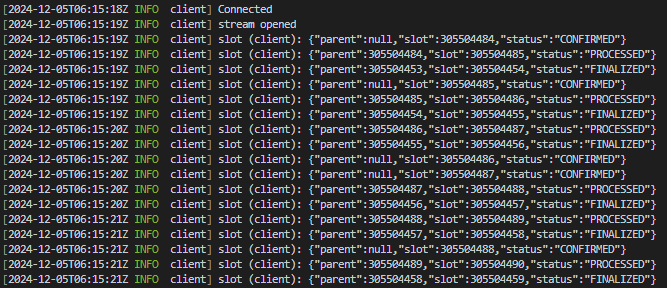
완료되면 터미널에서 새 슬롯을 출력하는 것을 볼 수 있습니다. URL과 토큰을 자신의 것으로 교체하는 것을 잊지 마십시오.
### TypeScript 예제
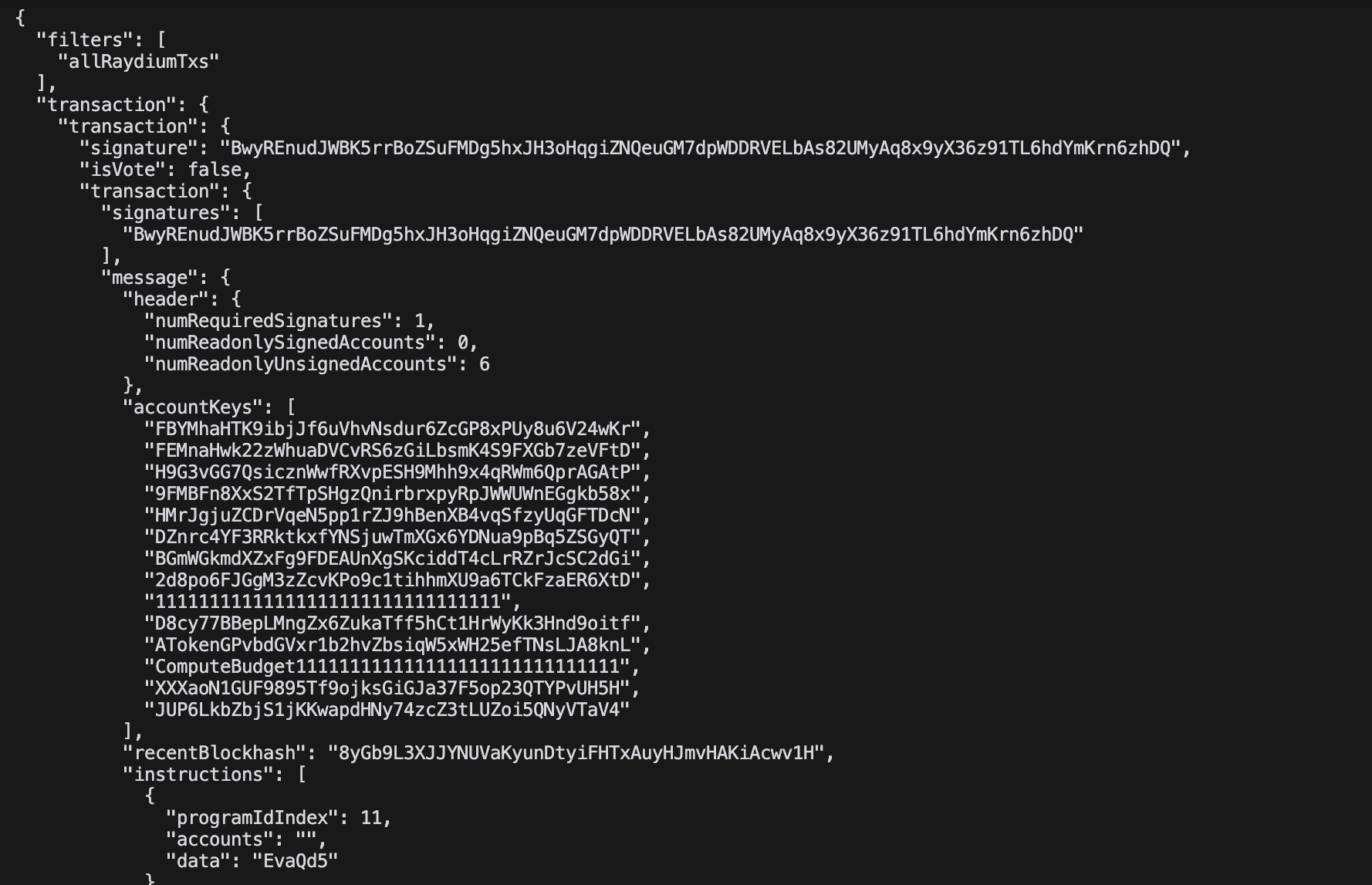
이 예제는 Raydium 거래를 실시간으로 JSON 형식으로 스트리밍합니다:
```typescript theme={"system"}
import Client, { CommitmentLevel, SubscribeRequest } from "@triton-one/yellowstone-grpc";
import * as bs58 from 'bs58';
const processBuffers = (obj: any): any =>
!obj ? obj :
Buffer.isBuffer(obj) || obj instanceof Uint8Array ? bs58.encode(obj) :
Array.isArray(obj) ? obj.map(processBuffers) :
typeof obj === 'object' ? Object.fromEntries(Object.entries(obj).map(([k, v]) => [k, processBuffers(v)])) :
obj;
const main = async () => {
const client = new Client("grpc_url",
"x_token",
{ "grpc.max_receive_message_length": 64 * 1024 * 1024 });
const stream = await client.subscribe();
const write = (req: SubscribeRequest) => new Promise((resolve, reject) =>
stream.write(req, (err) => err ? reject(err) : resolve()));
stream.on("data", (data) => {
try { console.log(JSON.stringify(processBuffers(data), null, 2)); }
catch (e) { console.error('Error:', e); }
});
await write({
slots: {},
accounts: {},
accountsDataSlice: [],
transactions: {
allRaydiumTxs: {
accountInclude: ["675kPX9MHTjS2zt1qfr1NYHuzeLXfQM9H24wFSUt1Mp8"],
accountExclude: [],
accountRequired: [],
}
},
blocks: {},
blocksMeta: {},
entry: {},
commitment: CommitmentLevel.PROCESSED,
});
setInterval(() => write({
ping: { id: 1 },
accounts: {},
accountsDataSlice: [],
transactions: {},
blocks: {},
blocksMeta: {},
entry: {},
slots: {},
}).catch(console.error), 30000);
await new Promise((resolve, reject) => {
stream.on("error", (e) => { console.error("Stream error:", e); reject(e); stream.end(); });
stream.on("end", resolve);
stream.on("close", resolve);
});
};
main().catch(console.error);
```
 ### 노드 유형
선택한 노드의 유형은 귀하의 요구사항에 따라 다릅니다. 우리는 속도 제한을 부과하지 않으므로 노드의 성능은 전적으로 사양에 의존합니다.
**gRPC 스트리밍 애플리케이션의 경우** (주요 사용 사례), 모든 노드 유형이 잘 작동합니다.
### 노드 유형
선택한 노드의 유형은 귀하의 요구사항에 따라 다릅니다. 우리는 속도 제한을 부과하지 않으므로 노드의 성능은 전적으로 사양에 의존합니다.
**gRPC 스트리밍 애플리케이션의 경우** (주요 사용 사례), 모든 노드 유형이 잘 작동합니다.
 ### 노드 위치
우리는 북미(피츠버그, 뉴어크, 솔트레이크시티, 로스앤젤레스, 밴쿠버), 유럽(더블린, 런던, 암스테르담, 프랑크푸르트), 아시아(도쿄, 싱가포르) 등 여러 지역에 걸쳐 노드를 제공하여 글로벌 Solana 인프라와 최고의 지리적 커버리지를 보장합니다.
최적의 지연을 위해 서버와 가장 가까운 노드를 선택하세요. 결제 후 3시간 이내에 노드가 배포됩니다.
### 노드 클라이언트
클라이언트 유형을 선택하여 노드를 맞춤화할 수 있습니다 — Agave 또는 Jito Labs (Agave의 포크로 추가 메서드 포함)
### 노드 위치
우리는 북미(피츠버그, 뉴어크, 솔트레이크시티, 로스앤젤레스, 밴쿠버), 유럽(더블린, 런던, 암스테르담, 프랑크푸르트), 아시아(도쿄, 싱가포르) 등 여러 지역에 걸쳐 노드를 제공하여 글로벌 Solana 인프라와 최고의 지리적 커버리지를 보장합니다.
최적의 지연을 위해 서버와 가장 가까운 노드를 선택하세요. 결제 후 3시간 이내에 노드가 배포됩니다.
### 노드 클라이언트
클라이언트 유형을 선택하여 노드를 맞춤화할 수 있습니다 — Agave 또는 Jito Labs (Agave의 포크로 추가 메서드 포함)
 ### TypeScript 예제
이 예제는 Raydium 거래를 실시간으로 JSON 형식으로 스트리밍합니다:
```typescript theme={"system"}
import Client, { CommitmentLevel, SubscribeRequest } from "@triton-one/yellowstone-grpc";
import * as bs58 from 'bs58';
const processBuffers = (obj: any): any =>
!obj ? obj :
Buffer.isBuffer(obj) || obj instanceof Uint8Array ? bs58.encode(obj) :
Array.isArray(obj) ? obj.map(processBuffers) :
typeof obj === 'object' ? Object.fromEntries(Object.entries(obj).map(([k, v]) => [k, processBuffers(v)])) :
obj;
const main = async () => {
const client = new Client("grpc_url",
"x_token",
{ "grpc.max_receive_message_length": 64 * 1024 * 1024 });
const stream = await client.subscribe();
const write = (req: SubscribeRequest) => new Promise
### TypeScript 예제
이 예제는 Raydium 거래를 실시간으로 JSON 형식으로 스트리밍합니다:
```typescript theme={"system"}
import Client, { CommitmentLevel, SubscribeRequest } from "@triton-one/yellowstone-grpc";
import * as bs58 from 'bs58';
const processBuffers = (obj: any): any =>
!obj ? obj :
Buffer.isBuffer(obj) || obj instanceof Uint8Array ? bs58.encode(obj) :
Array.isArray(obj) ? obj.map(processBuffers) :
typeof obj === 'object' ? Object.fromEntries(Object.entries(obj).map(([k, v]) => [k, processBuffers(v)])) :
obj;
const main = async () => {
const client = new Client("grpc_url",
"x_token",
{ "grpc.max_receive_message_length": 64 * 1024 * 1024 });
const stream = await client.subscribe();
const write = (req: SubscribeRequest) => new Promise